



Construction Equipment Step Diagram – A Tool for Efficient Operations
RJ0300012_11
- Last Update 04/21/2025
- File Size 0.9MB
- # of Slides 2
- File Format PPTX
- Slide Ratio 16:9
- Color
Keywords
- #Content-Based Slides
- #Design-Based Slides
- #Business Vision and Strategy
- #Operational Plan
- #Text Box
- #Business Background and Necessity
- #Mitigation Measures
- #Arrow
- #16:9
- #step process diagram PowerPoint
- #process arrow slide
- #4-stage PowerPoint diagram
- #sequential process PPT
- #how to create a step diagram in PowerPoint
About the Product
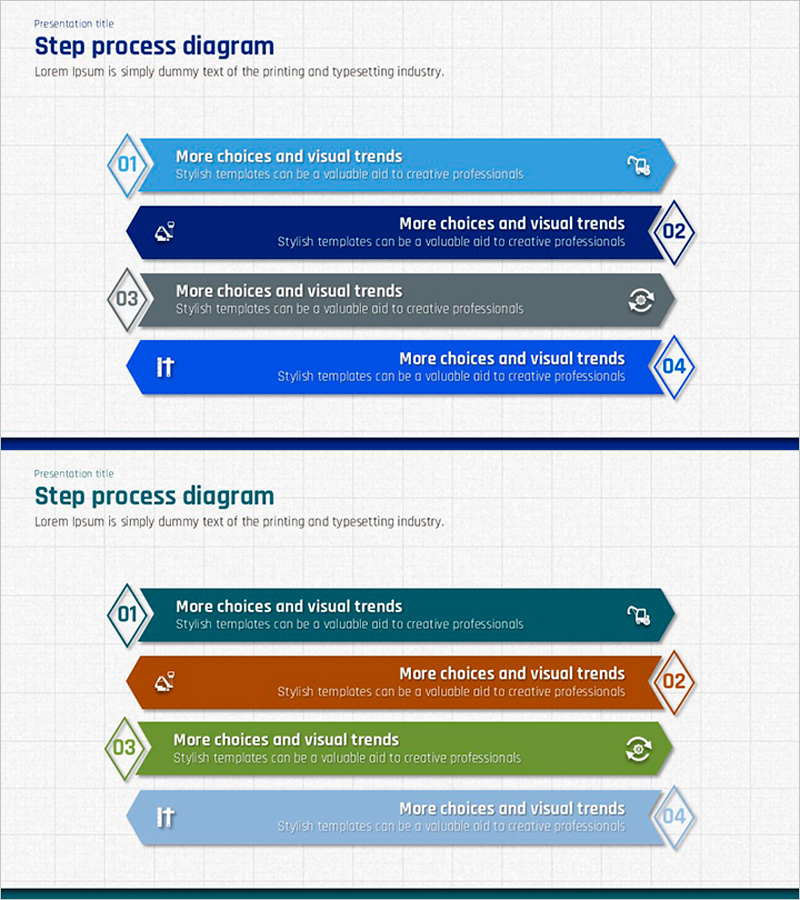
A PowerPoint slide that visualizes a 4-stage sequential process with a horizontal arrow layout. Each stage features a left-side diamond number marker and right-side arrow endpoint to clearly indicate progression direction, with dedicated title and description text areas. Four color variations—blue, navy, gray, and bright blue—allow customization to match corporate brand colors. Ideal for explaining operational plans, business strategies, project timelines, and workflow processes in presentations, reports, and proposals with immediate usability.
Usage Points
-
Main Usage
Visualizes a 4-stage sequential process flowing left to right using arrow shapes. Each stage accommodates a number, title, and description text, making it ideal for presenting operational procedures, business phases, project schedules, and workflow processes with clarity and visual impact.
-
How to Use
Enter stage numbers in the diamond markers, stage titles in the arrow bodies, and detailed descriptions in the text areas below. Use color variations (blue, navy, gray, bright blue) to differentiate stages or maintain visual consistency. During presentation, emphasize the logical left-to-right progression flow.
-
Recommended For
Suitable for business plans, operational plans, project proposals, strategy reports, process improvement presentations, and training seminars. Applicable across all industries—manufacturing, construction, IT, finance, marketing—for explaining staged progression. Effective for presentations to executives, team members, clients, and partners.
-
Slide Structure
Each slide contains 4 stage blocks, with each block comprising a left-side diamond number marker (01–04), center arrow body (title text input area), right-side diamond endpoint, and bottom description text area. Provided as 2 slides to accommodate multiple processes.
Related Products
-
Visualizing Evidence of Trial Documents in PowerPoint Slides
#Business Vision and Strategy #Operational Plan #Other
-
Pros and Cons Arrow Text Box – Data Visualization
#Product/Service Introduction #Operational Plan #Diagram
-
Colorful Flower Template Slide - Business Strategy and Solutions
#Business Vision and Strategy #Operational Plan #Diagram
-
Story Before and After Climbing – Business Vision and Strategy Slide
#Business Vision and Strategy #Operational Plan #Business Background and Necessity
