



Problem Solving Diagram – Business Support Strategy
RJ0300009_27
- Last Update 04/20/2025
- File Size 0.1MB
- # of Slides 2
- File Format PPTX
- Slide Ratio 16:9
- Color
Keywords
- #Content-Based Slides
- #Design-Based Slides
- #Operational Plan
- #Diagram
- #Mitigation Measures
- #Business Support Plan
- #Spread
- #Centralized Diagram
- #16:9
- #central diagram PowerPoint
- #circular diagram slide template
- #3-node hub structure
- #central concept diagram
- #how to create circular diagram in PowerPoint
About the Product
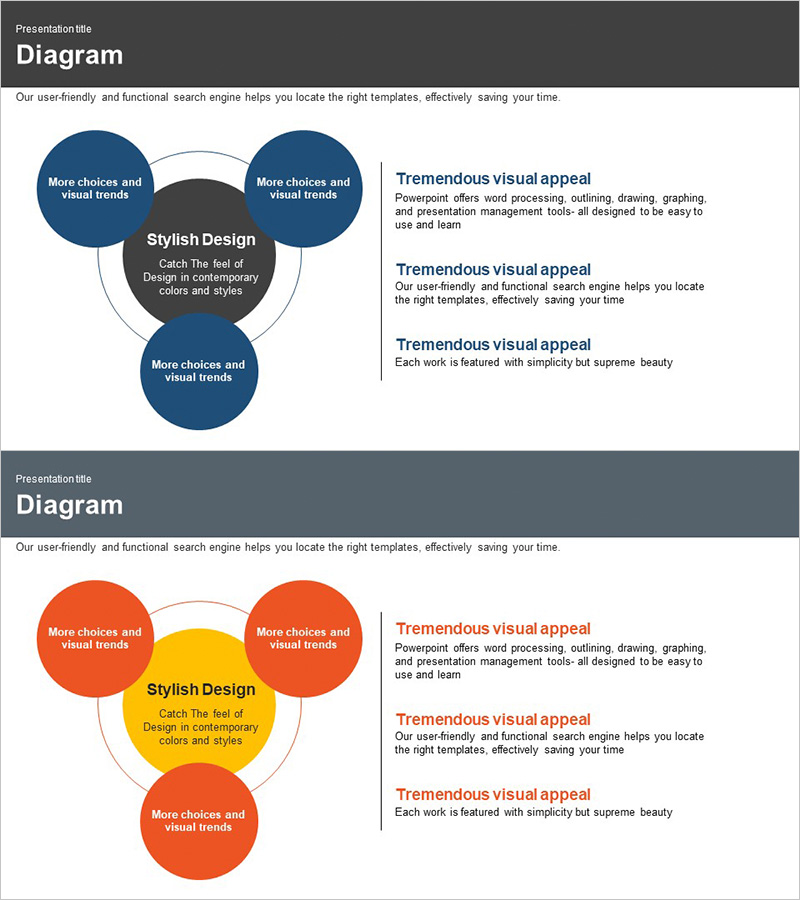
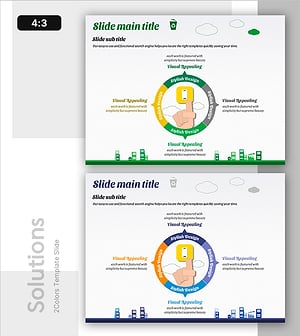
A central circular diagram PowerPoint slide that clearly expresses the relationship between a core concept and surrounding elements. Three dark blue circular nodes connect to a central black box, with space for key strategies or options in each node. The right text area accommodates detailed explanations to strengthen the logical flow of your presentation. This PowerPoint slide is ready to use for business support strategies, problem-solving approaches, operational planning, and various presentation scenarios. The 2-slide set includes color variations (dark blue, orange, and yellow) so you can select the design that matches your document tone.
Usage Points
-
Main Usage
Visually represents the relationship between a central concept and surrounding strategies, options, or elements. Optimized for presentations requiring hub-and-spoke relationship structures, such as business strategy development, problem-solving proposals, and operational planning.
-
How to Use
Enter your core topic (e.g., Stylish Design) in the central black box and add key strategies or options to the three dark blue circular nodes. Enhance audience comprehension by adding detailed explanations in the right text area for each item.
-
Recommended For
Executives, planning teams, and consultants presenting business strategies and operational plans; project managers and analysts who need to systematically present problem-solving approaches; educators and seminar facilitators explaining the connection between organizational core concepts and execution strategies.
-
Slide Structure
2-slide set. Each slide features a central black box (for core concept input) with three circular nodes connected in a circular pattern. The first slide uses dark blue, while the second offers orange and yellow color variations, allowing you to choose the design that best fits your document style.
Related Products
-
Traffic Accident Type Diagram – Prevention and Analysis
#Business Vision and Strategy #Operational Plan #Diagram
-
5 Critical Aspects – Business Operational Plan Slide
#Operational Plan #Diagram #Mitigation Measures
-
Differentiation Strategy Closed Diagram Blue Green
#Product/Service Introduction #Operational Plan #Diagram
-
Electricity Saving Behavior Tips Slide Template – Guidance for Environmental Protection
#Business Vision and Strategy #Operational Plan #Corporate Social Responsibility
