



Gradient PowerPoint Wide Template – Customer Success Stories
RJ0200060_7
- Last Update 10/08/2025
- File Size 0.1MB
- # of Slides 2
- File Format PPTX
- Slide Ratio 16:9
- Color
Keywords
- #Content-Based Slides
- #Design-Based Slides
- #Customer Success Stories
- #Text Box
- #Other
- #Customer Testimonials and Feedback
- #Speech Bubble
- #Silhouette
- #16:9
- #comparison analysis PPT slide
- #silhouette PowerPoint design
- #customer type comparison slide
- #gradient PowerPoint template
- #two-type comparison presentation
About the Product
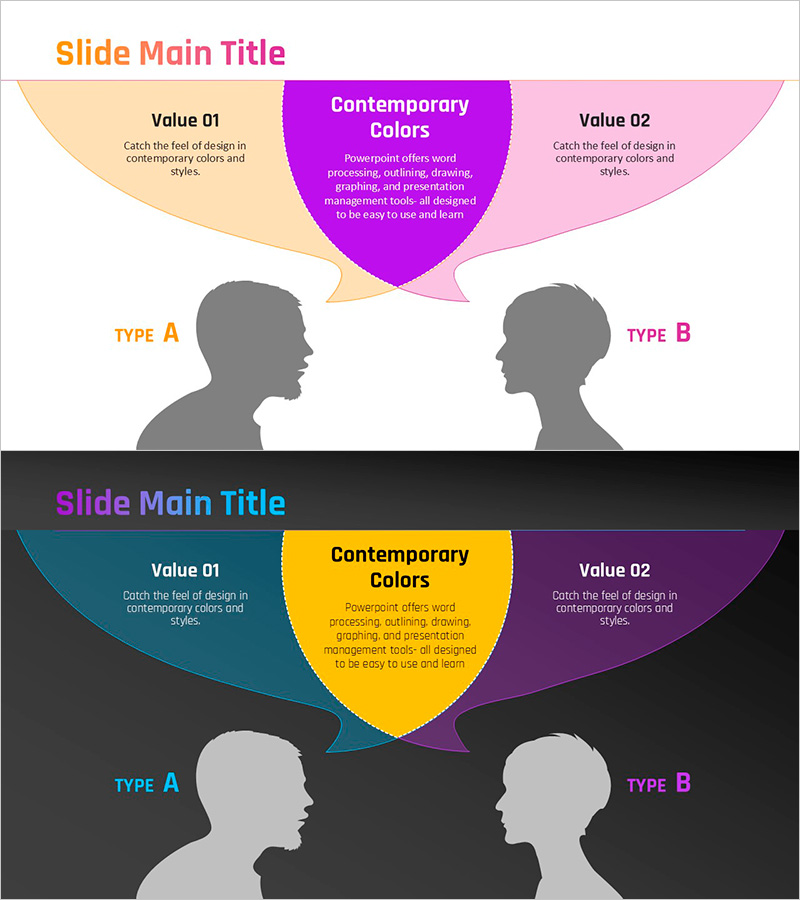
A PowerPoint slide designed for comparing customer success stories or two distinct types side by side. The layout features a title area at the top, three information boxes (Value 01, central highlight, Value 02), and two silhouette profiles (TYPE A and TYPE B) positioned symmetrically at the bottom. The gradient background in orange, purple, and pink creates visual contrast with gray silhouettes, making it ideal for presenting customer segment comparisons or target audience analysis in presentations. Available in 16:9 widescreen PPTX format, fully editable and ready to customize.
Usage Points
-
Main Usage
Optimized for comparing two customer types or target segments in customer success case studies and highlighting the distinct characteristics of each group. Ideal for company profiles and marketing plans where customer segmentation and target analysis sections require visual clarity.
-
How to Use
Enter each type's key features in the Value 01, central highlight, and Value 02 boxes at the top. Rename TYPE A and TYPE B labels to match your customer segments. Gradient colors can be adjusted to align with corporate branding, and silhouettes can be replaced with icons or images as needed.
-
Recommended For
Recommended for company profiles, marketing plans, proposals, and investor pitch decks that address customer success cases and target segmentation. Particularly effective for B2B companies presenting how different customer types have different needs and success outcomes.
-
Slide Structure
Two-slide set with each slide containing a title area (1), three information boxes at top (Value 01, central, Value 02), and two silhouette profile areas at bottom. Five text input zones and three color-emphasis areas create clear information hierarchy in a comparison-focused layout.
Related Products
-
Satisfaction with Elderly Welfare Programs – Customer Success Story
#Customer Success Stories #Text Box #Other
-

Square Frame Template for Presenting Customer Success Stories – Speaking Effect
#Customer Success Stories #Text Box #Other
-

Text Box Slide Visualizing Meeting Feedback Content
#Customer Success Stories #Text Box #Other
-
Customer Reviews and Feedback Slides – Stylish Customer Insights
#Market and Competitor Analysis #Customer Success Stories #Text Box
