



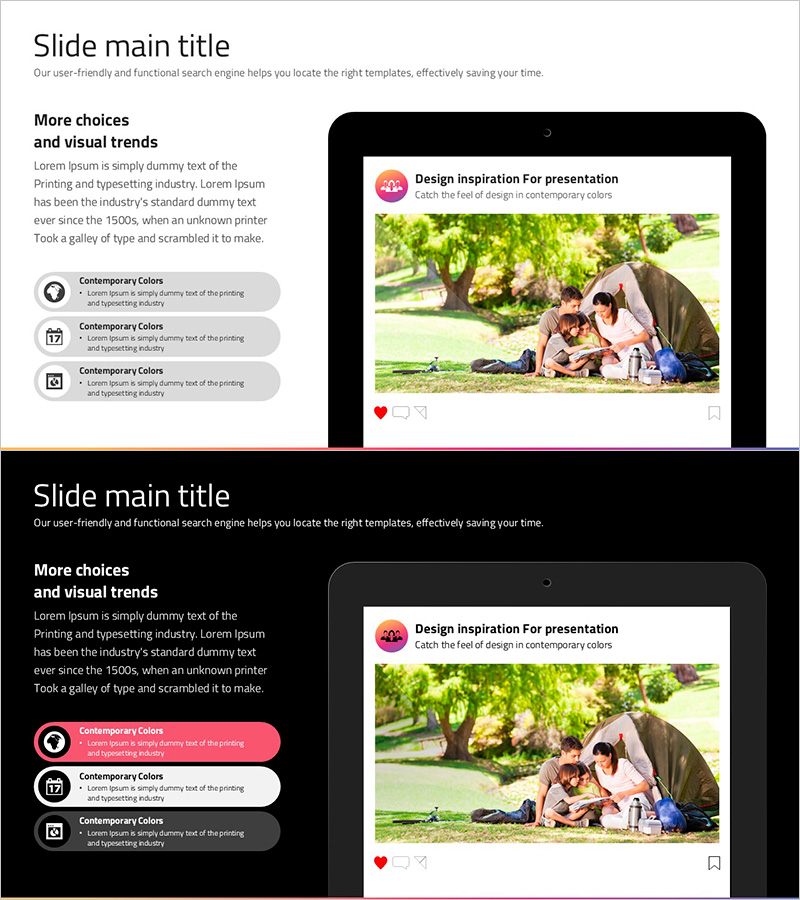
Social Network Wide Template Mockup - Modern and Fresh Layout
RJ0200055_20
- Last Update 04/14/2025
- File Size 0.9MB
- # of Slides 3
- File Format PPTX
- Slide Ratio 16:9
- Color
Keywords
About the Product
A professional mockup PowerPoint slide deck designed to showcase digital products, mobile apps, and social media platforms. This 3-slide presentation features tablet device frames with a clean, bright background and pink accent colors, perfect for product demonstrations, app feature explanations, and service pitches. The 16:9 widescreen PPTX format allows seamless editing of text and images, making it ideal for startups, IT companies, and marketing teams presenting product launches, investor pitches, and customer demos. Each slide includes dedicated space for UI screenshots, feature descriptions, and key messaging.
Usage Points
-
Main Usage
This mockup slide enables you to present digital products and apps using realistic device frames that resonate with investors, customers, and stakeholders. It transforms abstract product concepts into tangible visual demonstrations, making it essential for startup pitch decks, product launch presentations, and customer acquisition strategies.
-
How to Use
Insert app screenshots or UI designs into the tablet frames on each slide. Add feature descriptions, user benefits, and differentiation points in the text areas. Use the pink accent elements to highlight critical information. Deploy in product presentations, investor meetings, customer demos, and internal planning sessions via screen sharing or printed materials.
-
Recommended For
Ideal for startups, SaaS companies, and IT firms presenting new products or services. Marketing teams launching digital solutions, design teams showcasing UI/UX prototypes, and sales teams conducting customer demonstrations will find this template invaluable. Perfect for investor pitches, product webinars, and competitive positioning presentations.
-
Slide Structure
3-slide layout with each slide containing one tablet device mockup frame, left-side text area for descriptions, and right-side image zone for visual content. Information hierarchy flows from top title and description through central device frame to bottom supplementary details, supporting feature-by-feature or phase-by-phase product explanations.
Related Products
-
Goods Introduction T-Shirt Paper Mockup – Enhance Your Brand Identity
#Product/Service Introduction #Other #Product/Service Introduction
-
Sofa and Tablet Mockups for Product Visualization – Modern Sense and Style
#Product/Service Introduction #Other #Product/Service Introduction
-

Introduction to 3D Printing Configuration – Expansive Visualization
#Product/Service Introduction #Diagram #Other
-
Sports Icon Box and Mobile Mockup – Innovative Design and Information Delivery
#Product/Service Introduction #Diagram #Other
