



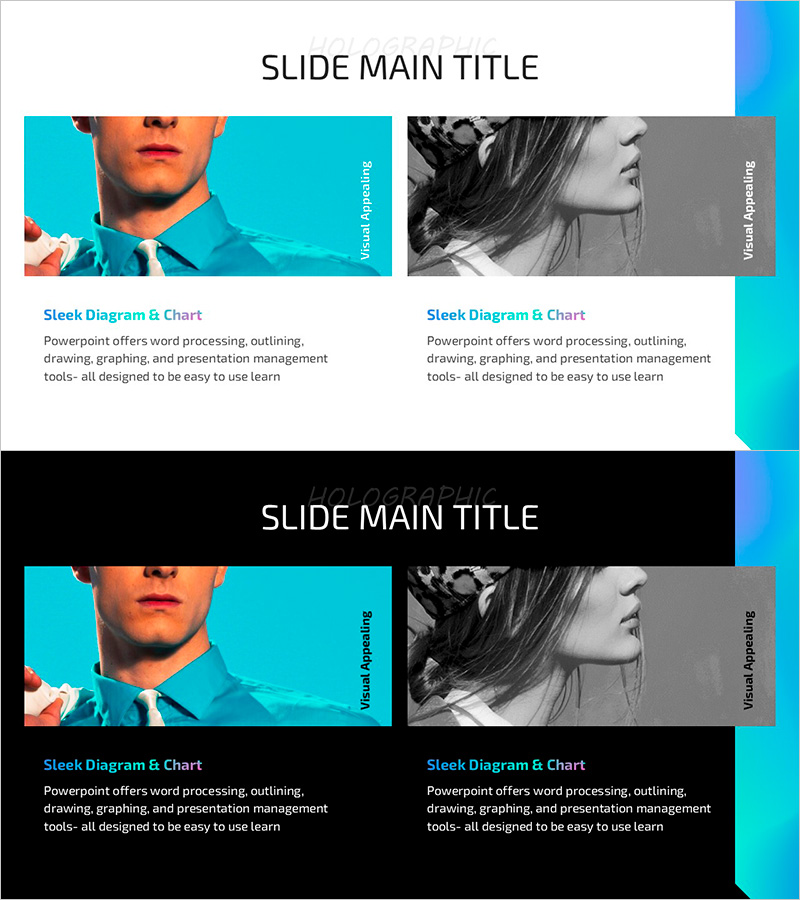
Hologram Wide PPT Image & Text Slide – Customer Analysis & Success Stories
RJ0200053_19
- Last Update 04/13/2025
- File Size 0.9MB
- # of Slides 2
- File Format PPTX
- Slide Ratio 16:9
- Color
Keywords
About the Product
A 2-slide PowerPoint presentation designed to showcase customer analysis and success stories with visual impact. The hologram-style image layout features a two-column comparison structure with color imagery on the left and grayscale imagery on the right, creating strong visual contrast that draws attention to your customer cases. Each section includes dedicated title and description text areas for detailed storytelling. Formatted in 16:9 widescreen PPTX, this slide deck is optimized for investor presentations, customer success case studies, and marketing pitches. Ready to use immediately with your own customer photos and performance metrics.
Usage Points
-
Main Usage
Present customer success stories and analysis results persuasively to investors, partners, and stakeholders. The hologram-style image combined with text reinforces customer trust and brand credibility, while the two-column comparison structure clearly illustrates before-after scenarios or case-by-case contrasts to support your business narrative.
-
How to Use
Insert customer photos or product usage scenes in the left color image area, and place comparison cases in the right grayscale section. Enter customer names or case types in the section titles, and add performance metrics or customer testimonials in the description areas. Use the vertical text bar on the right to emphasize your presentation theme.
-
Recommended For
B2B marketing managers, sales executives, investor relations (IR) professionals, and customer success teams presenting customer cases. Ideal for financial services, IT, consulting, and SaaS companies sharing customer success stories, preparing new customer proposals, or conducting internal team training.
-
Slide Structure
Two-slide deck with two-column comparison layout on each slide. Left side features image input areas (color or grayscale options), center contains title and description text fields, and right side includes a vertical accent bar. Formatted in 16:9 widescreen ratio for modern presentation environments.
Related Products
-
Dot Patterns Wide PowerPoint Template Silhouette – Customer Success Case Analysis
#Market and Competitor Analysis #Customer Success Stories #Other
-
Pleasure Interview with Learning – Customer Success Stories and Analysis
#Market and Competitor Analysis #Customer Success Stories #Customer Analysis
-
Student Interview Program Slide – Successful Customer Experience
#Market and Competitor Analysis #Customer Success Stories #Diagram
-
Visualizing Menu Sales Trends with Horizontal Bar Graph
#Market and Competitor Analysis #Financial Plans and Performance #Graph
