



Business Plan Presentation Template - Efficient Table of Contents
RJ0200027_2
- Last Update 04/05/2025
- File Size 4.5MB
- # of Slides 2
- File Format PPTX
- Slide Ratio 16:9
- Color
Keywords
About the Product
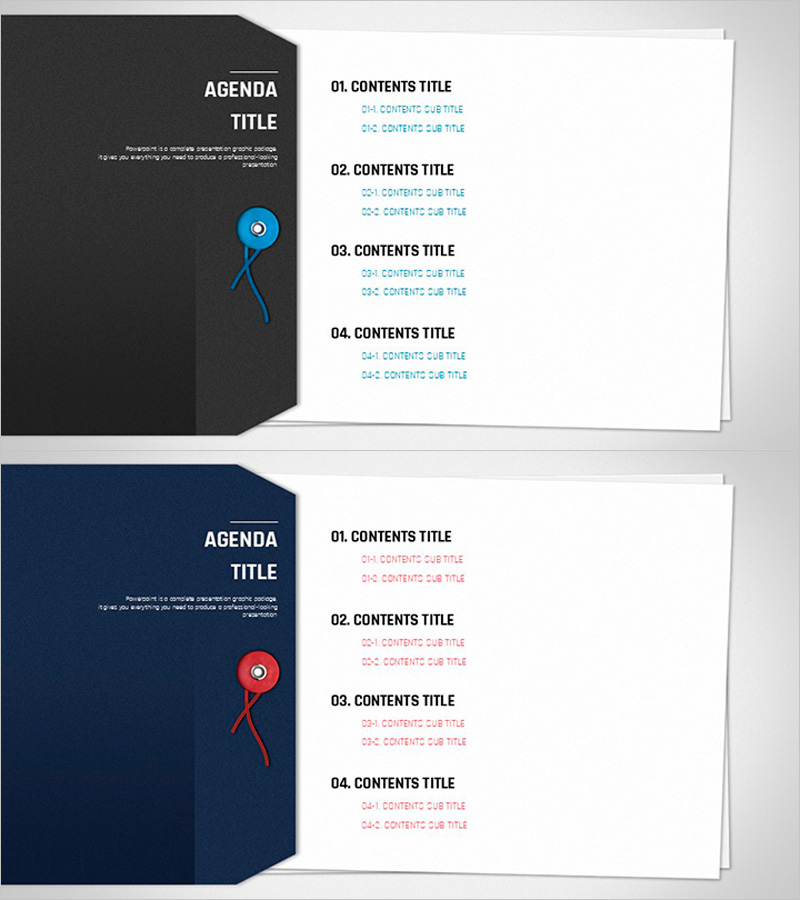
A professional table of contents PowerPoint slide designed for business plans, proposals, pitch decks, and corporate presentations. Features a dark gray background with a blue accent point icon and minimalist layout that clearly separates four main content sections. The asymmetrical composition combines a left-side polygonal panel with a right-side text area, maintaining visual balance while providing dedicated subtitle input spaces for each item. Optimized for 16:9 widescreen format in PPTX, allowing full customization of colors and text to match your presentation theme.
Usage Points
-
Main Usage
Serves as the agenda page for presentations, allowing audiences to grasp the overall content structure at a glance. Clearly displays four main sections with dedicated space for subsection details, enhancing audience comprehension of the presentation flow and logical progression.
-
How to Use
Use as the table of contents page in business plans, proposals, pitch decks, investment presentations, and corporate documents. Customize the left panel title and four right-side section items to match your document structure, then adjust colors and fonts to maintain consistency with your overall template design.
-
Recommended For
Ideal for business plans, proposals, investment pitches, marketing plans, company profiles, and other structured business presentations. Perfect for executives, business planners, sales professionals, consultants, and anyone delivering formal corporate presentations requiring clear content organization.
-
Slide Structure
Left polygonal panel contains 'AGENDA TITLE' text with blue accent point icon; right side features four numbered sections (01–04 CONTENTS TITLE) with dedicated subtitle input areas. Each item is independently editable, creating a clear hierarchical information structure suitable for multi-section presentations.
Related Products
-
Inventory Management Template Contents – Systematic Information Presentation
#Slide Type #Table of Contents
-
Mobile Network Presentation Index – The Beginning of Connection
#Slide Type #Table of Contents
-

Table of Contents Slide – Rounded Edge Business PowerPoint
#Slide Type #Table of Contents
-
Financial Management Template Contents
#Slide Type #Table of Contents
