



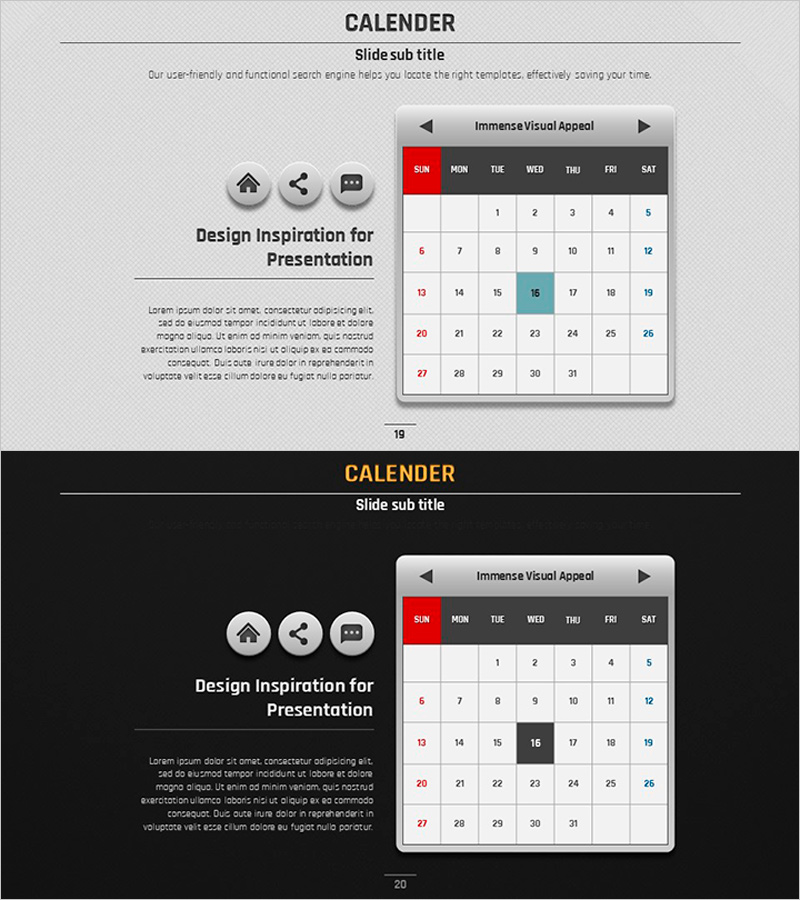
Volume Calendar Template for Efficient Business Management
RJ0200017_19
- Last Update 04/02/2025
- File Size 3MB
- # of Slides 2
- File Format PPTX
- Slide Ratio 16:9
- Color
Keywords
- #Content-Based Slides
- #Design-Based Slides
- #Business Management
- #Operational Plan
- #Diagram
- #Implementation Schedule
- #Project Implementation Schedule
- #Table
- #Standard Table
- #16:9
- #calendar table PowerPoint
- #monthly schedule slide template
- #business management calendar
- #7-column calendar template
- #schedule planning presentation
About the Product
A monthly calendar PowerPoint slide designed for business operations and schedule management. The 7-column (Sun–Sat) × 5-row structure displays an entire month's schedule at a glance, with weekend highlight colors (red and blue) and selectable date cells for marking important events. Two design versions are included—light background and dark background—allowing you to match your presentation's tone. This practical slide deck is ready to use for team schedule sharing, project timelines, and quarterly operational planning presentations.
Usage Points
-
Main Usage
Organize and share monthly business schedules, team project timelines, and quarterly operational plans visually. Ideal for highlighting critical dates, marking deadlines, and coordinating team collaboration schedules in presentations.
-
How to Use
Open the slide and enter dates directly into the calendar table or mark them with colors. Weekends (Sun and Sat) are automatically highlighted in red and blue; select specific date cells to change background colors and emphasize important events. Choose between light or dark background versions to match your presentation style.
-
Recommended For
Business managers, project managers, team leads, and operations coordinators presenting monthly schedules, milestone tracking, and quarterly operational plans. Suitable for regular meetings, strategic planning presentations, and team collaboration planning materials.
-
Slide Structure
2-slide set: Slide 1 features a light-background monthly calendar (7 columns × 5 rows, 31 days displayed); Slide 2 shows the same structure with a dark background. Each slide includes day-of-week headers (SUN–SAT), date cells (1–31), weekend highlight colors (red and blue), and editable input areas.
Related Products
-
Summer Template Planning Table Chart – Optimizing Business Management and Operations
#Business Management #Operational Plan #Diagram
-
Medical Product Differentiation Strategy Diagram
#Business Management #Operational Plan #Diagram
-
Simple & Modern Wide PPT – Perfect Choice for Business Management and Operations Planning
#Business Management #Operational Plan #Diagram
-
Curved Theme Purple Template Schedule – Efficient Operational Planning
#Business Management #Operational Plan #Diagram
