



Modern Business Plan Process Diagram – Efficient Information Delivery
RJ0200015_8
- Last Update 04/01/2025
- File Size 5.3MB
- # of Slides 2
- File Format PPTX
- Slide Ratio 16:9
- Color
Keywords
- #Content-Based Slides
- #Design-Based Slides
- #Product/Service Introduction
- #Other
- #Product/Service Introduction
- #Product and Service Overview
- #Mockup
- #16:9
- #process diagram PowerPoint slide
- #3-step flow diagram
- #business process presentation
- #step-by-step workflow slide
- #product introduction process PPT
About the Product
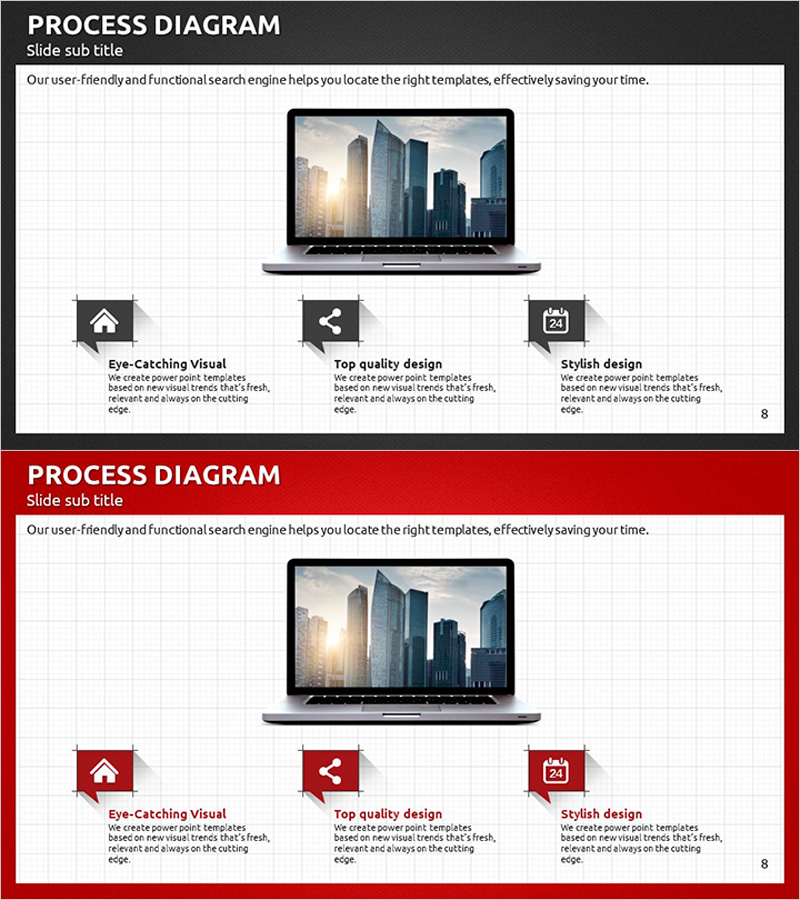
A professional 3-step process diagram PowerPoint slide that clearly visualizes business workflows and service stages. The slide features a central laptop mockup image flanked by three sequential steps: 'Eye-Catching Visual', 'Top Quality Design', and 'Stylish Design', each with dedicated icons and text areas. The dark gray header contrasts sharply with the white content zone, ensuring excellent readability and visual hierarchy. Each step includes ample space for descriptive text, making it ideal for product launches, service explanations, business process improvements, and strategic presentations. The 16:9 widescreen format includes 2 fully editable slides ready for immediate customization.
Usage Points
-
Main Usage
Effectively communicate business processes, product development stages, service delivery flows, and marketing campaign phases through a clear 3-step visual structure. The central mockup area allows you to insert product screenshots or service imagery, creating strong visual impact and audience engagement.
-
How to Use
Enter process stage names and descriptions in the text areas below each icon. Insert product screenshots or service images in the central laptop mockup zone. Customize the header title and subtitle to match your presentation context. Colors and fonts can be easily adjusted to align with your brand guidelines.
-
Recommended For
Product launch presentations, service improvement proposals, business process optimization explanations, marketing strategy pitches, customer journey mapping, technology implementation roadmaps, and stakeholder briefings. Suitable for executive presentations, investor pitches, partner meetings, and internal team workshops.
-
Slide Structure
Dark gray header section (title and subtitle input areas) + white content zone featuring a central laptop mockup image with three sequential icon boxes arranged horizontally. Each icon box contains an icon, step title, and descriptive text field with ample space for detailed explanations.
Related Products
-
Introducing PC Mobile Game Service – Innovation through Cutting-Edge Technology
#Product/Service Introduction #Other #Product/Service Introduction
-
App Service Introduction Slide – User-Friendly Design
#Product/Service Introduction #Other #Product/Service Introduction
-
Introducing Big Data Analysis Services – Efficiency and Innovation
#Product/Service Introduction #Other #Product/Service Introduction
-
Introducing the Weather Service – Clear Vision for the Future
#Product/Service Introduction #Other #Product/Service Introduction
