



Square Frame Template Table for Operational Planning Visualization – Efficient Management
RJ0200014_17
- Last Update 04/01/2025
- File Size 4.4MB
- # of Slides 2
- File Format PPTX
- Slide Ratio 16:9
- Color
Keywords
- #Content-Based Slides
- #Design-Based Slides
- #Business Management
- #Operational Plan
- #Text Box
- #Execution Plan
- #Post-Implementation Management & Maintenance
- #Rectangle Text Box
- #16:9
- #comparison table PowerPoint slide
- #3-option operational planning presentation
- #business strategy visualization slide
- #implementation framework PPT
- #how to create a comparison table in PowerPoint
About the Product
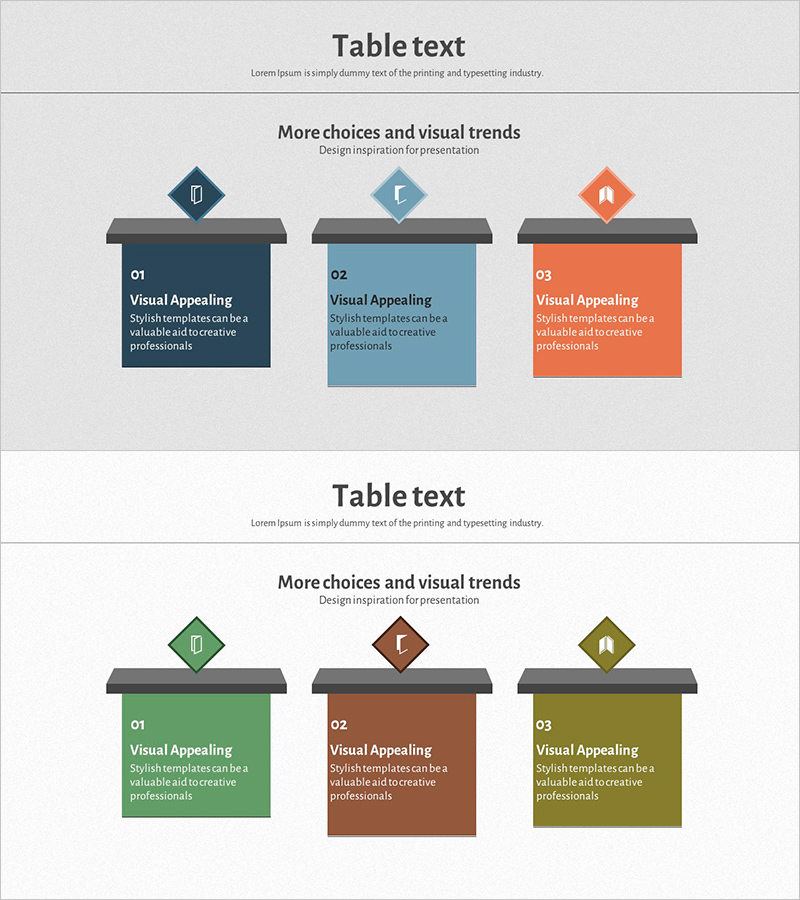
A PowerPoint slide designed to compare and analyze operational planning, business strategy, and implementation frameworks across three distinct options. Features three color-coded sections in navy blue, sky blue, and coral orange, each with dedicated icon and text input areas. Comprises 2 slides optimized for 16:9 widescreen format in PPTX. Perfect for strategy presentations, departmental planning sessions, and project timeline sharing in corporate environments. Fully editable text and color elements allow customization to match your organization's branding and messaging requirements.
Usage Points
-
Main Usage
Designed to present and compare three operational approaches, strategic options, or implementation pathways simultaneously. The color-coded layout enables clear differentiation between alternatives, supporting executive decision-making and stakeholder alignment on organizational direction.
-
How to Use
Input operational objectives, strategic initiatives, or expected outcomes into each color-coded text box. Add relevant icons or imagery to the designated icon areas. Deploy in board meetings, executive briefings, strategic planning sessions, or departmental reviews to enhance information clarity and audience engagement.
-
Recommended For
Executives, strategic planners, department heads, and project managers presenting operational plans, departmental roles, phased timelines, and performance targets. Ideal when comparing multiple approaches or presenting parallel initiatives requiring simultaneous evaluation.
-
Slide Structure
2-slide deck with each slide containing 3 independent comparison sections. Layout includes icon area at top, title input zone in center, and descriptive text field at bottom. Color differentiation provides visual hierarchy and intuitive option distinction across all content areas.
Related Products
-
Information on Examination Items – A Tool for Efficient Business Management
#Product/Service Introduction #Business Management #Diagram
-
Square Frame Presentation Template for Operational Planning – Efficient Workflow
#Business Management #Operational Plan #Text Box
-
Business Management Slide with Diagonal Text Box Items
#Business Management #Text Box #Execution Plan
-
Risk Management Slide with Car Background and Red Box
#Operational Plan #Diagram #Text Box
