



Simple Circle Presentation Template Mockup1 – Business Introduction and Emotion
RJ0200013_24
- Last Update 04/01/2025
- File Size 1MB
- # of Slides 2
- File Format PPTX
- Slide Ratio 16:9
- Color
Keywords
About the Product
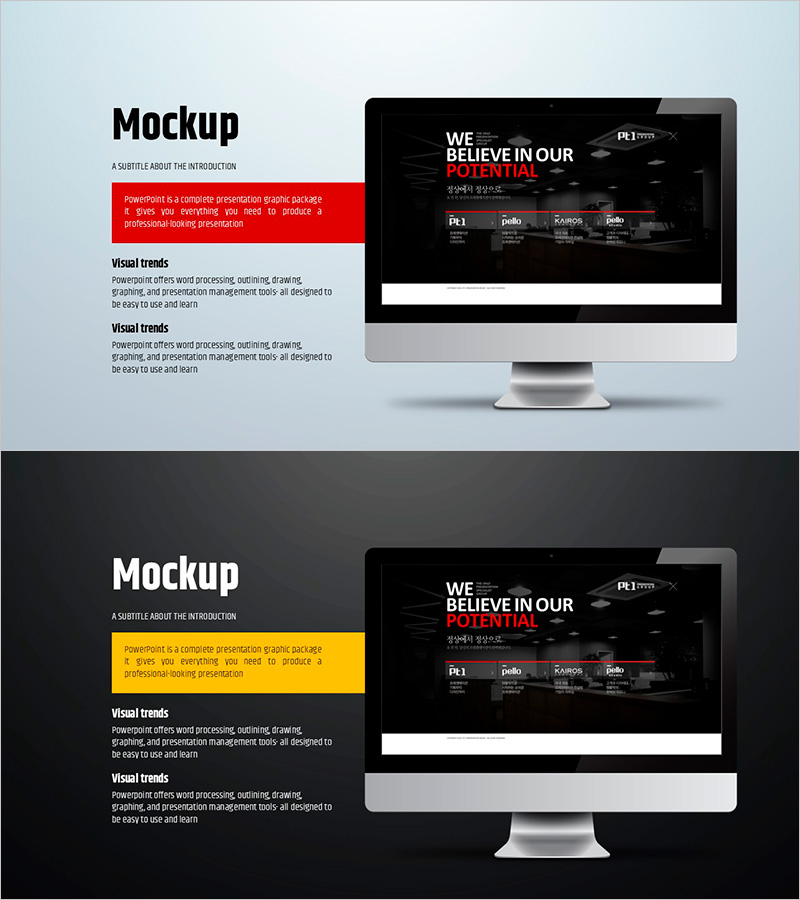
A mockup PowerPoint slide designed for business introductions and emotional storytelling. This 2-slide set features a left text area paired with a right-side monitor mockup image, perfect for product launches, business pitches, and company introductions. Red and yellow accent boxes highlight key messages, while the bright background contrasts with the dark-toned mockup for visual balance. Delivered in 16:9 widescreen PPTX format, fully editable across all PowerPoint versions. Customize text, images, and colors to match your brand identity and presentation needs.
Usage Points
-
Main Usage
This slide visualizes products, services, or business concepts using monitor mockup images. The left text area explains core messages while the right mockup displays actual screens, interfaces, or designs, enhancing audience comprehension. Ideal for company introductions, product launches, and business plan presentations that require both credibility and professional visual communication.
-
How to Use
Enter product name, description, and key features in the left text box. Insert actual product screenshots, website mockups, or app interfaces in the right mockup area. Use red and yellow accent boxes to emphasize critical messages or metrics. Customize colors and fonts to align with your brand guidelines. The 2-slide structure works for problem-solution or introduction-details narrative flows.
-
Recommended For
Perfect for startups, IT companies, and SaaS businesses presenting product features. Suitable for new business pitches, investment pitches (service overview sections), marketing strategy presentations, competitive analysis slides, and company profile documents. Highly effective for any digital product, web, app, or software-focused presentations.
-
Slide Structure
Two slides, each divided into left text input area (title, description, 3–5 key points) and right monitor mockup image area. Red or yellow accent boxes at the top emphasize core messages visually. Bright background contrasts with dark-toned mockups to establish clear information hierarchy and visual focus.
Related Products
-

Travel App Wide Mockup – Intuitive Service Introduction
#Product/Service Introduction #Other #Product/Service Introduction
-
App-Based Personal Workout Booking System – Intuitive Diagram
#Product/Service Introduction #Diagram #Other
-
Mobile Games to Foster Creativity – Innovation and Fun
#Product/Service Introduction #Other #Program Introduction
-
Preschool Parent Engagement System Overview – The Importance of Communication
#Product/Service Introduction #Diagram #Other
