



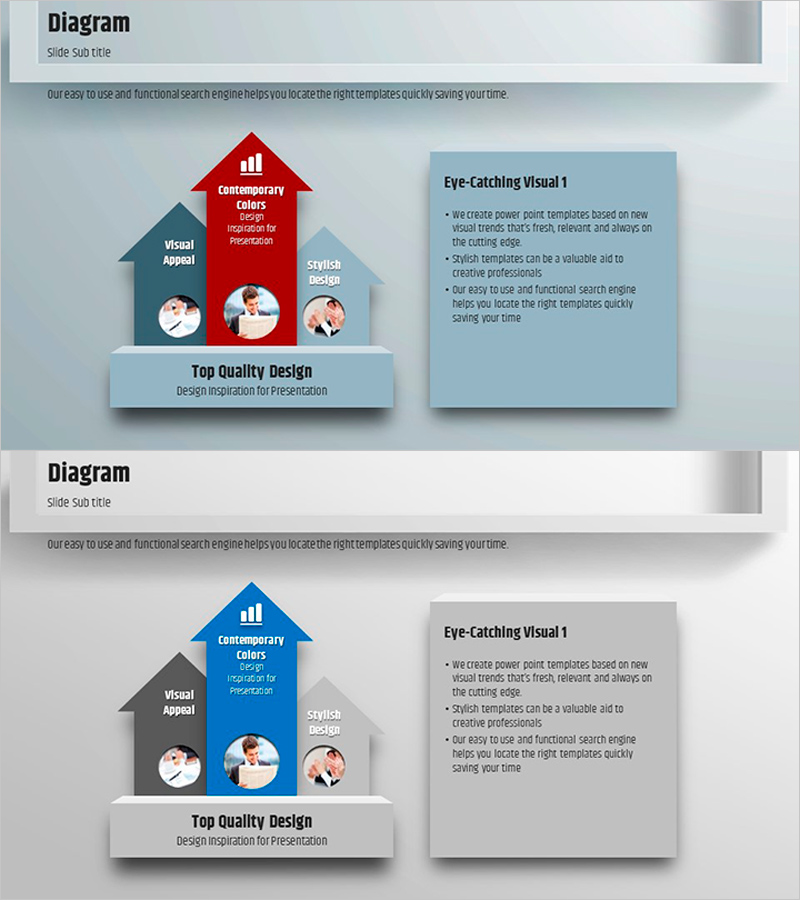
A Square Frame Presentation Template for Product and Service Introduction
RJ0200010_24
- Last Update 03/31/2025
- File Size 0.5MB
- # of Slides 2
- File Format PPTX
- Slide Ratio 16:9
- Color
Keywords
- #Content-Based Slides
- #Design-Based Slides
- #Product/Service Introduction
- #Operational Plan
- #Text Box
- #Product and Service Overview
- #Business Support Plan
- #Arrow
- #16:9
- #3-level diagram PowerPoint slide
- #house structure diagram design
- #hierarchical diagram slide
- #product introduction diagram PPT
- #how to create a hierarchy diagram in PowerPoint
About the Product
A 3-level house-structured diagram PowerPoint slide designed for product and service introductions. The contrasting red, blue, and gray color scheme clearly distinguishes each hierarchical element (Visual Appeal, Contemporary Colors, Stylish Design), while the 'Top Quality Design' foundation at the bottom unifies the overall message. Provided in 2-slide 16:9 PPTX format with fully editable text, icons, and box elements. Instantly applicable to company profiles, product introductions, service architecture diagrams, organizational structures, and various presentation scenarios.
Usage Points
-
Main Usage
Optimized for expressing three core elements of a product or service in a hierarchical structure while emphasizing integrated value propositions. The house structure visual metaphor conveys a trustworthy architecture built on a solid foundation, enabling clear message delivery to investors, partners, and customers.
-
How to Use
Input key product features, technologies, and values into the text boxes of each hierarchical level (red, blue, gray), and write an integrated message in the foundation area at the bottom. Insert product images or symbols in the icon areas to enhance visual impact, and freely adjust colors, fonts, and box sizes to match your corporate brand identity.
-
Recommended For
Recommended for product brochures, service planning documents, company profiles, and business proposals where core elements need to be structured and explained. Particularly effective for executive presentations, investment pitches, and partnership proposals that require simultaneous expression of three core values, three-step processes, or three departmental roles.
-
Slide Structure
Each slide features a title area at the top, a central 3-level house diagram with text boxes and three icon areas per level, an explanatory box on the right (Eye-Catching Visual 1), and an integrated message area at the bottom. Both slides share identical layouts for consistent messaging, and all elements are independently editable, movable, and deletable.
Related Products
-
Infographic Template for Issue Resolution – Practical Guide
#Operational Plan #Technical Approach #Diagram
-
Network Service Strategy and Support Plan – Emphasizing Business Vision
#Business Vision and Strategy #Operational Plan #Text Box
-
Work Process and Support Plan Yellow Bluegreen Slide
#Operational Plan #Text Box #Business Processes
-

Key AI Platform Features Slide for Product and Solution Overview
#Product/Service Introduction #Features #Product and Service Overview
