



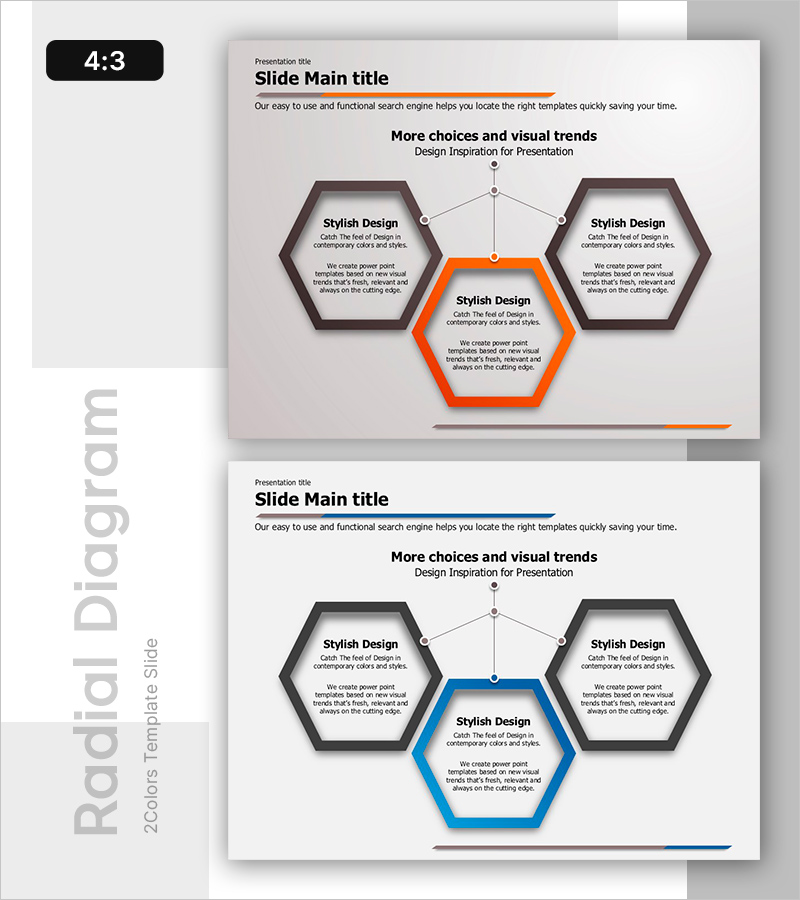
3 Types of Wave Effects – Product and Service Introduction
RB0800053_8
- Last Update 03/26/2025
- File Size 0.3MB
- # of Slides 2
- File Format PPTX
- Slide Ratio 4:3
- Color
Keywords
- #Content-Based Slides
- #Design-Based Slides
- #Product/Service Introduction
- #Business Vision and Strategy
- #Diagram
- #Benefits and Advantages
- #Core Competencies
- #Spread
- #Centralized Diagram
- #4:3
- #radial hexagon diagram PowerPoint
- #center connection slide template
- #product introduction diagram
- #business vision presentation
- #how to create radial diagram in PowerPoint
About the Product
A radial hexagon diagram PowerPoint slide with a central focal point connected to three surrounding hexagons, ideal for product and service introductions, business vision statements, and strategic presentations. The design uses an orange accent color for the center node and gray tones for peripheral elements, creating clear visual hierarchy and information flow. Each hexagon contains dedicated text areas for titles and descriptions, allowing flexible content customization. This 4:3 aspect ratio, 2-slide template is ready for immediate editing and presentation delivery.
Usage Points
-
Main Usage
Visualizes hierarchical relationships and radial expansion by placing a core concept in the center and connecting three related elements around it. Effectively communicates product features, business vision pillars, or three-pillar strategic frameworks in a balanced, visually organized manner.
-
How to Use
Enter your main topic in the center orange hexagon, then add three supporting points in the surrounding gray hexagons. Fill in descriptive text within each hexagon's text areas. Modify colors to match your brand identity or presentation theme as needed.
-
Recommended For
Product managers presenting feature sets, marketing professionals positioning services, executives delivering strategic vision, and startup founders explaining business models. Ideal for any presentation requiring balanced three-element composition and clear hierarchical structure.
-
Slide Structure
Four-node hexagon layout: one central orange hexagon (emphasis) plus three gray hexagons positioned at upper-left, upper-right, and bottom. Connecting lines radiate from center to each peripheral node. Each hexagon includes dedicated title and description text input areas.
Related Products
-
Illustrations and Diagrams of the Game – Sports Vision and Strategy
#Product/Service Introduction #Business Vision and Strategy #Diagram
-
Automobile Management System Slide – Effective Business Strategy
#Product/Service Introduction #Business Vision and Strategy #Diagram
-
Centralized Diagram Slide for Food Development Plan
#Product/Service Introduction #Business Vision and Strategy #Diagram
-
Branding Product Core Competencies Slide – Differentiated Value Proposition
#Product/Service Introduction #Business Vision and Strategy #Diagram
