



Exploring Three Strategic Paths for Growth – Business Innovation Strategies
RB0800027_16
- Last Update 03/23/2025
- File Size 0.4MB
- # of Slides 2
- File Format PPTX
- Slide Ratio 4:3
- Color
Keywords
- #Content-Based Slides
- #Design-Based Slides
- #Product/Service Introduction
- #Diagram
- #Product/Service Introduction
- #Composition
- #Spread
- #Radial Diagram
- #4:3
- #radial diagram PowerPoint slide
- #3-way expansion diagram
- #central hub strategy slide
- #business growth strategy PowerPoint
- #diagram slide template download
About the Product
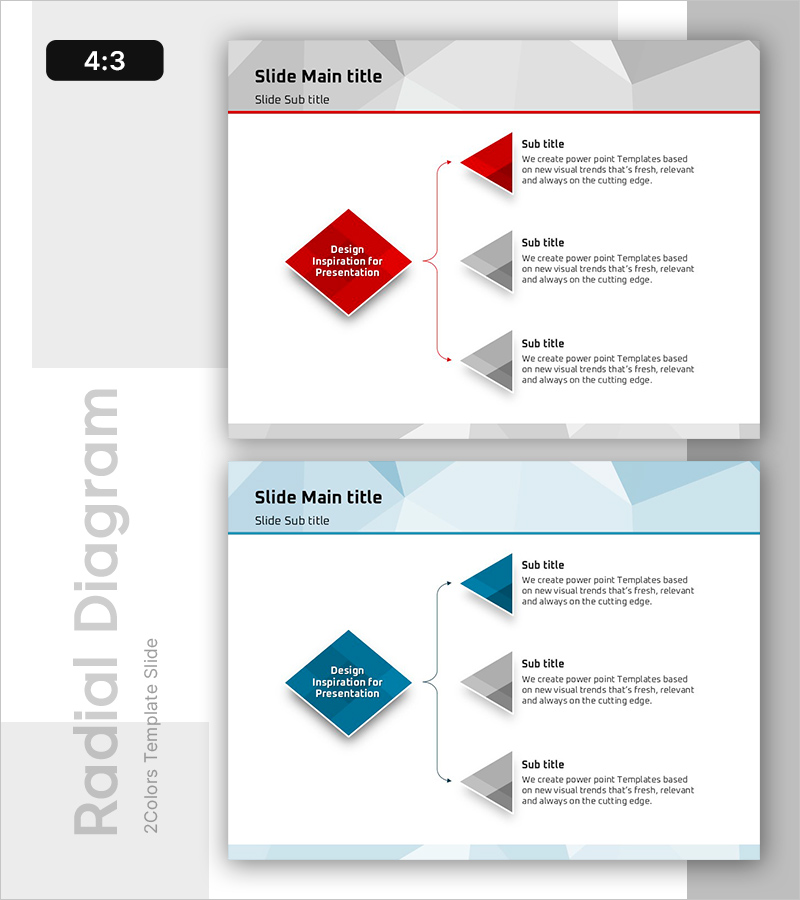
A radial diagram PowerPoint slide that branches three strategic directions from a central core concept. The design features a red diamond-shaped hub connected to three gray triangular nodes via curved arrow connectors, creating a visual hierarchy of strategic expansion. This presentation slide template works effectively for business growth strategies, product introductions, innovation roadmaps, and organizational direction statements. The 4:3 aspect ratio with 2 slides is fully editable and ready for immediate use in corporate presentations.
Usage Points
-
Main Usage
Use this slide when presenting a core strategy that branches into multiple execution paths, business units, or growth directions simultaneously. It emphasizes the central concept's importance while balancing the representation of derived strategies and initiatives.
-
How to Use
Enter your core strategy name in the central red diamond shape. Fill in each of the three gray triangular nodes with specific execution directions, sub-strategies, or business areas. The curved arrow connectors highlight the logical flow from the central concept to each direction.
-
Recommended For
Executive presentations, strategic planning meetings, product launch briefings, organizational transformation proposals, and marketing strategy sessions. Ideal for professionals explaining multi-path strategies stemming from a single core objective.
-
Slide Structure
Central red diamond hub (1) + gray triangular nodes (3) + curved connecting arrows (3). Each node includes text input areas. The 2-slide set in 4:3 ratio features the diagram on the first slide and a detailed explanation layout on the second.
Related Products
-
Introduction of Aircraft Product Characteristics – Providing Differentiated Value
#Product/Service Introduction #Diagram #Other
-
Simple & Modern Wide PPT Diffusion Diagram
#Product/Service Introduction #Diagram #Product/Service Introduction
-

Introduction to 3D Printing Configuration – Expansive Visualization
#Product/Service Introduction #Diagram #Other
-
Aurora Camping Business Vision Diagram
#Product/Service Introduction #Diagram #Product/Service Introduction
