



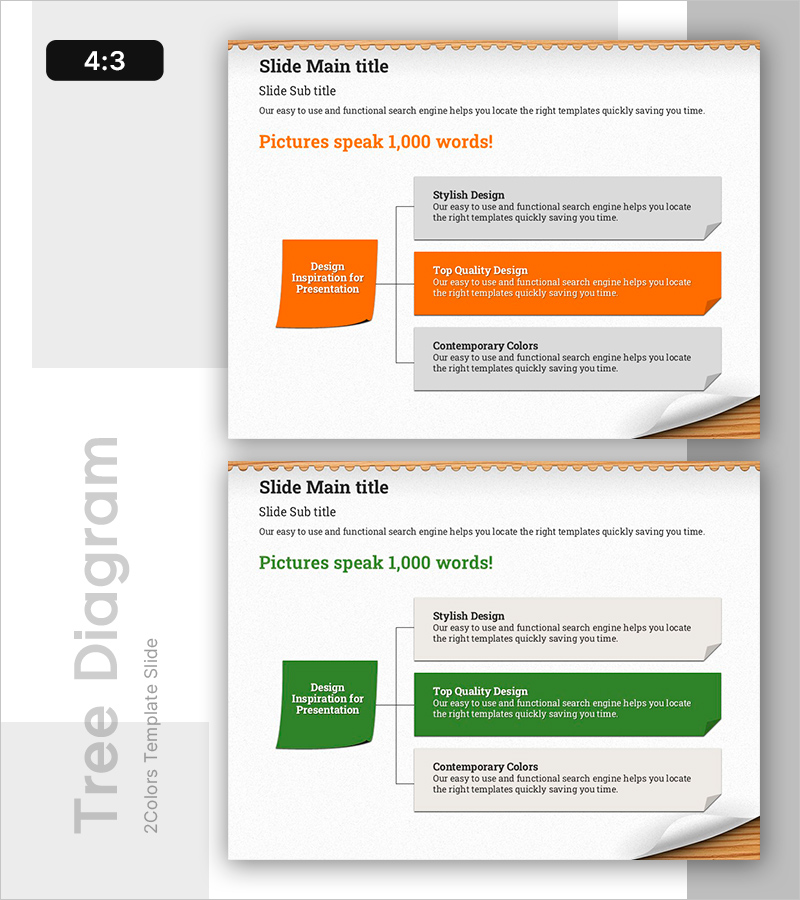
Post-it Diagram for Business Area Introduction
RB0800020_19
- Last Update 03/21/2025
- File Size 1.3MB
- # of Slides 2
- File Format PPTX
- Slide Ratio 4:3
- Color
Keywords
- #Content-Based Slides
- #Design-Based Slides
- #Product/Service Introduction
- #Business Introduction
- #Diagram
- #Program Introduction
- #Business Areas
- #Spread
- #4:3
- #post-it diagram PowerPoint
- #divergence diagram slide
- #business area introduction slide
- #how to create a divergence diagram in PowerPoint
- #3-direction diagram template
About the Product
A post-it style divergence diagram PowerPoint slide that expands from a central concept in three directions. This design is ideal for introducing business areas, product features, or service scope with clear visual hierarchy. The orange accent color contrasts with the gray background to emphasize information layers, while each section provides flexible text input areas. The 2-slide set includes both orange and green color versions, allowing you to match your presentation theme and brand tone. Each directional box accommodates multiple lines of descriptive text, making it suitable for detailed explanations in business introductions and product showcases.
Usage Points
-
Main Usage
This diagram is optimized for presenting multiple areas, features, or elements that branch from a central concept or core theme. It visualizes divergence-type information structures to enhance audience comprehension when explaining business portfolios, product feature categories, or service expansion strategies.
-
How to Use
Enter your core concept (company name, product name, or core value) in the center orange post-it area. Fill the three directional gray boxes with corresponding details, features, or benefits. Adjust box sizes or font sizes based on text length to control information density and visual balance.
-
Recommended For
Ideal for business plans, company introductions, and product presentation sections covering business portfolios or service lineups. Also effective in marketing strategy documents for customer segment classification and investor pitch decks explaining business diversification strategies.
-
Slide Structure
Composed of one central orange post-it input area plus three directional gray boxes (each with three input regions, totaling nine areas). The 2-slide 4:3 ratio set provides one orange and one green version, allowing flexible color selection to match your document's visual identity.
Related Products
-
Cartoon Theme Diffusion Diagram – Creative Business Introduction
#Product/Service Introduction #Business Introduction #Diagram
-
Building Systems Business Area Diagram
#Product/Service Introduction #Business Introduction #Diagram
-
Box Wide Template – Circular Connection Diagram
#Product/Service Introduction #Business Introduction #Diagram
-
Asset Management Business Area Diagram – Cluster and Connection
#Product/Service Introduction #Business Introduction #Diagram
