



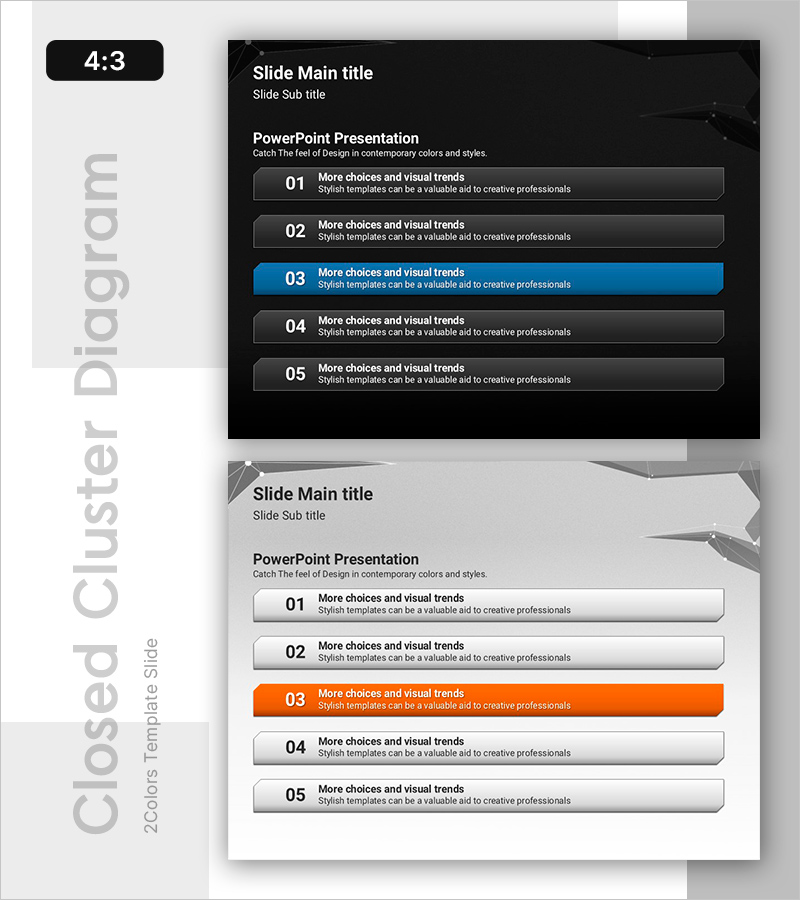
Closed Box Diagram for Visualizing Product Benefits
RB0800019_11
- Last Update 03/21/2025
- File Size 2.5MB
- # of Slides 2
- File Format PPTX
- Slide Ratio 4:3
- Color
Keywords
- #Content-Based Slides
- #Design-Based Slides
- #Product/Service Introduction
- #Diagram
- #Text Box
- #Composition
- #Benefits and Advantages
- #Cluster
- #Closed Cluster Diagram
- #Rectangle Text Box
- #4:3
- #closed box diagram PowerPoint
- #5-step diagram template
- #product benefits visualization slide
- #box diagram presentation
- #product introduction PowerPoint slide
About the Product
A professional PowerPoint slide featuring a 5-step closed box diagram structure to clearly present product or service benefits. Dark background with blue accent color and orange highlight distinguishes each step's importance visually. Left-aligned numbering (01–05) and right-aligned description areas create clear information hierarchy, naturally guiding audience attention during presentations. Available in 4:3 ratio with 2 slides, fully editable and ready to use in product introduction decks, service proposals, and business presentations.
Usage Points
-
Main Usage
Structures product or service advantages, features, or steps into 5 distinct items, delivering clear messaging to audiences. Each box functions independently while maintaining visual connection, creating logical flow and effective value proposition communication through numbered sequence.
-
How to Use
Enter key product benefits into each of the 5 boxes in the product introduction section, with detailed descriptions in the right-aligned text areas. Use the blue accent color to draw attention and orange highlight to emphasize priority items, controlling presentation flow and audience focus.
-
Recommended For
Ideal for product marketing professionals, sales presentations, service proposal writers, and corporate presenters explaining product value step-by-step to clients. Effective for B2B business pitches, product launch presentations, and customer persuasion materials requiring structured benefit communication.
-
Slide Structure
2-slide deck with 5 closed boxes per slide. Left side displays 01–05 numbering, center contains title text, and right side provides description input areas. Dark background with blue base color and orange accent color creates clear visual hierarchy and emphasis.
Related Products
-
Box Icon Diagram PowerPoint Template - Business Vision and Strategy
#Product/Service Introduction #Business Vision and Strategy #Diagram
-
Features of a Convenient Shooting App Slide
#Product/Service Introduction #Diagram #Composition
-
Information on Examination Items – A Tool for Efficient Business Management
#Product/Service Introduction #Business Management #Diagram
-
Concise Slide Template to Present Product Advantages
#Product/Service Introduction #Diagram #Composition
