



Current Situation from Three Perspectives – Business Strategy and Customer Success
RB0800012_11
- Last Update 03/19/2025
- File Size 3.8MB
- # of Slides 2
- File Format PPTX
- Slide Ratio 4:3
- Color
Keywords
- #Content-Based Slides
- #Design-Based Slides
- #Business Strategy
- #Customer Success Stories
- #Diagram
- #Customer Testimonials and Feedback
- #Cluster
- #Spread
- #Closed Cluster Diagram
- #4:3
- #radial diagram PowerPoint
- #3-item expansion slide
- #central concept presentation
- #multi-perspective analysis
- #situation analysis diagram
About the Product
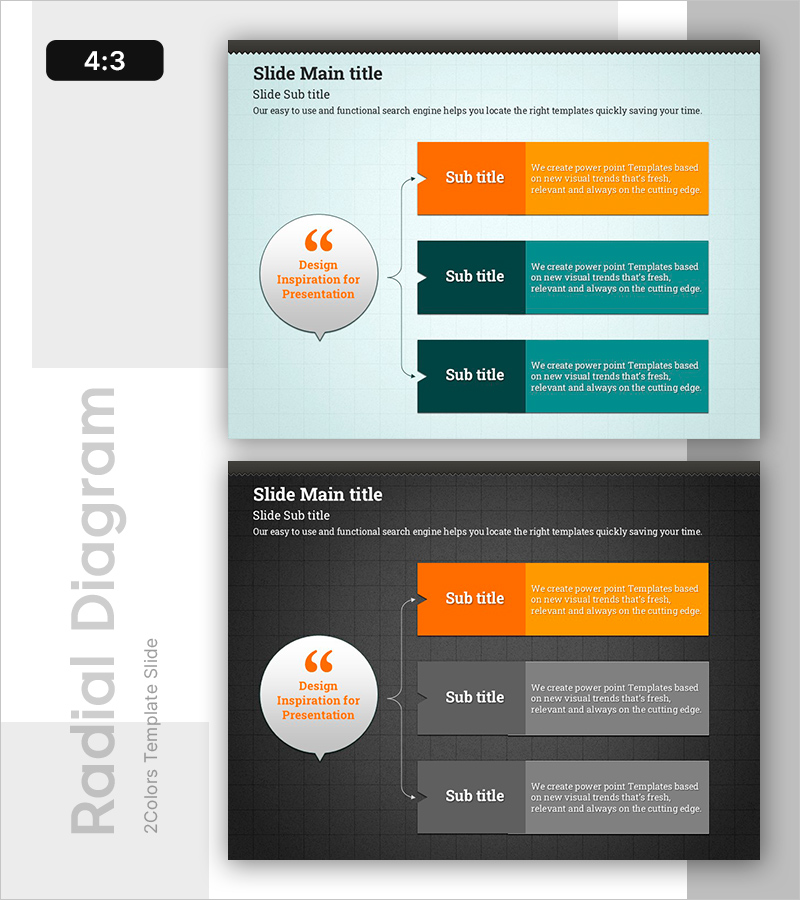
A radial diagram PowerPoint slide where three key items expand outward from a central concept. The design features a light blue background with orange and dark teal accent colors that clearly distinguish information hierarchy. Each item is presented in a speech bubble-style text box, effectively showing multiple perspectives such as current situation analysis, strategic planning, and customer success cases. The 2-slide set offers both light and dark background options to match your presentation tone. Fully editable in PPTX format, allowing you to customize text and colors freely to fit your content needs.
Usage Points
-
Main Usage
Visualizes multiple perspectives radiating from a core concept, such as current situation analysis, strategic planning, and customer success examples. The structure flows from a central message outward to three detailed items, making information flow intuitive and effective for presenting diverse analytical viewpoints during business strategy development phases.
-
How to Use
Enter your core topic in the central circular speech bubble (e.g., current situation, key strategy, success factor), then fill in the three directional text boxes with supporting details. Colors can be differentiated by item or unified for consistency, with arrow connectors emphasizing the relationship to the center. Choose between light blue or dark gray backgrounds to match your presentation context.
-
Recommended For
Ideal for executives, strategy teams, marketing departments, and sales teams analyzing business situations from multiple angles or presenting customer success stories. Perfect for investor pitch decks, business plans, strategic reports, and customer case study presentations where you need to consolidate complex perspectives on a single slide.
-
Slide Structure
2-slide set with Slide 1 featuring a light blue background and Slide 2 a dark gray background. Each slide contains a central orange-bordered circular speech bubble for core concept input, three color-coded text boxes (orange, dark teal, light teal) positioned left, top, and right, and arrow connectors radiating from center to each item to emphasize the expansion flow.
Related Products
-
Three Strategies for Effective Meetings – Driving Successful Business
#Business Strategy #Business Management #Diagram
-
Business Box Diagram – Strategic Operations Plan
#Business Strategy #Operational Plan #Diagram
-
Customer Satisfaction and Key Achievements – Effective Business Strategy
#Business Strategy #Customer Success Stories #Diagram
-
Four-Leaf Clover Diagram – Product Introduction and Business Strategy
#Product/Service Introduction #Business Strategy #Diagram
