



Target Settings Diagram – Clarifying Marketing Goals
RB0800005_18
- Last Update 03/18/2025
- File Size 1.9MB
- # of Slides 2
- File Format PPTX
- Slide Ratio 4:3
- Color
Keywords
About the Product
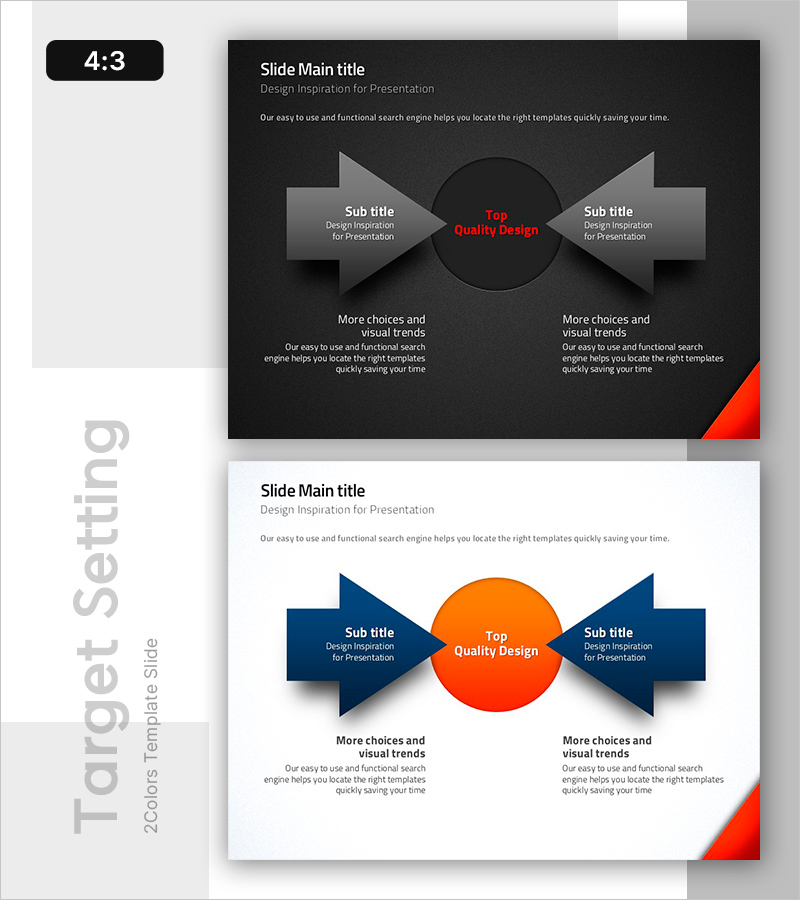
A professional target setting diagram PowerPoint slide that visually clarifies marketing objectives and strategic directions. The design features a central circular element with symmetrical bidirectional arrows on both sides, allowing you to emphasize core messages alongside detailed goals simultaneously. The dark version combines a black background with gray arrows and red accent colors for professional credibility and visual impact. A light version with white background, navy arrows, and orange accents is also included, enabling you to select the appropriate style for your presentation context and document tone. The 2-slide set provides flexible design options for different audience settings. Text input areas include one central circle, two side arrows, and two lower description sections, totaling five distinct zones optimized for comparison, contrast, or cause-and-effect relationships.
Usage Points
-
Main Usage
Optimized for marketing strategy presentations where you need to express core objectives alongside related sub-strategies simultaneously. The central circle holds your primary message while the side arrows display interconnected goals or action items, visually communicating relationships and balance.
-
How to Use
Use in marketing planning documents, business strategy presentations, or product launch decks within the goal-setting section. Place 'core objective' in the center circle, 'target audience' on the left arrow, and 'value proposition' on the right arrow. Alternatively, use it to contrast 'current state' versus 'target state' scenarios.
-
Recommended For
Marketing managers, strategic planning teams, sales directors, and product managers communicating goal-setting and strategic direction. Particularly effective when emphasizing bidirectional relationships or mutual influence between elements.
-
Slide Structure
Two-slide set featuring a dark version (black background, gray arrows, red accent) and light version (white background, navy arrows, orange accent). Each slide contains five text input zones: one central circle, two side arrows, and two lower description areas, optimized for comparison, contrast, or flow visualization.
Related Products
-
Real Estate Marketing System - Actionable Strategies and Flow
#Operational Plan #Marketing Plan and Strategy #Diagram
-

Final Marketing Goals According to Users
#Marketing Plan and Strategy #Diagram #Marketing Objectives
-

Seminar Goal Setting Diagram – Business Vision and Marketing Strategy
#Business Vision and Strategy #Marketing Plan and Strategy #Diagram
-
Setting Goals for Business Growth – Vision and Marketing Strategy
#Business Vision and Strategy #Marketing Plan and Strategy #Diagram
