



Introducing the Hobby Life Support Program – Supporting Enjoyable Leisure
RB0700010_6
- Last Update 03/15/2025
- File Size 0.8MB
- # of Slides 2
- File Format PPTX
- Slide Ratio 4:3
- Color
Keywords
- #Content-Based Slides
- #Design-Based Slides
- #Product/Service Introduction
- #Diagram
- #Program Introduction
- #Benefits and Advantages
- #Cluster
- #Closed Cluster Diagram
- #Chain Diagram
- #4:3
- #connector diagram PowerPoint
- #2-node comparison slide
- #symmetrical diagram template
- #program introduction PowerPoint
- #concept comparison slide design
About the Product
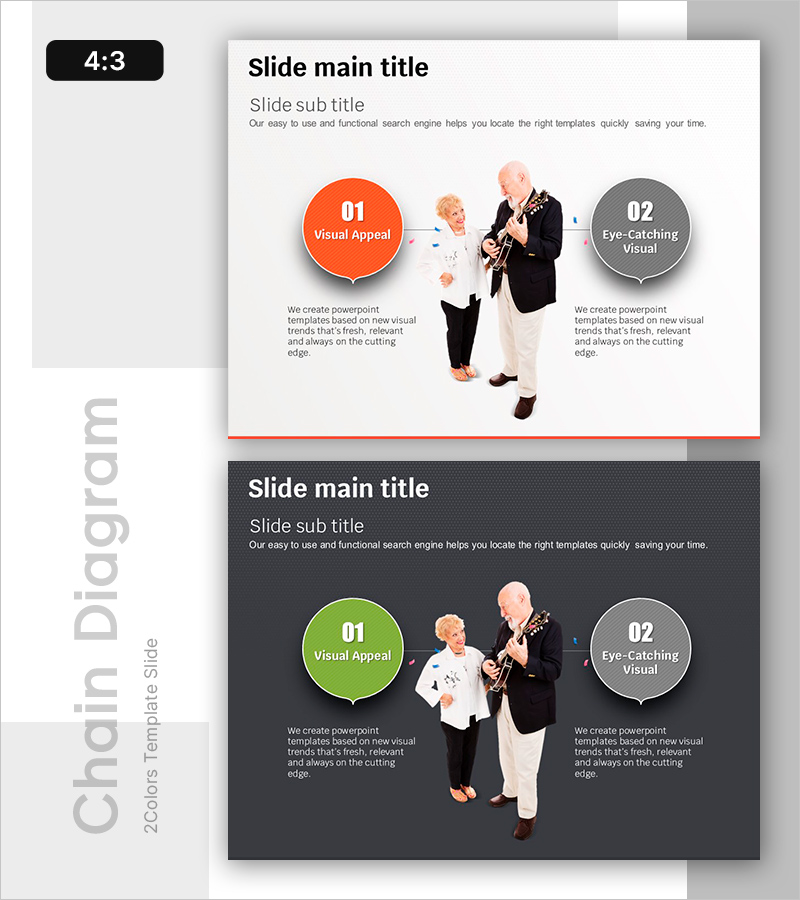
A symmetrical 2-node connector diagram PowerPoint slide featuring left-right balanced composition. Orange and gray circular nodes flank a central human image, enabling visual comparison and contrast of two concepts, features, or alternatives. Each node includes a title and descriptive text area below, making it ideal for program benefits comparison, feature showcase, or option presentation in business and organizational contexts. This 4:3 ratio, 2-slide template is ready for immediate editing and presentation use.
Usage Points
-
Main Usage
Optimized for visually comparing and contrasting two concepts, features, alternatives, or benefits using a balanced left-right structure. Ideal for program benefit comparison, option presentation, feature contrast, before-after scenarios, and decision-making contexts in professional presentations.
-
How to Use
Edit node titles and description text to input your comparison items. Replace the central image with program-representative photos or icons, and customize node colors to match your organization's brand palette for context-specific presentations.
-
Recommended For
Program and service introductions, policy briefings, welfare benefit presentations, product feature comparisons, educational institution overviews, nonprofit fundraising pitches, HR policy explanations, and any presentation requiring two-option or alternative scenarios.
-
Slide Structure
2-slide set with consistent layout: title and subtitle area at top, central human image, left and right circular nodes (numbered 01 and 02 with titles and descriptive text), connector lines showing relationships, and red accent line at bottom for visual closure.
Related Products
-
Effectiveness of Planterior Design – Capturing Innovation in Spaces
#Product/Service Introduction #Diagram #Program Introduction
-
Exciting Performers and Connection Diagram
#Product/Service Introduction #Marketing Plan and Strategy #Diagram
-
Key Shape Diagram for Delivering Vision and Mission
#Company Introduction #Product/Service Introduction #Diagram
-
The Strength of the Media – Diagram Template for Presentation
#Product/Service Introduction #Diagram #Differentiation Strategy for Products/Services
