



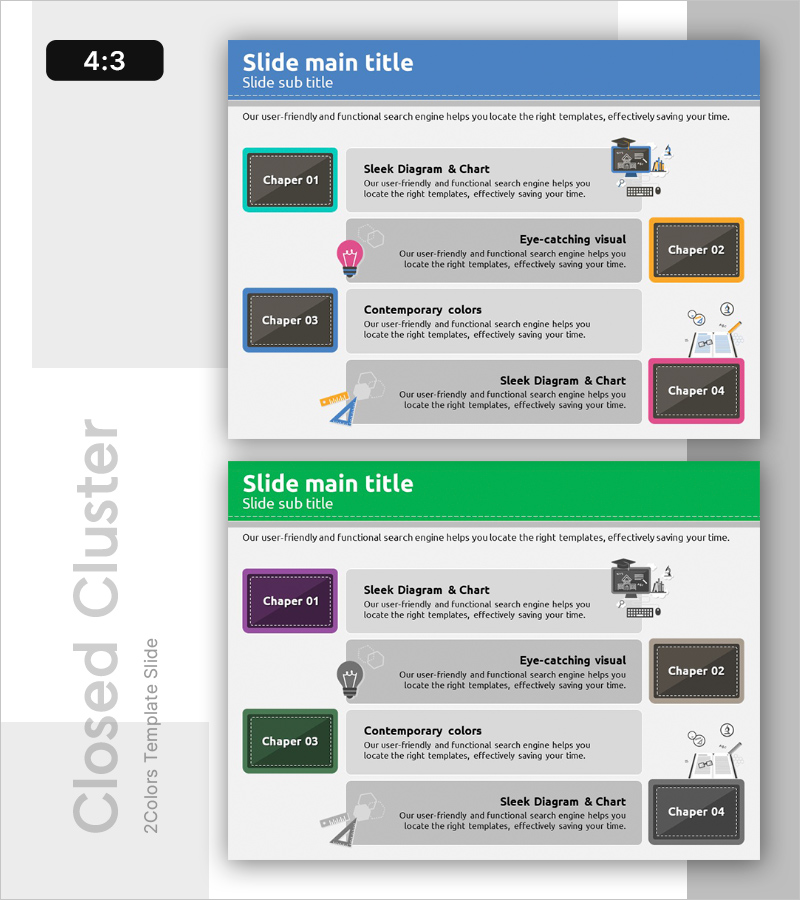
Overview of the Lesson Management Program – Effective Stage Management Diagram
RB0300043_4
- Last Update 03/11/2025
- File Size 0.6MB
- # of Slides 2
- File Format PPTX
- Slide Ratio 4:3
- Color
Keywords
- #Content-Based Slides
- #Design-Based Slides
- #Product/Service Introduction
- #Business Strategy
- #Diagram
- #Program Introduction
- #Step-by-Step Schedule Plan
- #Cluster
- #Closed Cluster Diagram
- #4:3
- #4-stage cluster diagram PowerPoint
- #closed cluster diagram slide
- #educational program presentation
- #stage management diagram
- #program overview PPT slide
About the Product
A 4-stage closed cluster diagram PowerPoint slide designed to visualize educational program operations and stage-by-stage management. Each stage (Chapter 01–04) is distinguished by colorful bordered boxes in turquoise, orange, blue, and pink, with icons and descriptive text positioned centrally to clearly represent information hierarchy. The 2-slide set features a repeatable layout that can be immediately applied to program overviews, curriculum guides, and phased implementation strategy presentations. Text and icons within each box are fully editable, allowing customization to match various program structures and organizational needs.
Usage Points
-
Main Usage
Presents the 4-stage structure of an educational program using a closed cluster format, clearly communicating the role and relationship of each stage. Ideal for program overviews, curriculum guides, phased strategy presentations, and any scenario requiring visual representation of information hierarchy.
-
How to Use
Replace each box title (Chapter 01–04) and description text with your program's actual stage names and content. Swap icons to represent each stage's characteristics, and adjust background and border colors to match your organization's brand palette. Duplicate the 2-slide set to represent additional stages if needed.
-
Recommended For
Educational institutions, training centers, and online course management teams; corporate training and talent development departments; program planners and operations report writers; instructors and speakers explaining educational curricula; consultants requiring visual process explanations.
-
Slide Structure
2-slide set with identical layout. Each slide features 4 closed cluster boxes (turquoise, orange, blue, and pink borders) arranged left-to-right, containing title, icon, and descriptive text areas. Additional icons and explanatory text are centrally positioned to emphasize stage connectivity.
Related Products
-
Diagram Slide Visualizing Idea Development Stage
#Product/Service Introduction #Business Strategy #Diagram
-
Blood Donation Program Introduction Diagram – An Opportunity to Share Life
#Product/Service Introduction #Business Strategy #Diagram
-
Introducing the Card Company Service Program – Effective Business Strategy
#Product/Service Introduction #Business Strategy #Diagram
-

Introducing the Business Partner Project – Impressive Diagram Layout
#Product/Service Introduction #Business Strategy #Diagram
