



Centralized Diagram Template for Network-Based App Infrastructure
RB0200029_5
- Last Update 03/09/2025
- File Size 2.9MB
- # of Slides 2
- File Format PPTX
- Slide Ratio 4:3
- Color
Keywords
- #Content-Based Slides
- #Design-Based Slides
- #Business Introduction
- #Technical Approach
- #Diagram
- #Infrastructure
- #System Architecture Diagram
- #Spread
- #Centralized Diagram
- #4:3
- #radial diagram PowerPoint
- #central hub network slide
- #system architecture diagram
- #network structure PPT
- #infrastructure visualization slide
- #organizational hierarchy diagram
About the Product
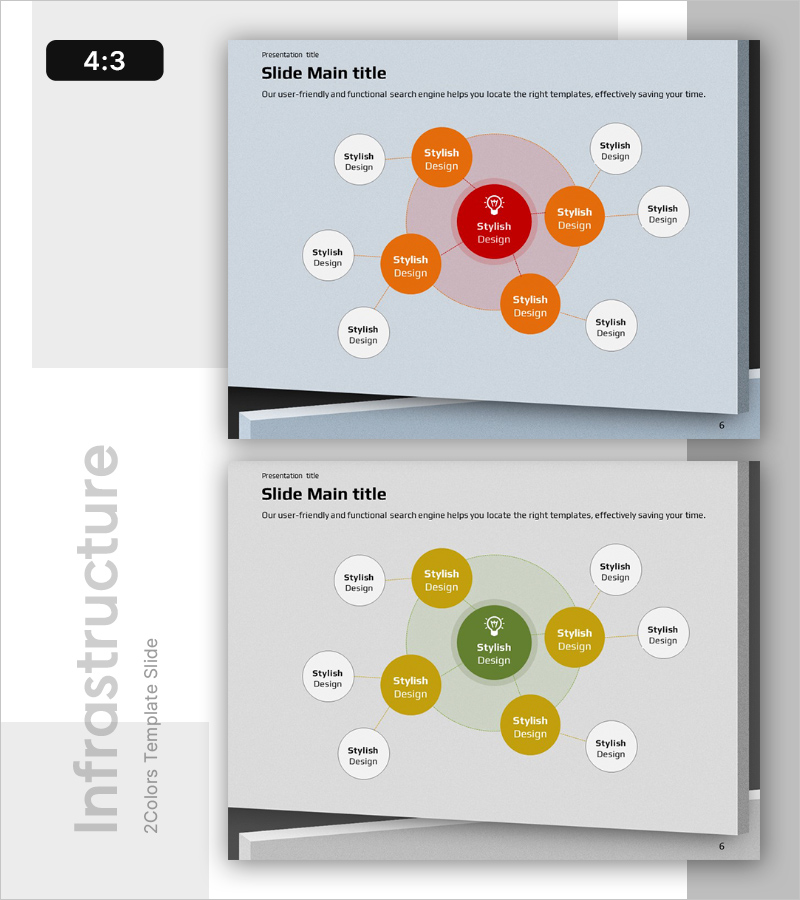
A radial diagram PowerPoint slide that visualizes network-based app infrastructure and system architecture. The design features a central red hub node connected to eight satellite nodes in orange and white, representing system components, technical layers, and organizational hierarchy. The two-slide template includes a red-centered version and a green-centered version for flexible presentation contexts. Delivered in 4:3 ratio PPTX format, fully editable with customizable node labels and color schemes for immediate use in technical presentations.
Usage Points
-
Main Usage
Visualizes network-based app infrastructure, system architecture, and organizational hierarchy in a centralized format. Positions core concepts at the center and clarifies relationships with surrounding elements, ideal for technical presentations, system design documentation, and organizational structure explanations.
-
How to Use
Insert into technical presentation, system architecture explanation, or organizational structure slides. Add core concepts (e.g., app platform, system core) to the central node and detailed elements (e.g., database, API, server) to satellite nodes to represent hierarchical relationships.
-
Recommended For
Technology planners, system architects, IT department leads, and development team managers presenting infrastructure structure in technical pitches, proposals, and business plans. Highly effective for visualizing technical competitive advantages in investor pitch decks.
-
Slide Structure
Composed of one central red (or green) circular node plus four orange satellite nodes and four white satellite nodes. Dotted connector lines link the central node to all satellite nodes, with text input areas on each node. Both slides share identical structure with different color schemes.
Related Products
-
IoT System Configuration Diagram – Innovation Through Connection
#Business Introduction #Technical Approach #Diagram
-
System Education Infographic Connection Elements – Integrating Business and Education
#Business Introduction #Technical Approach #Diagram
-
Magic Trick Configuration Diagram – Creative Business Solution
#Business Introduction #Technical Approach #Diagram
-
Spring Natural Diffusion Diagram – Business Introduction and Technology Status
#Business Introduction #Diagram #Technological Status
