



Structure Shape Business Area Diagram – Centralized Expansion
RB0200001_4
- Last Update 03/08/2025
- File Size 0.3MB
- # of Slides 2
- File Format PPTX
- Slide Ratio 4:3
- Color
Keywords
- #Content-Based Slides
- #Design-Based Slides
- #Company Introduction
- #Business Introduction
- #Diagram
- #Business Areas
- #Business Areas
- #Spread
- #Centralized Diagram
- #4:3
- #radial expansion diagram PowerPoint
- #central hub diagram slide
- #business area structure template
- #6-direction node diagram
- #how to create radial diagram in PowerPoint
About the Product
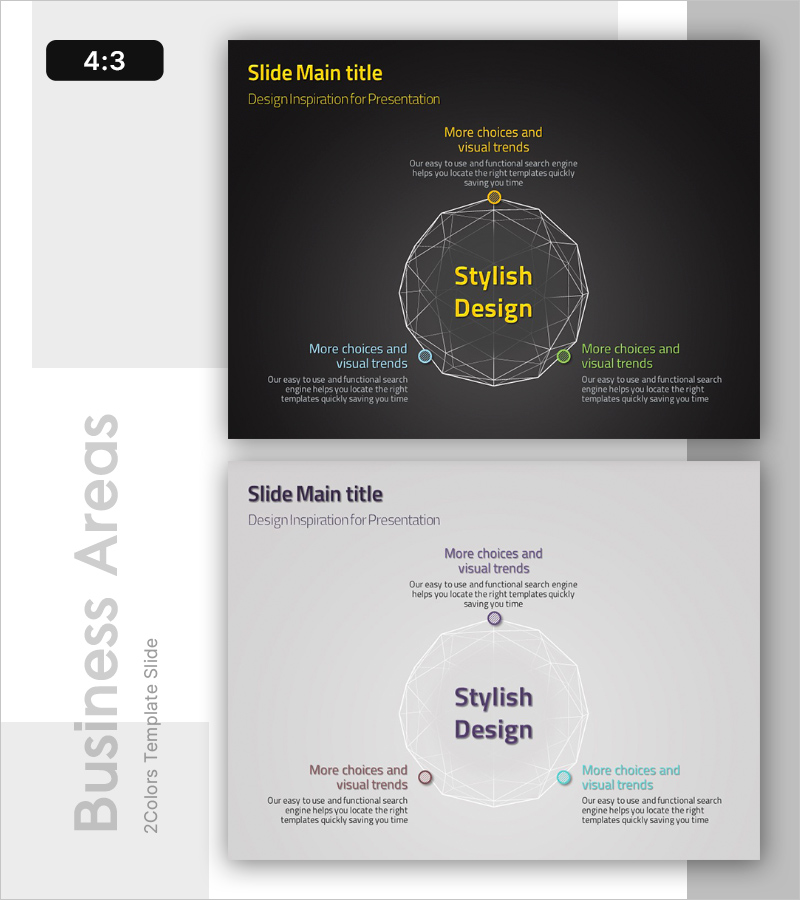
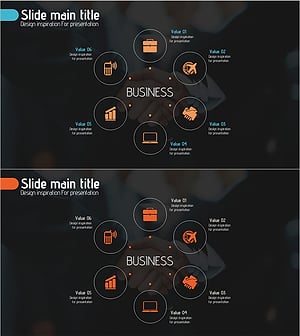
A radial expansion diagram PowerPoint slide with a central hub node extending to six directional branches. Features a dark background with a yellow center node, gray connecting lines, and color-coded accent points (blue, green, orange) to highlight each direction. The 4:3 ratio, 2-slide template is fully editable and ideal for visualizing business areas, strategic directions, organizational structures, and concept hierarchies in presentations and business proposals.
Usage Points
-
Main Usage
Visualizes organizational core business areas, strategic directions, and multi-layered business models through a radial expansion structure. Effectively communicates relationships between central concepts and detailed items in company introductions, business strategy presentations, and organizational structure briefings.
-
How to Use
Enter the core concept (company name, core value, strategic goal) in the central yellow text area. Distribute detailed items (business divisions, strategic initiatives, organizational units) across the six directional gray nodes. Customize the dark background and color accents to match your presentation tone.
-
Recommended For
Ideal for executives, planning teams, and marketing departments presenting business strategies, company introduction materials, business area sections, organizational restructuring explanations, and new business planning presentations. Effectively simplifies and clarifies complex structures.
-
Slide Structure
Central yellow circular node with text input area, six directional gray circular nodes (top, bottom, left, right, top-left, top-right) with connecting lines, text description areas beside each node. Dark background with yellow, blue, green, and orange accent points for visual emphasis. Two-slide template with identical layout for consistency.
Related Products
-
Card Payment Service Area Diagram – Business Sector Introduction
#Company Introduction #Business Introduction #Diagram
-
Sketch Icon Business Area Diagram – Visualizing Business Introduction
#Company Introduction #Business Introduction #Diagram
-
Financial Management Services Area Diagram – Visualizing Business Areas
#Company Introduction #Business Introduction #Diagram
-
Travel Business Services Area – Effective Diagram Design
#Company Introduction #Business Introduction #Diagram
