



Visualizing Equipment Operation and Maintenance Strategy Slides
RB0100037_4
- Last Update 03/05/2025
- File Size 4.6MB
- # of Slides 2
- File Format PPTX
- Slide Ratio 4:3
- Color
Keywords
- #Content-Based Slides
- #Design-Based Slides
- #Operational Plan
- #Diagram
- #Production and Technology Development Strategy
- #Post-Implementation Management & Maintenance
- #Cluster
- #Closed Cluster Diagram
- #4:3
- #closed cluster diagram PowerPoint
- #4-color circular diagram slide
- #operations strategy presentation
- #gear icon diagram
- #cluster diagram PowerPoint template
About the Product
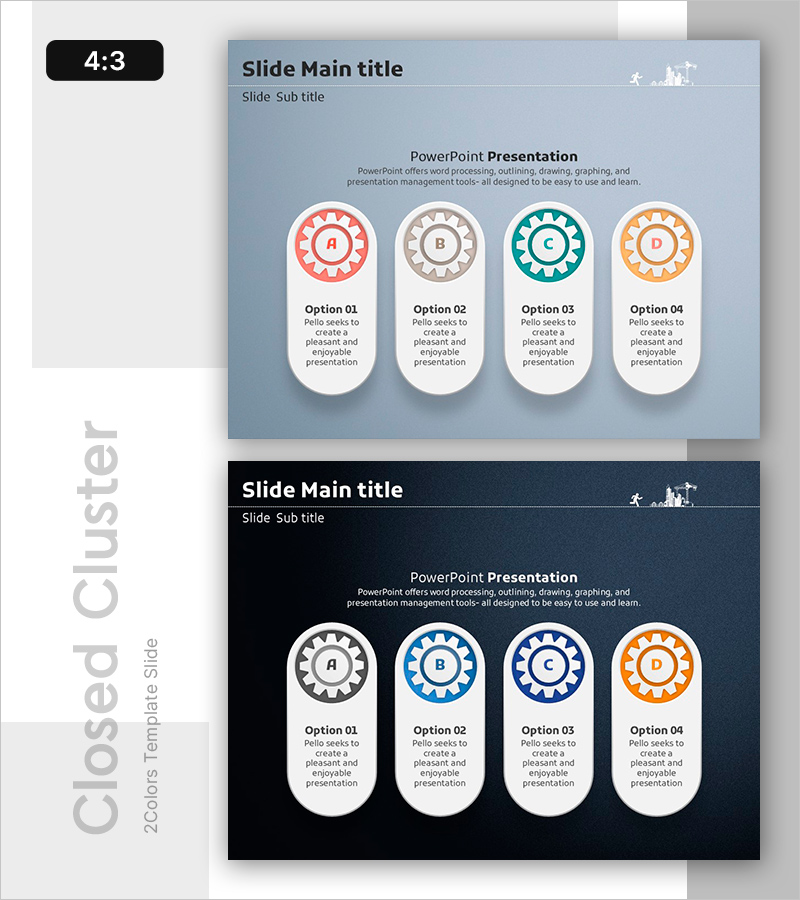
A PowerPoint slide template that visualizes operations and maintenance strategy using four color-coded closed clusters arranged symmetrically around a central gear icon. The design features red, gray, teal, and orange options with dedicated text input areas in each cluster. Presented in 4:3 aspect ratio across 2 slides with light blue and dark navy background themes. Ideal for immediate use in presentations covering operational planning, maintenance strategy, process management, and system administration.
Usage Points
-
Main Usage
Visualizes operations and maintenance strategies, process management, organizational function allocation, and system components across four distinct areas. The central gear icon symbolizes core operational function, while the four closed clusters express both independent roles and interconnected relationships.
-
How to Use
Enter operational items, strategies, or department names in the text input spaces within each closed cluster. Use color differentiation to represent categories or priority levels. Apply the light blue theme for bright-toned presentations and dark navy theme for professional authority-focused presentations.
-
Recommended For
Operations managers, system engineers, project managers, quality assurance specialists, and maintenance team leads presenting operational plans, strategy improvements, organizational function explanations, and system administration updates.
-
Slide Structure
2-slide set. Each slide features a central circular gear icon with four symmetrically arranged closed clusters (red, gray, teal, orange). Each cluster contains an option label (Option 01–04) and text input area. Title and subtitle spaces are positioned at the top of each slide.
Related Products
-
Automotive Management Diagram – Operations Plan and Maintenance Strategy
#Operational Plan #Diagram #Production and Technology Development Strategy
-
Cognitive Exploration System Diagram – Operational Planning and Technical Development Strategy
#Operational Plan #Diagram #Production and Technology Development Strategy
-
Review and Analysis of Business Details – Visualized with Modern Diagrams
#Business Management #Operational Plan #Diagram
-

Cluster Diagram Slide Template for Digital Construction System
#Operational Plan #Technical Approach #Diagram
