



Survey and Voting Slides – Effective Marketing Strategy
RM0900001_15
- Last Update 03/02/2025
- File Size 0.5MB
- # of Slides 2
- File Format PPTX
- Slide Ratio 16:9
- Color
Keywords
- #Content-Based Slides
- #Design-Based Slides
- #Marketing Plan and Strategy
- #Diagram
- #Marketing Objectives
- #Marketing Strategy
- #Cluster
- #Closed Cluster Diagram
- #16:9
- #survey diagram PowerPoint
- #voting slide presentation
- #3-option choice diagram
- #cluster diagram PPT slide
- #marketing survey presentation template
About the Product
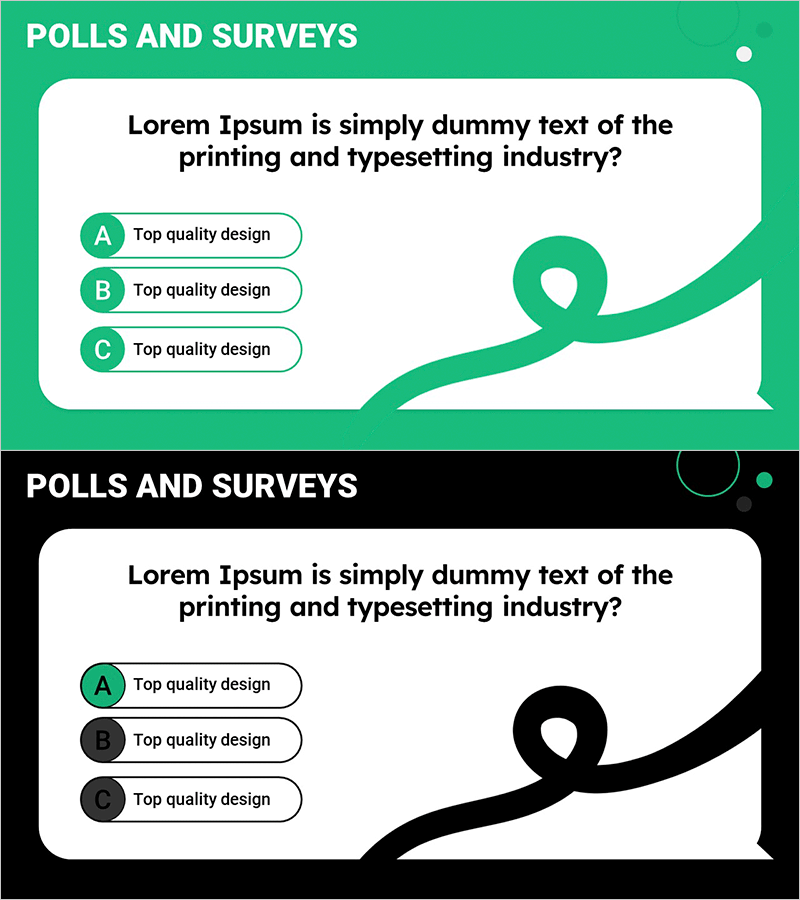
An optimized survey and voting PowerPoint slide deck for marketing strategy presentations and customer feedback collection. This cluster diagram uses three circular nodes (A, B, C) connected by curved arrows to intuitively visualize survey items and response options. The design features a green background with white text boxes for high readability during presentations. The 2-slide set includes both green and black color variations in 16:9 widescreen format, making it compatible with modern presentation environments. Instantly applicable to marketing planning documents, market research reports, and customer feedback collection slides.
Usage Points
-
Main Usage
Visualizes customer survey results, voting outcomes, and opinion collection using a 3-option choice diagram format. Used during marketing strategy development to clearly express target customer preferences, satisfaction levels, and intentions, serving as decision-making evidence in meetings, reports, and presentations.
-
How to Use
Enter your survey question in the text box at the top of the slide. Input each choice and response content in the three circular nodes (A, B, C). The curved arrows represent relationships, flow, or priority between options. Choose between the green or black version based on your presentation background and tone. All text and shapes are fully editable.
-
Recommended For
Marketing professionals, planners, and research teams presenting customer survey results, brand preferences, and product feedback. Ideal for executive reports, strategy meetings, marketing planning documents, market research reports, and customer satisfaction analysis slides.
-
Slide Structure
2-slide set. Each slide contains a question text box at the top (bold black text), three choice options on the left (circular nodes A, B, C in green or black background), and curved arrow graphic elements on the right. 16:9 widescreen format in PPTX, with all text and shapes fully editable.
Related Products
-
Setting Strategic Key Marketing Targets – Effective Marketing Strategy
#Marketing Plan and Strategy #Diagram #Marketing Objectives
-
Business Communication Strategy PowerPoint Template
#Marketing Plan and Strategy #Diagram #Marketing Objectives
-
Bulb Segmentation Diagram – Clearly Define Marketing Goals and Strategies
#Marketing Plan and Strategy #Diagram #Marketing Objectives
-
Notebook Mockup and Information Messages Slide – Marketing Plans and Strategies
#Marketing Plan and Strategy #Diagram #Other
