



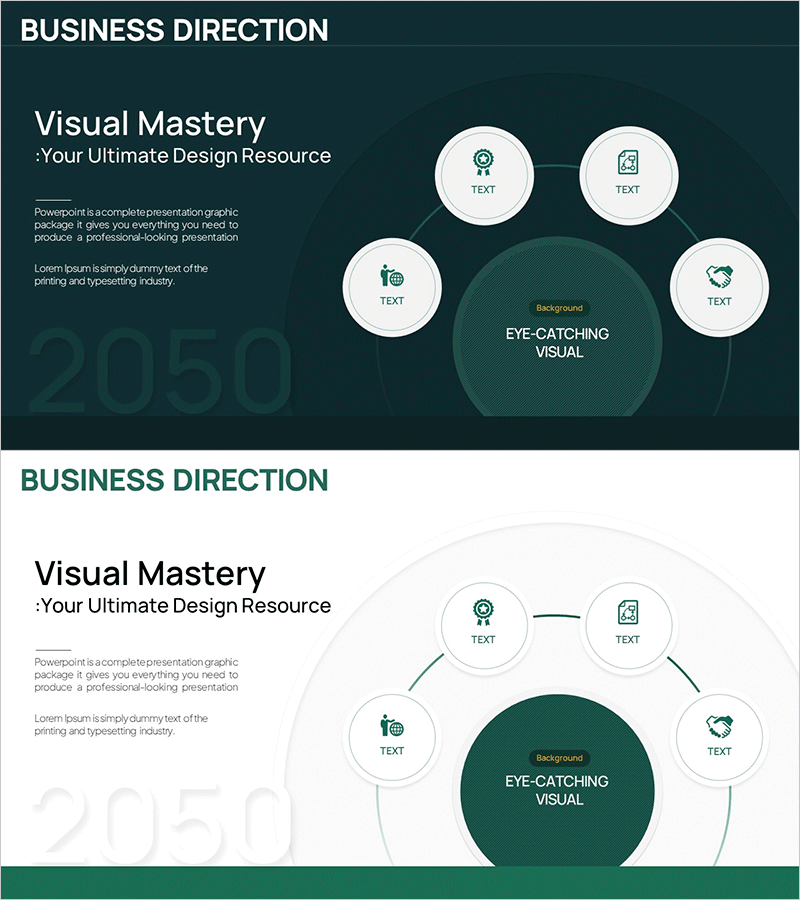
Business Direction Connection Diagram – Strategy and Implementation Focus
RM0800002_6
- Last Update 02/27/2025
- File Size 0.4MB
- # of Slides 2
- File Format PPTX
- Slide Ratio 16:9
- Color
Keywords
- #Content-Based Slides
- #Design-Based Slides
- #Business Vision and Strategy
- #Business Strategy
- #Diagram
- #Business Strategy
- #Business Direction
- #Cluster
- #Chain Diagram
- #16:9
- #radial diagram PowerPoint
- #connection diagram slide
- #business direction template
- #strategy structure diagram
- #5-node diagram PowerPoint slide
About the Product
A radial connection diagram PowerPoint slide that visually links business direction with implementation strategy. The design features a central dark green circular node with four satellite nodes radiating outward, clearly expressing the flow from core vision to detailed execution directions. The combination of icons and text input areas allows you to add descriptions for each strategic item intuitively, while the contrast between the dark background and white nodes creates a professional presentation. Two layout variations (dark background and light background) are included for immediate use across diverse presentation contexts.
Usage Points
-
Main Usage
This diagram places your organization's core business direction at the center and radiates it outward into four supporting strategies and implementation items. It enables you to communicate the complete picture at a glance during executive briefings, business strategy presentations, and organizational goal-sharing sessions where vision-to-execution alignment is critical.
-
How to Use
Enter your core vision or objective in the central dark green circle, then populate the four satellite nodes with specific strategies and implementation directions. You can easily customize the icons in each node to match your categories, expand text areas for detailed explanations, and adjust colors to align with your company's brand palette.
-
Recommended For
Ideal for executive teams, strategy departments, and business development teams presenting quarterly or annual strategies, new business direction initiatives, and post-reorganization goal redefinition. Particularly effective for executive briefings and company-wide town hall meetings where complex strategies must be visualized simply and clearly.
-
Slide Structure
Two-slide composition: The first slide features a dark-tone background (dark green and charcoal) with five white nodes (one central and four satellite) connected by lines. The second slide uses a light-tone background (white and light gray) with identical node placement. Each node combines an icon with a text input area, optimized for 16:9 widescreen format on modern projectors and displays.
Related Products
-
Pet Market Strategy Diagram – Roadmap for Growth and Success
#Business Vision and Strategy #Business Strategy #Diagram
-
Football Step Diagram – Business Vision and Strategy
#Business Vision and Strategy #Business Strategy #Diagram
-

E-Learning Learning Effect Diagram – Visualizing Business Strategies
#Business Vision and Strategy #Business Strategy #Diagram
-
Bulb Shape Configuration Diagram – Business Strategy Visualization
#Product/Service Introduction #Business Vision and Strategy #Diagram
