



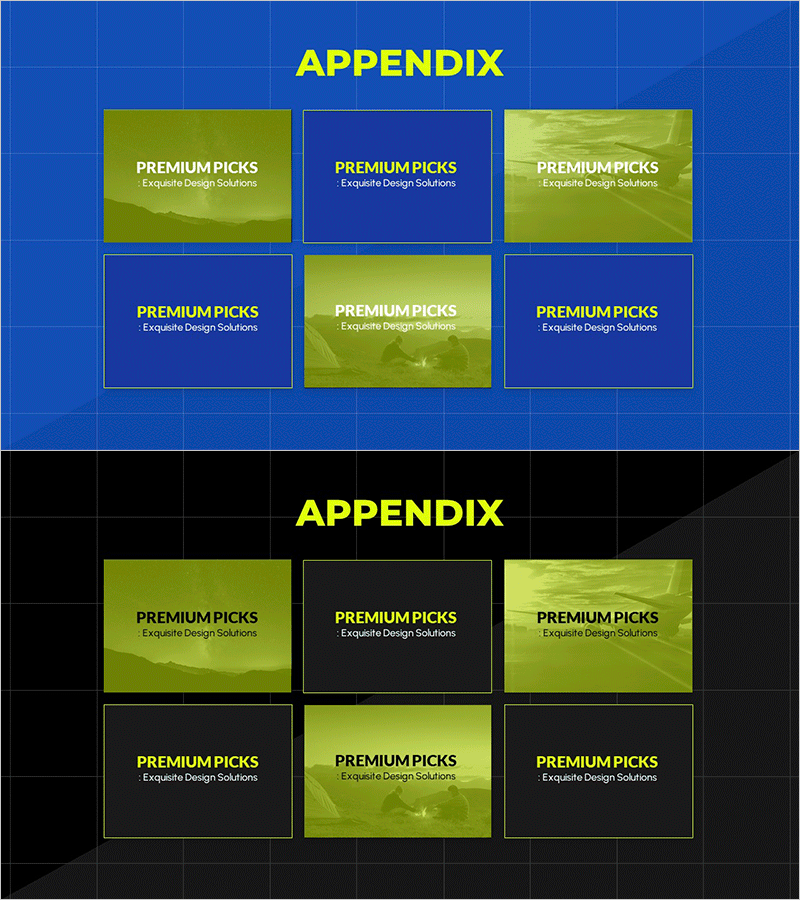
Introduction to the Appendix Program – Engaging Program Structure
RM0700003_24
- Last Update 02/26/2025
- File Size 5.7MB
- # of Slides 2
- File Format PPTX
- Slide Ratio 16:9
- Color
Keywords
- #Content-Based Slides
- #Design-Based Slides
- #Product/Service Introduction
- #Diagram
- #Program Introduction
- #Product and Service Overview
- #Cluster
- #Closed Cluster Diagram
- #16:9
- #cluster diagram PowerPoint
- #6-item box slide template
- #program structure presentation
- #grid layout diagram slide
- #appendix introduction PPT slide
About the Product
A 2-slide PowerPoint template featuring a cluster diagram for appendix program introduction. The design combines a blue grid background with lime and yellow accent boxes arranged in a 3×2 grid layout, visually organizing six program components. Each box represents an independent item, creating a hierarchical structure with a central emphasis area and supporting peripheral elements. This presentation slide set is ready to use for program introductions, educational materials, and business presentations, with fully editable text and image areas.
Usage Points
-
Main Usage
Designed to classify and visually present six components of a program, service, or product. The hierarchical structure with a central emphasis area and supporting peripheral items clearly communicates the relationship between primary and secondary elements.
-
How to Use
Enter program names, features, or descriptions in each box to create an appendix program introduction slide. Use at the beginning of presentations to show the complete program structure at a glance, or in educational materials to categorize learning modules. Customize colors and text to match your corporate brand identity.
-
Recommended For
Ideal for program planners, training managers, and marketing teams explaining service structures. Suitable for new employee orientation, department introductions, product lineup presentations, and project structure explanations across various business scenarios.
-
Slide Structure
Consists of 2 slides, each featuring a 3×2 grid layout with 6 boxes. The top-center box is highlighted in lime or yellow, while the remaining 5 boxes are arranged in blue or lime. A blue grid background unifies the entire slide design, with each box providing an independent text input area for customization.
Related Products
-
Social Network Program Overview – Key Messages Delivered with Stylish Design
#Product/Service Introduction #Diagram #Program Introduction
-

Aerospace Industry Introduction Diagram – Visualizing Cluster Information
#Product/Service Introduction #Diagram #Program Introduction
-
Collaborative Business Process – Visualized by Cluster
#Product/Service Introduction #Diagram #Program Introduction
-
Introducing the Picture Work Tool – Creative Approach
#Product/Service Introduction #Diagram #Program Introduction
