



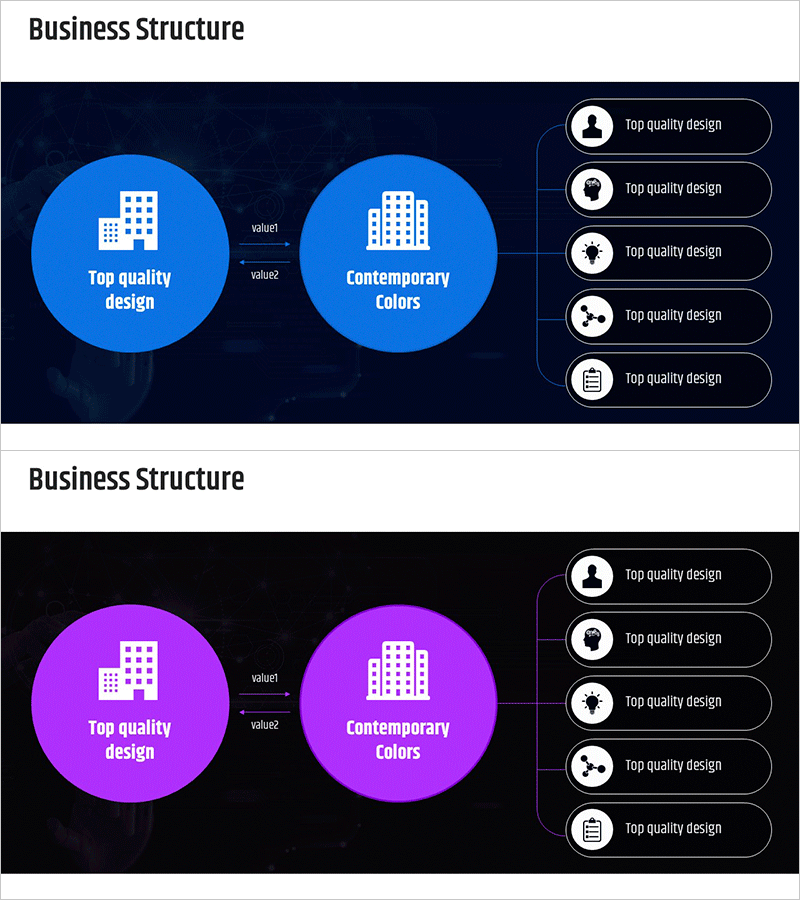
Business Structure Tree Diagram – Vision and Strategy
RM0600003_10
- Last Update 02/23/2025
- File Size 0.7MB
- # of Slides 2
- File Format PPTX
- Slide Ratio 16:9
- Color
Keywords
- #Content-Based Slides
- #Design-Based Slides
- #Business Introduction
- #Business Vision and Strategy
- #Diagram
- #Business Overview
- #Structure
- #Tree Diagram
- #16:9
- #tree diagram PowerPoint
- #organizational structure presentation
- #hierarchy diagram slide
- #business structure PPT
- #how to create tree diagram in PowerPoint
About the Product
A 2-slide tree diagram PowerPoint presentation for visualizing business structure and organizational hierarchy. Available in two color versions—blue and magenta—on dark backgrounds. Each slide features a central node with building icon connected to five detailed items on the right via directional arrows. The clear hierarchical layout effectively communicates core concepts such as vision, strategy, and values. Ready to use in business presentations, strategic planning documents, and organizational introductions. All text labels and icons are fully editable for customization.
Usage Points
-
Main Usage
Clearly illustrates organizational hierarchy, the relationship between business vision and strategy, and the flow from core concepts to detailed components. The tree structure extending rightward from a central node effectively conveys both causality and hierarchy, while the combination of icons and text enhances information comprehension.
-
How to Use
Use in the organizational structure section of business plans, company introduction presentations explaining vision-mission-strategy relationships, and strategic planning meeting materials. Input core concepts in the central node, add details in the five right-side items, and replace icons to create a customized organizational diagram.
-
Recommended For
Executives, business planners, organizational development specialists, consultants, and educators explaining organizational structure and strategic relationships. Effective for startup investor pitches, corporate strategy presentations, and departmental goal-sharing meetings.
-
Slide Structure
Two-slide set. Each slide features a dark navy background with a large circular central node (containing building icon and text input area) on the left-center, connected via arrows to five smaller circular nodes (with icons and text labels) on the right. First slide uses blue color palette; second slide applies magenta color scheme.
Related Products
-

Business Deck Layout – Company Overview and Business Outline
#Company Introduction #Business Introduction #Business Vision and Strategy
-
Business Revenue Structure Diagram – Visualizing Business Strategy
#Business Introduction #Business Vision and Strategy #Diagram
-
Colorful Company Organization Chart Diagram – Business Vision and Strategy
#Company Introduction #Business Introduction #Business Vision and Strategy
-
Business Area Circular 3D Diagram – Introducing Strategic Vision
#Business Introduction #Business Vision and Strategy #Diagram
