



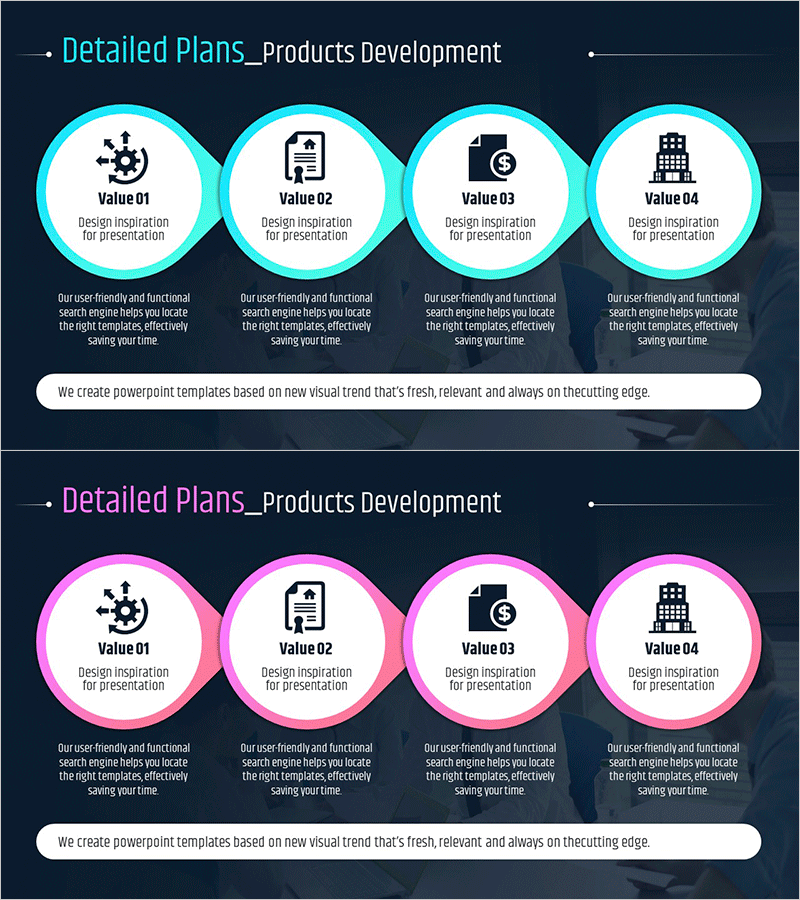
IT Business Detail Plan Diagram – Cluster and Connection
RM0500007_20
- Last Update 02/21/2025
- File Size 2.2MB
- # of Slides 2
- File Format PPTX
- Slide Ratio 16:9
- Color
Keywords
- #Content-Based Slides
- #Design-Based Slides
- #Product/Service Introduction
- #Operational Plan
- #Diagram
- #Development Plan
- #Production and Technology Development Strategy
- #Cluster
- #Chain Diagram
- #16:9
- #IT business plan diagram
- #cluster diagram PowerPoint
- #connection structure slide
- #business planning visualization
- #how to create cluster diagram in PowerPoint
About the Product
A cluster diagram PowerPoint slide that visualizes IT business detail plans with a central hub connected to four key value areas. Each node provides independent explanation space with icons and text labels, creating a clear information hierarchy. The bright cyan border contrasts against the dark background, making each element distinctly visible. This slide template effectively communicates multi-layered business structures including strategy, operations, and development plans in professional presentations.
Usage Points
-
Main Usage
Express multi-layered IT business detail plans using a centralized cluster structure that intuitively conveys relationships between core items and subordinate areas. Simultaneously visualize multiple planning domains including business strategy, operational planning, and development planning.
-
How to Use
Enter the core topic (e.g., IT Business Detail Plan) in the central circular node, then place detailed items such as design inspiration, operations plan, development plan, and organizational structure in the four surrounding nodes. Add detailed descriptions in the text area below each node to enhance presentation content.
-
Recommended For
Ideal for IT company executives, project managers, and business planning teams presenting complex business structures in business plans, strategy reports, and investment pitch decks. Particularly effective for multi-departmental collaboration scenarios and integrated planning presentations.
-
Slide Structure
Two-slide set featuring a central node connected to four surrounding nodes. First slide uses cyan borders, second slide uses pink borders. Each slide contains 5 circular elements (1 center + 4 surrounding), connecting lines, icons, and text input areas for each node.
Related Products
-
Construction Safety Management System Slide – Visual Risk Management
#Operational Plan #Diagram #Production and Technology Development Strategy
-
Connection Diagrams for Review Plans – Effective Business Management
#Product/Service Introduction #Business Management #Diagram
-
Question Mark Connection Diagram – Facilitating Business Strategy
#Business Strategy #Operational Plan #Diagram
-
Mobile Mockup and 4 Steps – Stylish Design
#Product/Service Introduction #Operational Plan #Other
