



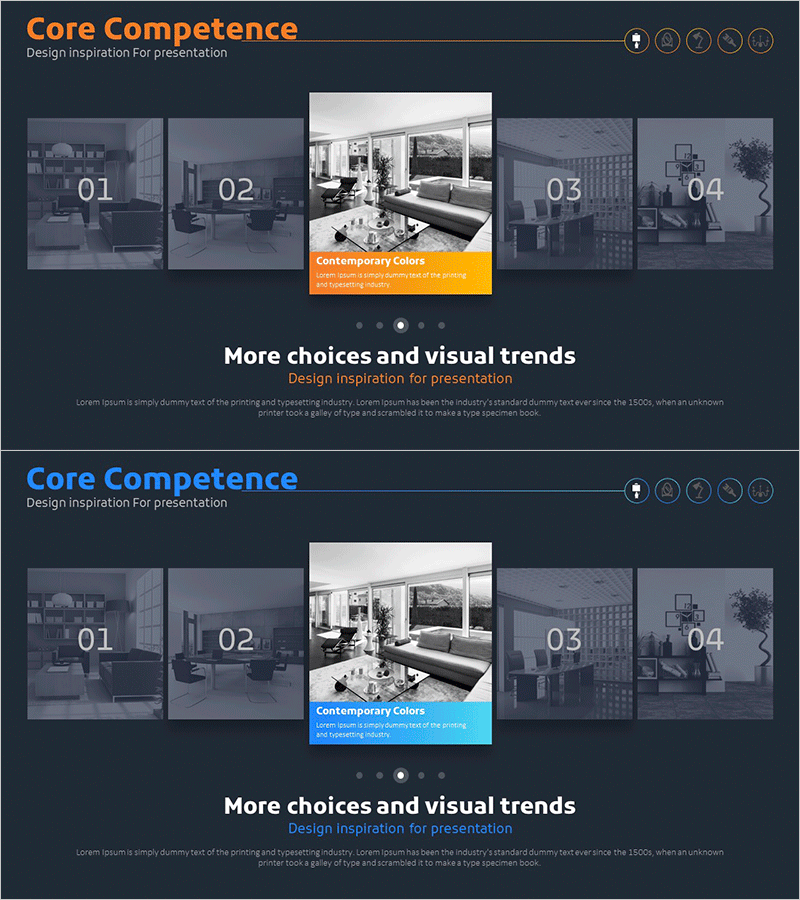
Introduction to Interior Types – Design and Vision
RM0300018_9
- Last Update 02/12/2025
- File Size 1.8MB
- # of Slides 2
- File Format PPTX
- Slide Ratio 16:9
- Color
Keywords
- #Content-Based Slides
- #Design-Based Slides
- #Product/Service Introduction
- #Business Vision and Strategy
- #Diagram
- #Program Introduction
- #Core Competencies
- #Cluster
- #Closed Cluster Diagram
- #16:9
- #closed-form cluster diagram PowerPoint
- #interior design slide template
- #4-zone diagram presentation
- #how to create cluster diagram in PowerPoint
- #interior style showcase slide
About the Product
A closed-form cluster diagram PowerPoint slide designed to introduce interior design styles and concepts. Four interior spaces (Contemporary Colors, zones 01–04) connect to a central focal point, each paired with actual interior photography. The dark gray background with orange and blue accent colors creates a professional presentation aesthetic. This 2-slide, 16:9 PPTX template is ready for immediate use in design firm portfolios, architectural presentations, interior company product showcases, and corporate design vision pitches.
Usage Points
-
Main Usage
Visually classify and present diverse interior design styles and characteristics using a cluster diagram structure. The central concept (Contemporary Colors) radiates to four interior spaces, clearly conveying each style's unique features alongside supporting imagery.
-
How to Use
Deploy in architecture and interior design firm portfolio presentations, design agency style proposal pitches, and real estate or construction company space introductions. Customize text and images in each zone to match your specific interior projects and client presentations.
-
Recommended For
Architects, interior designers, construction company executives, real estate agents, design agency professionals, and space planning specialists presenting interior styles to clients. Ideal for portfolio reviews, proposal presentations, and design concept pitches.
-
Slide Structure
Two-slide layout with four interior photography zones arranged around a central highlight area (orange box on slide 1, blue on slide 2). Each zone functions as an independent editable region for title, description, and image insertion, maintaining consistent visual hierarchy across both slides.
Related Products
-
Highlighting the Benefits of Bodyweight Exercises with Diagrams
#Product/Service Introduction #Business Vision and Strategy #Diagram
-
Introduction to Key Elements Slide – Harmony of Teal and Pink
#Product/Service Introduction #Business Vision and Strategy #Diagram
-
Hexagonal Diagram for Core Competencies – Visualizing Vision and Strategy
#Product/Service Introduction #Business Vision and Strategy #Diagram
-
Introduction to Medicinal Herbs – Business Strategy and Innovation
#Product/Service Introduction #Business Vision and Strategy #Diagram
