



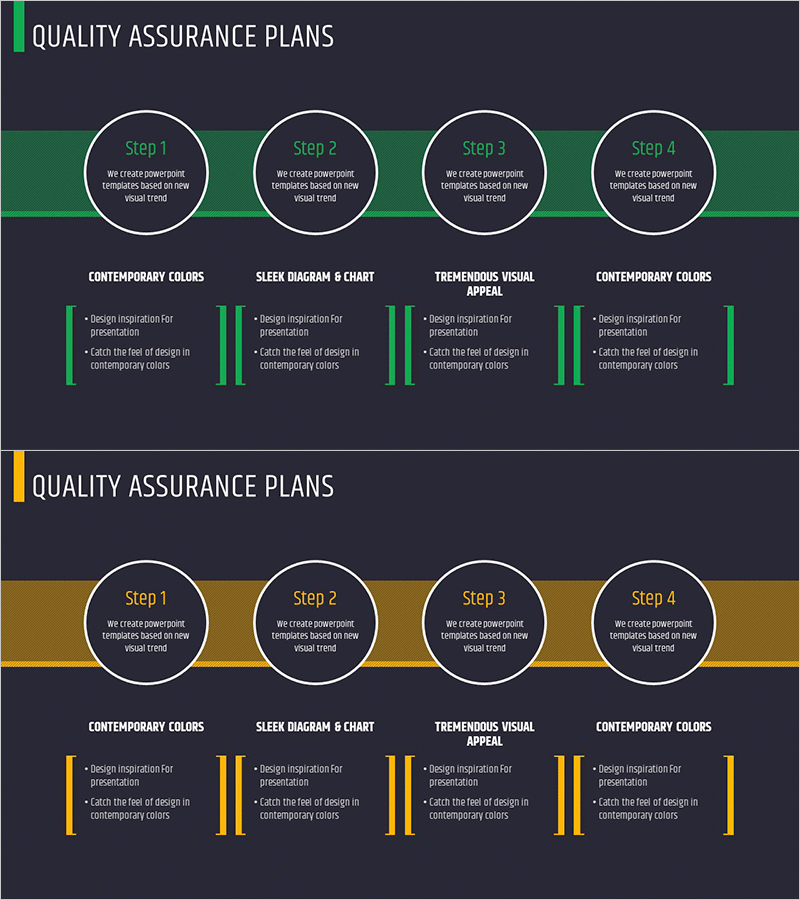
Quality Assurance Plan 4 STEP Diagram
RM0200011_26
- Last Update 02/04/2025
- File Size 1MB
- # of Slides 2
- File Format PPTX
- Slide Ratio 16:9
- Color
Keywords
- #Content-Based Slides
- #Design-Based Slides
- #Business Strategy
- #Business Management
- #Diagram
- #Step-by-Step Schedule Plan
- #Quality Assurance Plan
- #Cluster
- #Closed Cluster Diagram
- #16:9
- #4-step circular diagram PowerPoint
- #quality assurance plan slide template
- #process flow diagram
- #cycle diagram PowerPoint slide
- #business process presentation template
About the Product
A PowerPoint slide featuring a 4-step circular diagram designed to visualize quality assurance planning and execution processes. Four circular nodes are arranged in a cycle along a central connecting line, with editable text fields for each stage. The design uses a dark background with green or gold accent colors in a dual-tone palette, allowing customization to match your presentation theme. Below the diagram, four sections with text boxes and accent bars provide space for detailed explanations of each step, making it ideal for quality management processes, business strategy presentations, operational planning, and project management decks. 16:9 widescreen format, PPTX file, 2-slide set.
Usage Points
-
Main Usage
Clearly communicate the four-stage quality assurance process using a circular structure that emphasizes stage interconnection and cyclical repetition. Organize objectives, activities, and outcomes for each stage visually, with supplementary text sections below for detailed explanations—ideal for executive and team presentations.
-
How to Use
Enter stage names (Step 1–4) and key activities within each circular node. Use the four sections below to add stage-specific descriptions, goals, responsibilities, and timelines. Select either green or gold to align with your corporate brand colors. Nodes can be adjusted to 3 or 5 stages if needed.
-
Recommended For
Quality assurance and quality management professionals, business planning and strategy teams, operations managers, project managers, consulting firms, manufacturing and service industry executives, internal training sessions, seminars, and client proposal presentations.
-
Slide Structure
2-slide set. Slide 1: Dark background with 4 circular nodes arranged in a cycle along a central line, each node containing editable Step 1–4 text fields, and 4 sections below (Contemporary Colors, Sleek Diagram & Chart, Tremendous Visual Appeal, Contemporary Colors) with text boxes and accent bars. Slide 2: Color variation (green to gold or vice versa) with identical layout. 16:9 widescreen format.
Related Products
-
Customer Value and Offered Benefits – Step-by-Step Guide
#Business Strategy #Business Management #Diagram
-
Step-by-step Quality Assurance Plan Diagram
#Business Strategy #Business Management #Diagram
-
Stairline Shelf Diagram – Business Strategy Visualization
#Business Strategy #Business Management #Diagram
-
Foxes and Four Items – Effective Business Strategy
#Business Strategy #Marketing Plan and Strategy #Diagram
