



Business Program Proposal Items – Cluster Diagram Design
RM0200010_4
- Last Update 02/04/2025
- File Size 6.5MB
- # of Slides 2
- File Format PPTX
- Slide Ratio 16:9
- Color
Keywords
- #Content-Based Slides
- #Design-Based Slides
- #Product/Service Introduction
- #Business Introduction
- #Diagram
- #Program Introduction
- #Business Overview
- #Cluster
- #Closed Cluster Diagram
- #16:9
- #cluster diagram PowerPoint
- #business proposal slide
- #3-item structure presentation
- #program introduction diagram
- #business proposal PPT slide
About the Product
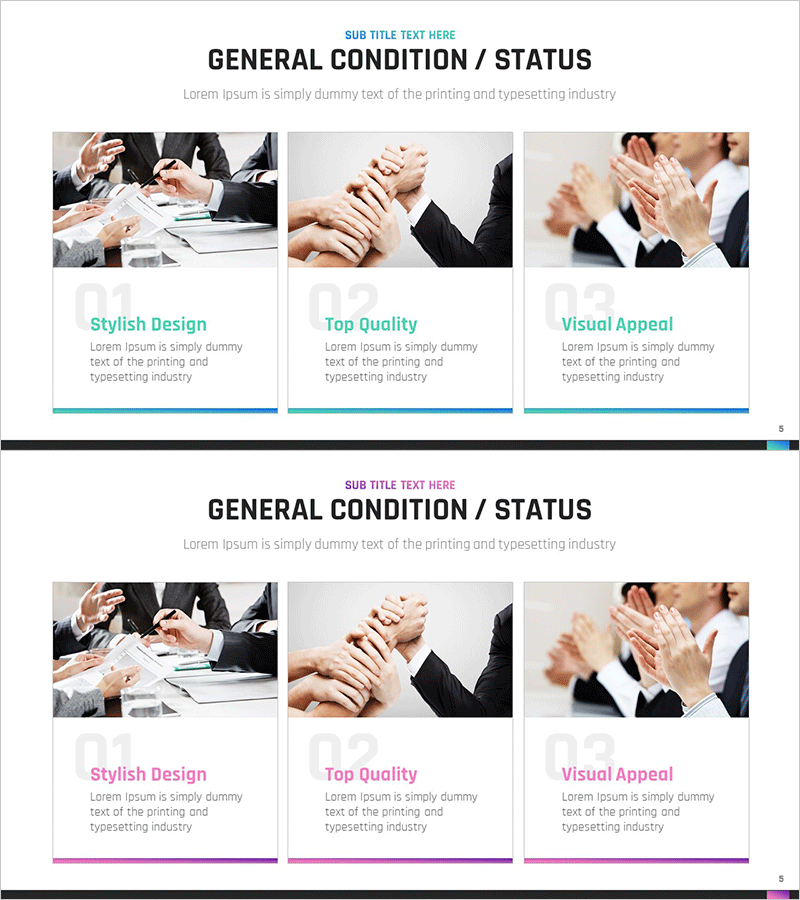
A cluster diagram PowerPoint slide optimized for business program proposal presentations. The closed-form structure radiates from a central concept to three key items, clearly expressing the main components of your program. The turquoise accent line and gray background create effective information hierarchy, while image areas and text spaces are balanced across each item. This PowerPoint template is ready to use immediately when visualizing program composition in presentation decks, proposal documents, and business introduction slides.
Usage Points
-
Main Usage
Visually represents the core concept of a business program and its three key components. The closed-form cluster structure radiates from a central point to surrounding items, clearly communicating program composition in proposal materials.
-
How to Use
Insert into the program composition section of presentation decks, proposals, or business introduction slides. Enter the core program name in the center text area and detailed components in the three item areas, then add images. Colors and text are fully customizable to match your corporate brand.
-
Recommended For
Planners, marketing managers, and sales professionals presenting business program proposals use this to explain program structure. Effective for investor presentations, client proposal pitches, and internal reporting materials when communicating program components systematically.
-
Slide Structure
Two-slide set featuring a 3-item cluster diagram with turquoise accent line on the first slide and purple accent line version on the second. Each slide uses a closed-form structure with one central node and three surrounding nodes, with image areas and text input spaces allocated for each item.
Related Products
-
Service Key Function Closure Diagram – Overview and Introduction
#Product/Service Introduction #Business Introduction #Diagram
-
Introduction to the Internet of Things Program – Innovation and Growth
#Product/Service Introduction #Business Introduction #Diagram
-
Science Experiment Description Closed Diagram
#Product/Service Introduction #Business Introduction #Diagram
-

Introducing the Business Program – Emphasizing Features and Values
#Product/Service Introduction #Business Introduction #Diagram
