



Proposal General Provisions Introduction Slide – Business Overview and Strategy
RM0200008_4
- Last Update 02/03/2025
- File Size 2.2MB
- # of Slides 2
- File Format PPTX
- Slide Ratio 16:9
- Color
Keywords
- #Content-Based Slides
- #Design-Based Slides
- #Company Introduction
- #Business Introduction
- #Business Vision and Strategy
- #Diagram
- #Company Overview
- #Business Overview
- #Cluster
- #Closed Cluster Diagram
- #16:9
- #closed diagram PowerPoint
- #3-item icon slide
- #proposal introduction slide
- #business overview PowerPoint template
- #diagram slide design
About the Product
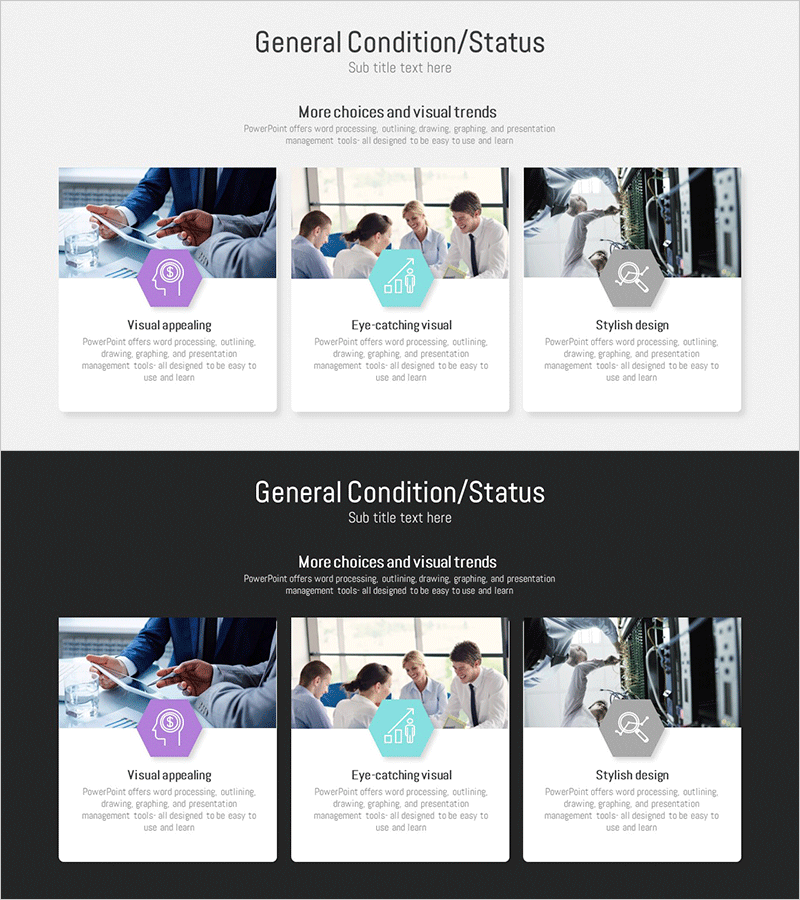
A PowerPoint slide designed to introduce general provisions, key content, and business overview of proposals and planning documents using a 3-item closed diagram structure. Each section features a hexagonal icon paired with a text area, enabling both visual emphasis and information organization. The three hexagon icons in purple, cyan, and gray represent distinct categories, with descriptive text space below each element. This layout is ideal for presenting core items clearly during business presentations, strategy sessions, and proposal introductions. The 2-slide set includes both light and dark background versions, adapting to various presentation environments and display settings.
Usage Points
-
Main Usage
Visually distinguish and communicate three core items—general provisions, key content, and business overview—in proposal and planning presentations. The independent hexagon icons and text areas create clear information hierarchy for audience comprehension.
-
How to Use
Enter proposal details, general provisions, or business strategy text in the text area below each hexagon icon. Use the light background version for daytime presentations and print materials; use the dark background version for evening presentations and large-screen displays. Colors and icons are fully editable.
-
Recommended For
Proposal and planning document creators, sales presentation managers, business briefing facilitators, and strategy session leaders. Particularly effective when introducing three major items with balanced emphasis.
-
Slide Structure
2-slide set. Each slide contains a title area at the top and three closed-form hexagon icons (purple, cyan, gray) in the center. Text input areas are positioned below each icon. The first slide features a light background; the second slide features a dark background for versatile use.
Related Products
-
Joint Business Overview – Business Strategy and Organization Chart
#Company Introduction #Business Introduction #Business Vision and Strategy
-
Overview of Key Business Services – Dynamism and Innovation
#Company Introduction #Business Introduction #Business Vision and Strategy
-

Emphasized Quote with Icon Highlights
#Company Introduction #Business Introduction #Business Vision and Strategy
-
Securities Business Overview – Presentation for Successful Strategy
#Company Introduction #Business Introduction #Business Vision and Strategy
