



Business Objectives Closed Diagram – Cluster & Strategy
RM0100008_16
- Last Update 01/27/2025
- File Size 0.4MB
- # of Slides 2
- File Format PPTX
- Slide Ratio 16:9
- Color
Keywords
- #Content-Based Slides
- #Design-Based Slides
- #Product/Service Introduction
- #Business Vision and Strategy
- #Diagram
- #Features
- #Business Goals
- #Cluster
- #Closed Cluster Diagram
- #16:9
- #closed cluster diagram PowerPoint
- #4-node diagram template
- #business objectives diagram slide
- #strategy cluster PPT
- #how to create cluster diagram in PowerPoint
About the Product
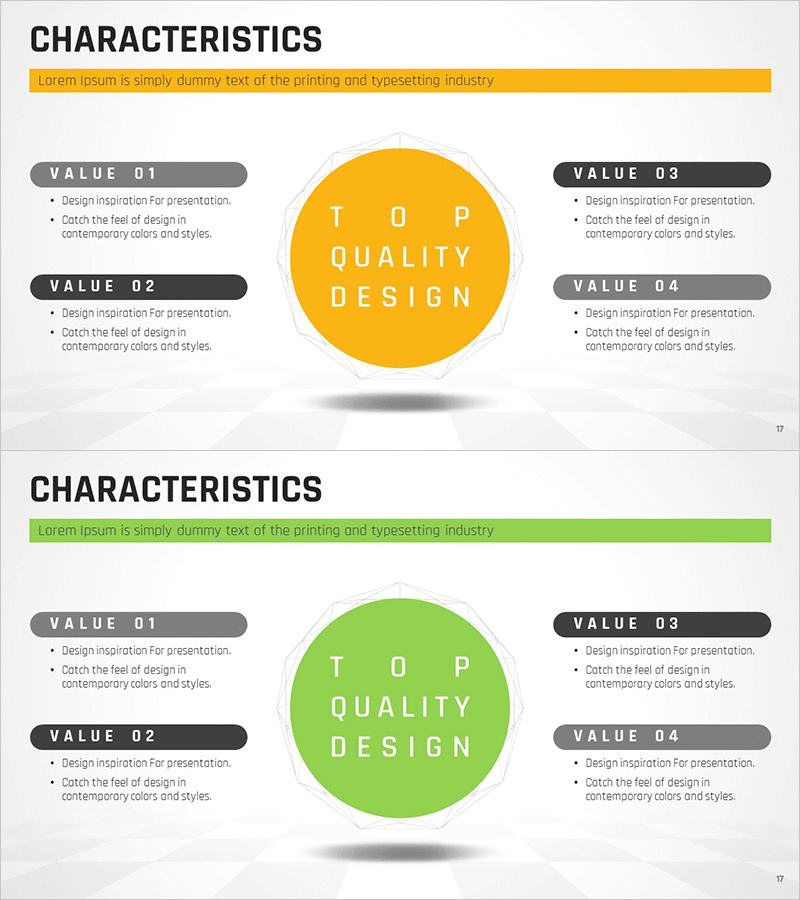
A closed-cluster structure PowerPoint slide with a central circular node connected to four surrounding elements. Available in two color versions: yellow and green. Each version features four gray boxes labeled VALUE 01 through VALUE 04, with a central circular text area for your core concept. Ideal for presenting business objectives, core values, and strategic pillars in corporate presentations, business plans, and strategy documents. Delivered in 16:9 widescreen format, fully editable PPTX file.
Usage Points
-
Main Usage
Visualize your organization's core objective or strategic concept in the central circular node, with four supporting pillars, values, or execution strategies positioned around it. The closed-cluster structure creates a complete, integrated framework that emphasizes interconnected relationships.
-
How to Use
Enter your core concept (e.g., TOP QUALITY DESIGN) in the central circle. Fill the four surrounding boxes with supporting details or strategic elements. Customize text and background colors to match your corporate branding. Choose between the yellow or green version based on your presentation theme.
-
Recommended For
Executive presentations, business plans, strategic planning pitches, corporate value propositions, marketing strategy proposals, organizational restructuring briefs, new business initiative presentations. Especially effective when emphasizing four balanced, equally important elements.
-
Slide Structure
Two-slide set. Each slide features a symmetrical layout with a central circular node (editable text area) and four gray boxes positioned at cardinal points (top, bottom, left, right), each labeled VALUE 01–04 with editable text fields. Yellow version uses golden-yellow center circle; green version uses vibrant green. All text boxes are fully customizable.
Related Products
-
Constellation Theme Business Goals Diagram
#Product/Service Introduction #Business Vision and Strategy #Diagram
-
Smart Network Characteristics Diagram – Business Goals and Vision
#Product/Service Introduction #Business Vision and Strategy #Diagram
-
Educational Goals for Boosting Cognitive Thinking
#Business Vision and Strategy #Business Strategy #Diagram
-
Data Business Overview and Features – Innovative Business Solutions
#Product/Service Introduction #Business Introduction #Diagram
