



Competitor Analysis Comparison Table – Assessing Market and Competitor Impact
RM0100005_12
- Last Update 01/25/2025
- File Size 0.3MB
- # of Slides 2
- File Format PPTX
- Slide Ratio 16:9
- Color
Keywords
- #Content-Based Slides
- #Design-Based Slides
- #Market and Competitor Analysis
- #Diagram
- #Competitor Analysis
- #Market Analysis
- #Table
- #16:9
- #competitor analysis PPT slide
- #competitive comparison PowerPoint
- #market analysis table slide
- #competitor evaluation matrix PPT
- #how to create competitor analysis in PowerPoint
About the Product
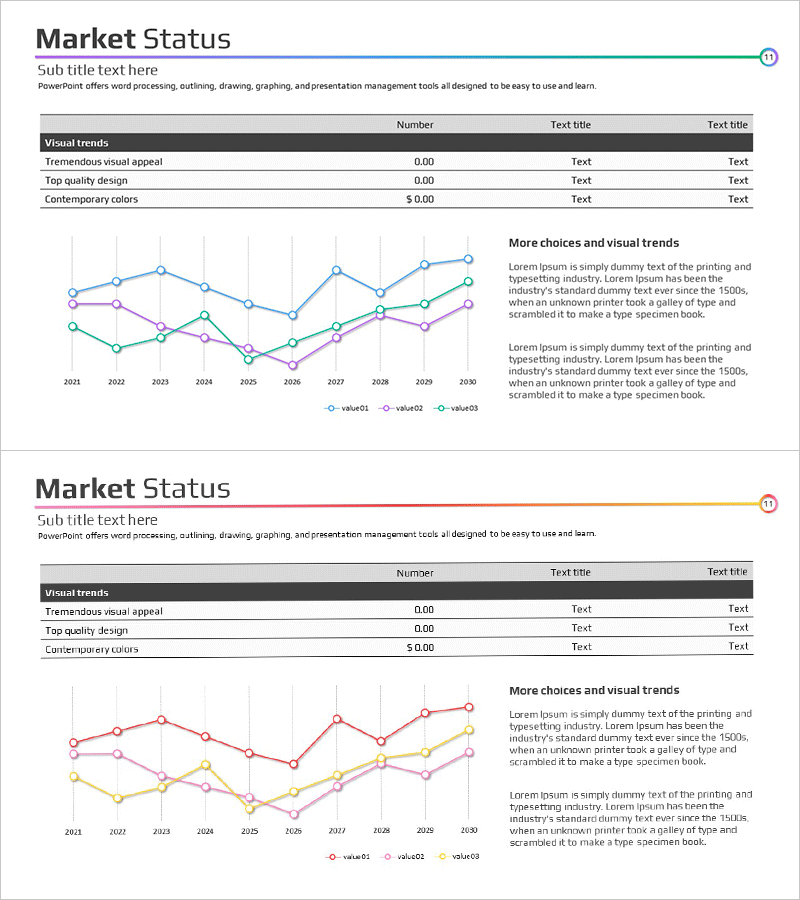
A comprehensive competitor analysis PowerPoint slide that visualizes market status and competitive positioning in a single view. The 2-slide deck features a data table with three key metrics alongside multi-line trend charts on the first slide, and a 4-column evaluation matrix comparing competitor strengths and weaknesses on the second. Designed for immediate use in the market analysis section of business presentations, investor pitches, and strategic planning decks. Available in 16:9 widescreen PPTX format, fully editable across all PowerPoint versions. The layout combines quantitative data visualization with qualitative assessment for comprehensive competitive intelligence.
Usage Points
-
Main Usage
Presents market data and competitor evaluation metrics simultaneously to support strategic decision-making. Line charts display trends over time while the matrix table enables objective comparison of competitor strengths and weaknesses across key dimensions.
-
How to Use
Replace the sample data in the first slide's chart and numerical table with actual market figures. Input competitor names and evaluation criteria into the second slide's matrix. Use color highlighting to emphasize competitive advantages and create visual impact during presentations.
-
Recommended For
Ideal for market analysis sections in business plans, investor pitch decks, and strategic reports. Effective for executive briefings, investor presentations, and new business initiative launches. Commonly used by marketing teams, strategy departments, and business planning units.
-
Slide Structure
2-slide layout. Slide 1: Title + 3×3 data table + 3-line trend chart + right-side text area. Slide 2: Title + 4×4 evaluation matrix + right-side description text area. All cells and text boxes are fully editable for customization.
Related Products
-

Depression Self-Assessment Checklist & Mental Health Evaluation Slide
#Market and Competitor Analysis #Diagram #Competitor Analysis
-
Table of Contents List of Major Competitors – Market and Competitive Analysis
#Market and Competitor Analysis #Diagram #Competitor Analysis
-
Competitor and Market Analysis Blue Navy PowerPoint Template
#Market and Competitor Analysis #Diagram #Graph
-
Competitor Analysis Table – Optimized for Market and Competitor Analysis
#Market and Competitor Analysis #Diagram #Competitor Analysis
