



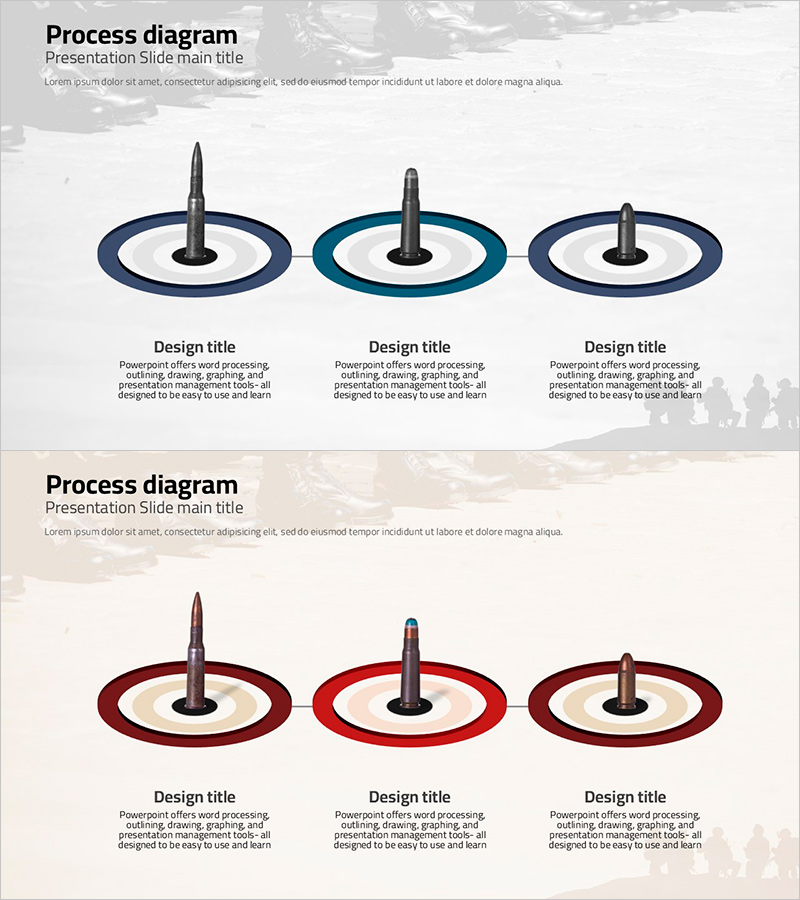
Bullet Types Illustrated in a Diagram Slide – Product Introduction and Plan
RJ0600056_27
- Last Update 08/28/2025
- File Size 2.4MB
- # of Slides 2
- File Format PPTX
- Slide Ratio 16:9
- Color
Keywords
- #Content-Based Slides
- #Design-Based Slides
- #Product/Service Introduction
- #Business Management
- #Diagram
- #Product/Service Introduction
- #Implementation Plan
- #Cluster
- #Chain Diagram
- #16:9
- #connected diagram PowerPoint
- #3-step process slide
- #product introduction presentation
- #implementation plan diagram
- #business strategy PPT slide
About the Product
A process diagram PowerPoint slide featuring three circular nodes connected with a central focal element, expressing sequential workflow through navy, teal, and dark-tone gradient ring structures. Each node includes a text area below for clearly distinguishing product features, implementation strategies, and business plans. The 2-slide set provides color variations (navy-teal tone and red-brown tone) for flexible adaptation to presentation themes. Immediately applicable to product introduction slides, business implementation plan sections, and phased strategy documentation in professional presentations.
Usage Points
-
Main Usage
Visually distinguish and communicate three core features, functions, or phases of a product or service to your audience. Ideal for business implementation roadmaps, product development timelines, three-phase marketing execution plans, and presentations requiring sequential workflow representation.
-
How to Use
Input phase names, product features, or implementation timelines in the text areas below each circular node. Replace the central focal element with key messages or brand names as needed. Select color tones matching your presentation theme (navy for technology/products, red for growth/activities) and apply accordingly.
-
Recommended For
Recommended for product planning and marketing teams presenting product introductions, executive-level business plan reports, investor pitches on business implementation strategies, and internal team project roadmap sharing sessions.
-
Slide Structure
Three circular nodes arranged horizontally, each with a multi-layer ring structure (outer ring, central icon, inner circle). Three text input areas positioned below the nodes. The 2-slide set maintains identical structure with color tone variations (navy-teal vs. red-brown) for flexible theme adaptation.
Related Products
-
World Travel Planning Diagram – Effective Business Execution Strategy
#Business Strategy #Business Management #Diagram
-
Introduction to Healthcare Services – Innovative Strategies
#Product/Service Introduction #Business Strategy #Diagram
-
Mountain Climbing Aftercare and Maintenance Plan
#Business Strategy #Business Management #Diagram
-
Product Introduction Diagram – Harmony of Blue and Yellow
#Product/Service Introduction #Diagram #Product/Service Introduction
