



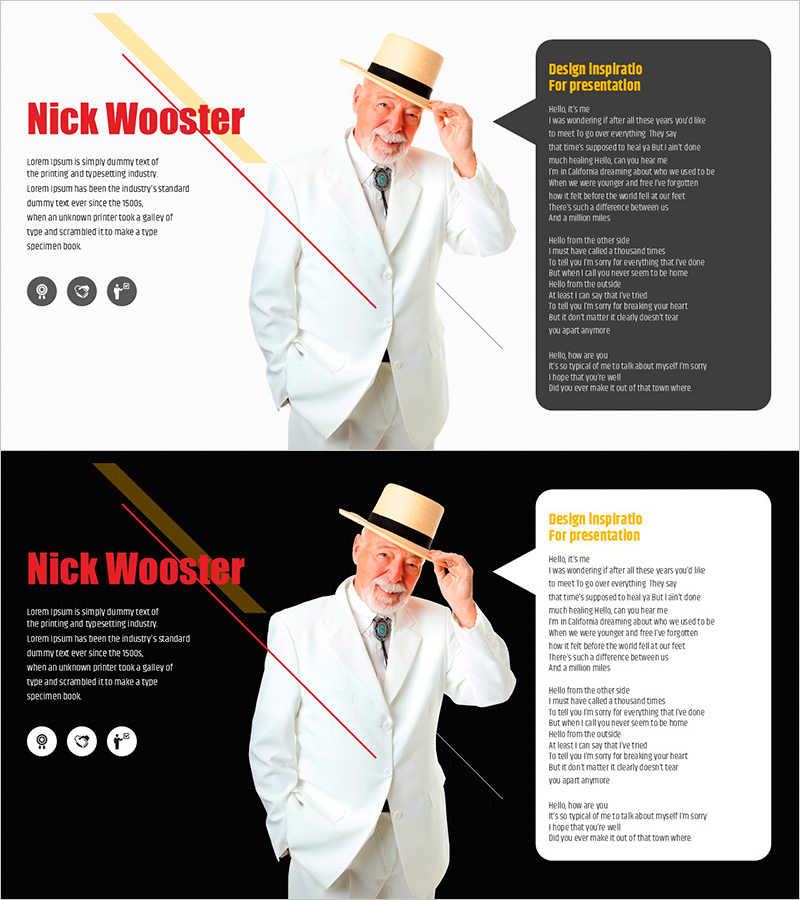
Person Introduction and Speaking Box – Customer Success Stories
RJ0800037_20
- Last Update 08/10/2025
- File Size 0.7MB
- # of Slides 2
- File Format PPTX
- Slide Ratio 16:9
- Color
Keywords
- #Content-Based Slides
- #Design-Based Slides
- #Company Introduction
- #Customer Success Stories
- #Text Box
- #Introduction of Executives
- #Customer Testimonials and Feedback
- #Speech Bubble
- #16:9
- #person introduction PowerPoint slide
- #speaking box presentation template
- #customer success stories slide
- #how to present customer testimonials in PowerPoint
- #professional person introduction slide
About the Product
A professional PowerPoint slide set for presenting customer success stories and person introductions. The layout features a left text area, right person image space, and a speaking box information section, with light and dark gray backgrounds creating strong visual contrast for readability. The 2-slide set includes both light-tone and dark-tone versions, allowing you to match your presentation style and brand identity. Immediately applicable to company introductions, customer testimonials, and success case presentations.
Usage Points
-
Main Usage
This slide effectively communicates customer success stories and person introductions with credibility and professionalism. The left text area accommodates background information and achievements, while the right speaking box highlights key messages or customer testimonials, creating clear information hierarchy. Perfect for company introductions, customer success case presentations, and partner introductions to emphasize trust and expertise.
-
How to Use
Enter the person's title, experience, and achievements in the left text area, place the person's photo on the right, and write customer testimonials or key messages in the speaking box. Choose the light-tone version for a bright and positive atmosphere, or the dark-tone version for a professional and trustworthy impression. Select the appropriate version based on your presentation theme and audience.
-
Recommended For
Ideal for introducing company executives and key personnel, presenting customer success cases, introducing partner companies, creating team member profile pages, and showcasing customer reviews and testimonials. Particularly effective for B2B presentations, investor meetings, and presentations focused on building customer trust and credibility.
-
Slide Structure
The 2-slide set provides both light-tone (light background with dark gray box) and dark-tone (black background with white box) layouts. Each slide contains three functional areas: left text input section (approximately 200 characters), right person image space, and upper-right speaking box (approximately 150 characters).
Related Products
-
Participant Feedback Review Slide – Capturing Customer Voices
#Market and Competitor Analysis #Customer Success Stories #Diagram
-

Square Frame Template for Presenting Customer Success Stories – Speaking Effect
#Customer Success Stories #Text Box #Other
-
Slide Template Effectively Presenting Trial Conversation Content
#Market and Competitor Analysis #Customer Success Stories #Text Box
-
Slide Template for App User Evaluation – Customer Success Stories
#Customer Success Stories #Text Box #Other
