



Experiment Checklist Slide – Supporting Effective Research
RJ0700019_28
- Last Update 07/27/2025
- File Size 1.2MB
- # of Slides 2
- File Format PPTX
- Slide Ratio 16:9
- Color
Keywords
About the Product
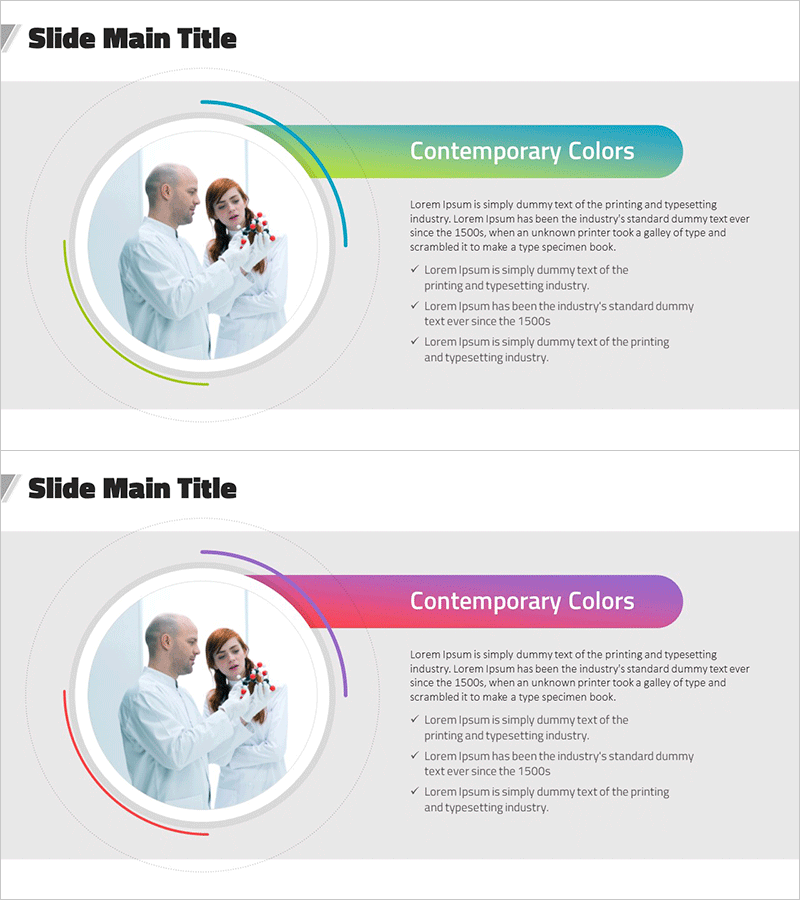
A professional PowerPoint slide set for presenting product and service features in a structured format. This 2-slide deck features a circular image area on the left and a text box on the right, with the first slide using a teal-to-green gradient curve design and the second featuring a purple-to-pink gradient curve design for visual variety. Each slide includes space for a product image and three checklist items to clearly outline key features and benefits. Fully editable PPTX file ready for immediate use in presentations.
Usage Points
-
Main Usage
Visually highlight product or service features and benefits with a professional layout. The circular image area showcases product photography while the checklist format on the right clearly communicates three key selling points to enhance audience understanding.
-
How to Use
Use in the core product introduction section of your presentation. Insert product photography in the circular image area and add three main product features in the checklist text box. The two-slide color variation provides visual interest and maintains audience engagement throughout the presentation.
-
Recommended For
Product marketing managers, sales professionals, new product launch presenters, and service introduction facilitators. Ideal for B2B and B2C product pitches, technology product explanations, service package overviews, and corporate presentations.
-
Slide Structure
Two-slide layout with consistent structure. Each slide contains a left-aligned circular image area for product photography and a right-aligned text box with one heading and three checklist items. First slide uses teal-green gradient curve; second slide uses purple-pink gradient curve for visual distinction.
Related Products
-

Travel App Wide Mockup – Intuitive Service Introduction
#Product/Service Introduction #Other #Product/Service Introduction
-
Preparing for Overseas Travel Ticket Reservation – Excitement of Travel
#Product/Service Introduction #Diagram #Other
-

Slide Introducing Hobby Gardening – Cluster Design
#Product/Service Introduction #Diagram #Product/Service Introduction
-
Summer Illustration Mobile Mockup – A Vibrant Design
#Product/Service Introduction #Other #Product/Service Introduction
