



Fruit Vegetable Connection Diagram – Freshness and Effective Communication
RJ0600103_26
- Last Update 07/19/2025
- File Size 1.3MB
- # of Slides 2
- File Format PPTX
- Slide Ratio 16:9
- Color
Keywords
- #Content-Based Slides
- #Design-Based Slides
- #Product/Service Introduction
- #Diagram
- #Product/Service Introduction
- #Benefits and Advantages
- #Cluster
- #Chain Diagram
- #16:9
- #connection diagram PowerPoint
- #cluster diagram slide
- #4-node relationship diagram
- #circular diagram PPT
- #how to create connection diagram in PowerPoint
About the Product
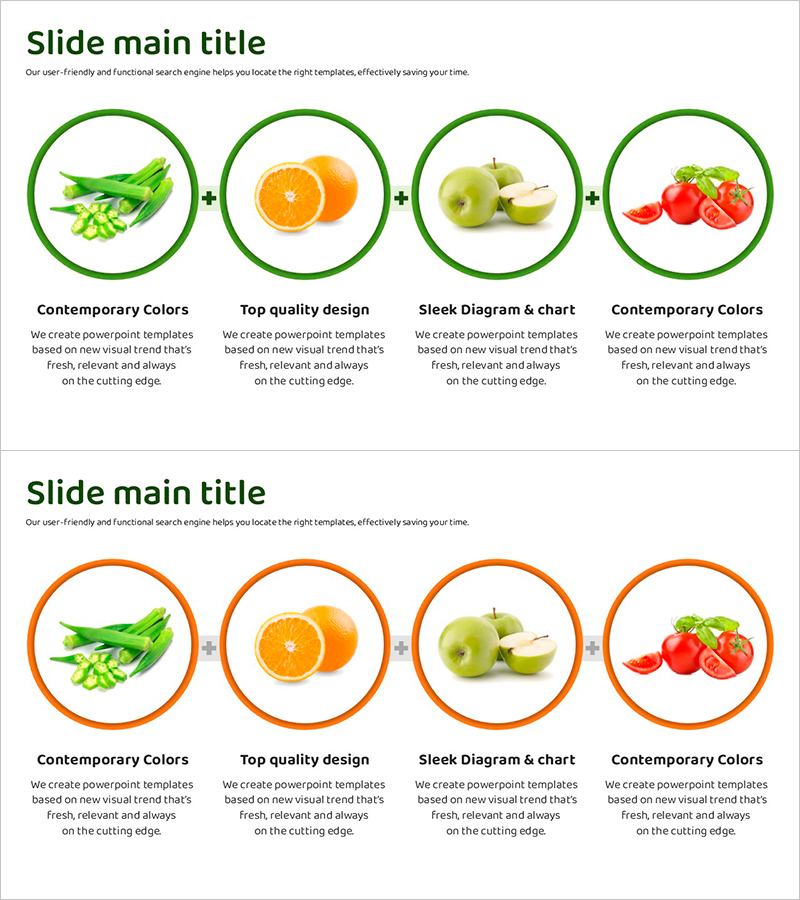
A 4-node connection diagram PowerPoint slide that visualizes relationships between fruits and vegetables. Each item is highlighted with green and orange circular borders, while plus symbols in the center clearly express the combining relationship between elements. The 2-slide set provides two color versions (green and orange) with identical layouts, allowing you to select based on your presentation context. This PPT slide effectively communicates various relationship diagrams such as product combinations, service integration, and category connections in presentations.
Usage Points
-
Main Usage
Optimized for intuitively expressing connection relationships between products, services, and categories. The circular nodes and plus symbols clearly visualize the interconnected structure of four items, enhancing audience comprehension. Effectively conveys integration, combination, and linkage concepts in business presentations, marketing plans, and product introduction materials.
-
How to Use
Enter product names, service names, or category names in each circular node and add descriptions in the text area below. Use the green version for presentations emphasizing freshness, growth, and nature; use the orange version for presentations highlighting energy, activity, and innovation. Slide background color, fonts, and node sizes are fully editable to match your corporate brand guidelines.
-
Recommended For
Recommended for marketing teams presenting product portfolios, sales teams proposing integrated solutions, planning teams developing business strategies, and training teams explaining concepts. Particularly useful in food and beverage, health food, distribution, and retail industries when explaining product combinations and category connections.
-
Slide Structure
2-slide set. Each slide features 4 circular nodes (approximately 80px diameter) arranged horizontally and connected by plus symbols (+) in the center. Image or text can be inserted inside nodes, with description text boxes (approximately 200 characters) positioned below each item. First slide has green borders; second slide has orange borders.
Related Products
-

Order of Halloween Events Slide - Stylish Diagram
#Product/Service Introduction #Business Vision and Strategy #Diagram
-
Introduction to Healthcare Services – Innovative Strategies
#Product/Service Introduction #Business Strategy #Diagram
-
Aurora Camping Business Goal Diagram – Clear Vision Communication
#Company Introduction #Product/Service Introduction #Diagram
-
Eco-Friendly Business Future Development Direction Icon – Blue Green
#Product/Service Introduction #Diagram #Product/Service Introduction