



How to Use a Coffee Machine – A Simple and Intuitive Guide
RJ0600075_12
- Last Update 07/10/2025
- File Size 2.9MB
- # of Slides 2
- File Format PPTX
- Slide Ratio 16:9
- Color
Keywords
About the Product
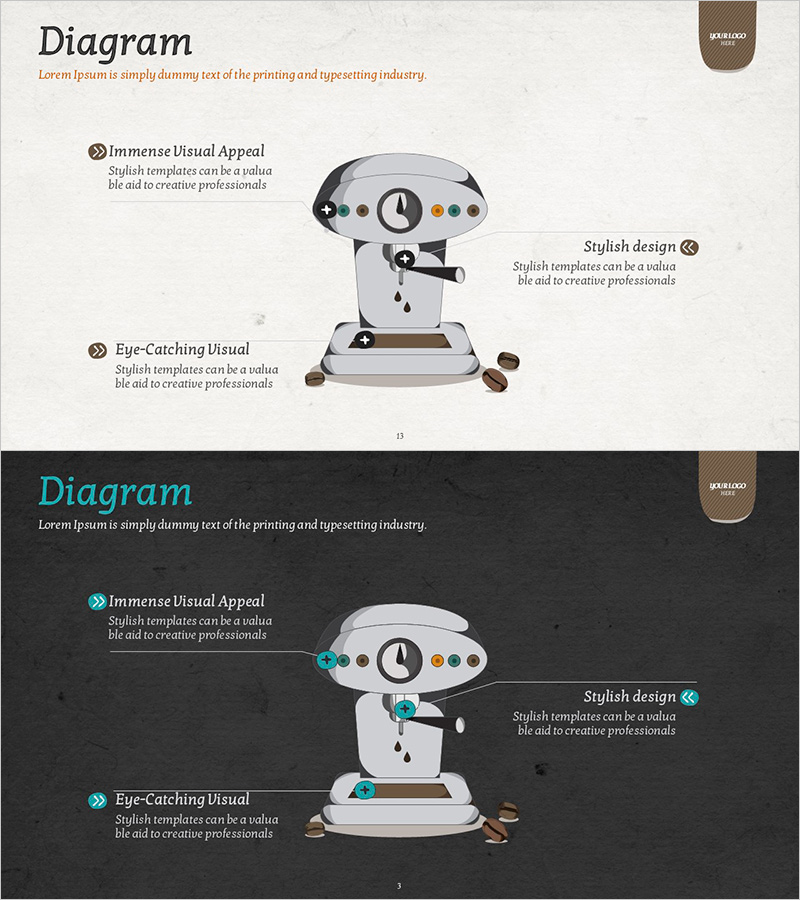
A PowerPoint slide that explains product usage methods with intuitive visual design. The layout features a central product illustration surrounded by three key features on both left and right sides, each paired with icons and descriptive text. This slide is optimized for technical presentations and product introduction decks. The beige background with brown accent elements conveys professionalism, while two slide versions—one with a light background and one with a dark background—adapt to different presentation environments. Clearly defined text input areas enable immediate editing, making this slide ideal for the core section of technical guides or product documentation.
Usage Points
-
Main Usage
This slide is designed to clearly communicate product or service usage methods through step-by-step visual explanation. The central product image combined with surrounding feature descriptions enables audiences to understand intuitively, making it suitable for technical presentations, product guides, and customer training materials.
-
How to Use
Enter product features or usage steps in the text areas, and customize icons as needed. Select the light background version for bright presentation venues and the dark background version for dimly lit environments to maintain readability throughout your presentation.
-
Recommended For
Recommended for product development teams, technical support departments, and marketing teams presenting product explanations. Particularly effective for new product launch presentations, customer training seminars, technical guide documentation, and product manual presentations where clear usage instructions are essential.
-
Slide Structure
The slide consists of a title area, a central product illustration, three text blocks with icons on the left side, and three text blocks with icons on the right side. Each text block is paired with an icon for clear information hierarchy. Both slides maintain identical layouts to ensure consistent presentation flow.
Related Products
-
Automobile Cargo Transport Methods – Innovative Solutions
#Product/Service Introduction #Business Introduction #Product/Service Introduction
-
Introduction to Trade Transport – A Multidirectional Approach to Information
#Product/Service Introduction #Business Introduction #Diagram
-
Camera Focus Diagram – Innovative Technology Presentation
#Product/Service Introduction #Business Introduction #Diagram
-
Diagram Slide for Planning Remodeling Work
#Product/Service Introduction #Business Introduction #Diagram
