



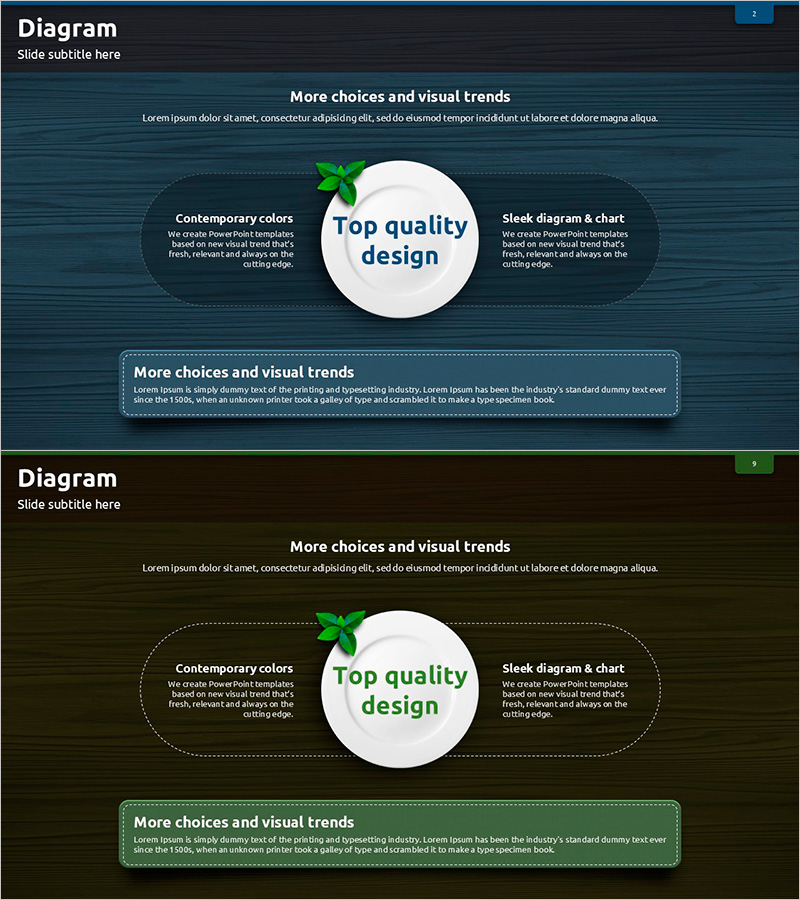
Product/Service Introduction and Business Strategy – Plate and Text Box
RJ0600069_8
- Last Update 07/08/2025
- File Size 4.8MB
- # of Slides 2
- File Format PPTX
- Slide Ratio 16:9
- Color
Keywords
- #Content-Based Slides
- #Design-Based Slides
- #Product/Service Introduction
- #Business Vision and Strategy
- #Diagram
- #Differentiation Strategy for Products/Services
- #Business Strategy
- #Cluster
- #Spread
- #Closed Cluster Diagram
- #Centralized Diagram
- #16:9
- #central radial diagram PowerPoint
- #3-direction text box slide
- #product introduction diagram
- #business strategy presentation
- #how to create radial diagram in PowerPoint
About the Product
A central radial diagram PowerPoint slide designed to effectively communicate product introductions and business strategies. The white circular center serves as the focal point, with three text boxes positioned at the upper left, upper right, and lower areas to emphasize key messages. The dark blue background features dotted borders and green icons to create visual hierarchy, allowing you to input titles and descriptive text in each section. The 2-slide set provides multiple color variations (dark blue and dark green) to maintain presentation consistency while enabling section differentiation. Optimized for modern 16:9 widescreen presentations and delivered in fully editable PPTX format.
Usage Points
-
Main Usage
Place your core message, product value, or strategic concept in the central white circle, then distribute three supporting elements (key features, benefits, or strategic pillars) across the surrounding text boxes. This radial structure emphasizes the central theme while intuitively conveying relationships between peripheral elements.
-
How to Use
Enter your core message (product name, tagline, or strategy title) in the central white circle. Fill the three text boxes with corresponding details such as features, benefits, and implementation plans. Background colors and icons can be customized to match your brand identity, and font sizes are adjustable based on text length.
-
Recommended For
Ideal for product introduction slides, business strategy presentations, marketing plans, investor pitch decks, and consulting proposals where you need to explain a core concept from three different perspectives. Suitable for executives, marketing teams, sales professionals, and consultants presenting in strategy meetings, client presentations, and internal reports.
-
Slide Structure
2-slide set with slide 1 featuring a dark blue background and slide 2 a dark green background. Each slide centers a white circle (approximately 120px diameter) with three dotted-border text boxes (each roughly 200×80px) positioned at upper left, upper right, and lower areas. A small green leaf icon appears above the central circle, with matching icons positioned to the left of each text box for visual consistency.
Related Products
-
Diffusion of Ideas and Areas of Focus – Centralized Cluster Diagram
#Product/Service Introduction #Business Vision and Strategy #Diagram
-
Sales Strategy PowerPoint Slide – 4-Framework Client Hub
#Product/Service Introduction #Business Vision and Strategy #Diagram
-
Central Diagram Slide for Cosmetic Manufacturing Strategy
#Business Vision and Strategy #Diagram #Business Vision
-
Four Closed Diagrams of Travel Guide Business Differentiation Strategies
#Product/Service Introduction #Business Vision and Strategy #Diagram
