



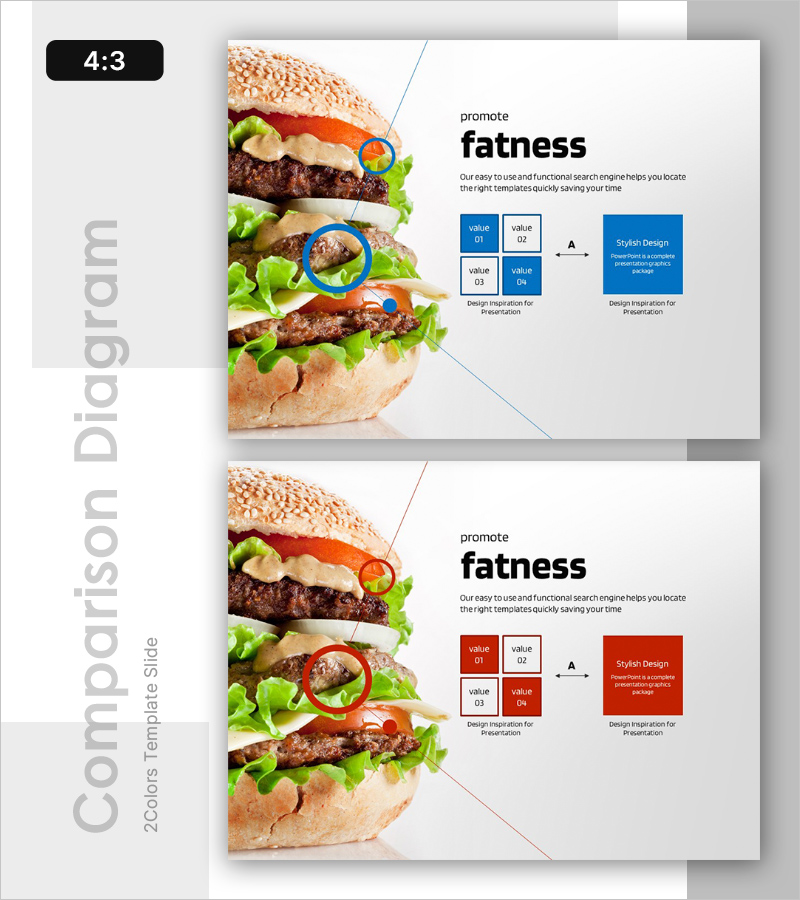
Ingredient Comparison Analysis Diagram - Product Differentiation Strategy
RL0100024_2
- Last Update 01/19/2025
- File Size 1.3MB
- # of Slides 2
- File Format PPTX
- Slide Ratio 4:3
- Color
Keywords
About the Product
A professional PowerPoint slide that visually compares and analyzes product ingredients using a four-quadrant layout. This presentation template allows you to showcase up to four key ingredients simultaneously, with circular highlight markers that draw attention to critical features. Available in both blue and red color schemes to match your brand identity. The slide is ideal for product introduction presentations where you need to emphasize competitive advantages and differentiation points. Perfect for food, beverage, cosmetics, and health supplement companies. The clearly defined text input areas and image insertion spaces make editing straightforward and efficient.
Usage Points
-
Main Usage
This slide effectively communicates product differentiation by comparing key ingredients against competitors. The four-quadrant layout allows simultaneous visualization of multiple ingredients, while circular highlight markers emphasize the most important features. Ideal for investor pitches, partner presentations, and customer demonstrations where proving product superiority is essential.
-
How to Use
Enter ingredient names and descriptions in each quadrant, then add core messaging in the central value boxes. Use the right-side blue or red box to include additional explanations or design inspiration that strengthens your presentation narrative. Insert this slide into product introduction decks, business plans, or marketing presentations to enhance audience comprehension.
-
Recommended For
Product marketing managers, product planning teams, sales professionals, and investor relations specialists will find this slide invaluable. It's particularly suited for companies in food, beverage, cosmetics, health supplements, and pharmaceutical industries. Use it for new product launches, product improvement reports, or competitive positioning presentations.
-
Slide Structure
The layout features a product image area on the left, a central four-quadrant comparison box with value fields (01-04), and a right-side design inspiration box. Two slide versions are provided—one in blue and one in red—allowing you to select the color scheme matching your brand. Each quadrant is independently editable, enabling flexible adjustment based on the number of ingredients you need to showcase.
Related Products
-
Cluster Slide for Company Overview - See the Possibilities
#Emotional Messages
-
Business Growth Analysis Graph – Market Outlook and Growth Potential
#Emotional Messages
-
Growth and Development – Effective Business Strategy Introduction
#Emotional Messages
-
Growth Theme Template Cover
#Emotional Messages
