



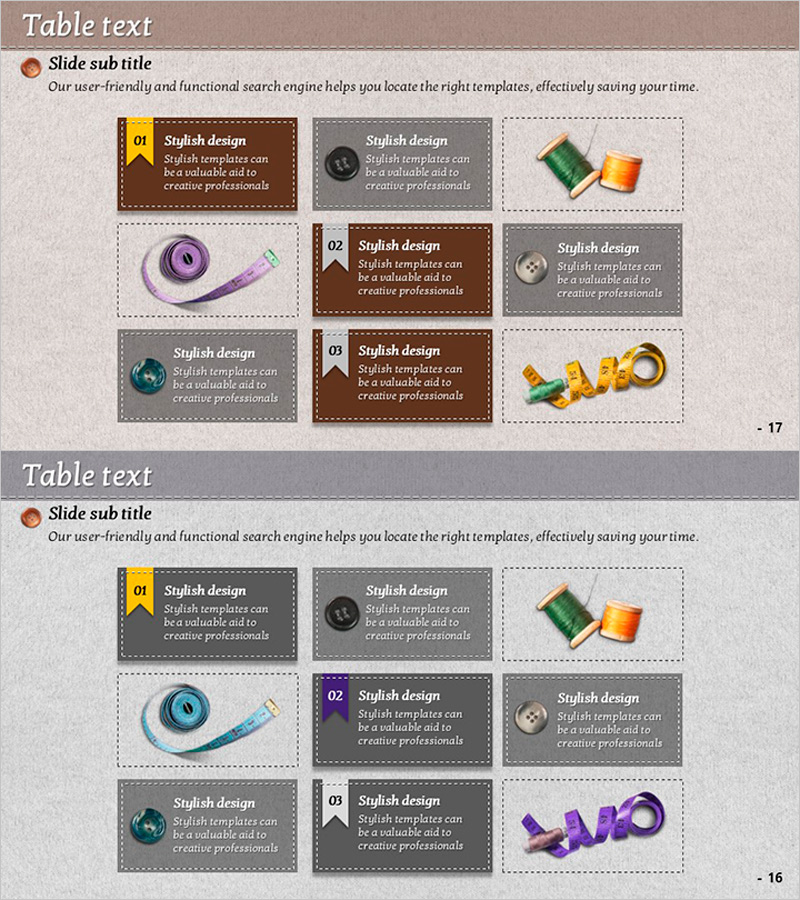
Bookmark Box Diagram – Product and Service Introduction
RJ0600059_16
- Last Update 07/06/2025
- File Size 5.5MB
- # of Slides 2
- File Format PPTX
- Slide Ratio 16:9
- Color
Keywords
- #Content-Based Slides
- #Design-Based Slides
- #Product/Service Introduction
- #Operational Plan
- #Diagram
- #Text Box
- #Features
- #Post-Implementation Management & Maintenance
- #Cluster
- #Closed Cluster Diagram
- #Rectangle Text Box
- #16:9
- #bookmark box PowerPoint
- #text box slide template
- #product introduction diagram
- #3-item box template
- #service introduction PPT slide
About the Product
A bookmark-shaped text box PowerPoint slide optimized for product and service introductions. This presentation template features three box designs in brown, gray, and transparent backgrounds, each equipped with a numbered badge (01, 02, 03), title field, and description text area. Image placeholders are included in each box to insert product photos or icons, enhancing visual impact. Comprising 2 slides, this deck is ready to use for corporate presentations, product catalogs, and service introduction materials.
Usage Points
-
Main Usage
Systematically present three key features or aspects of a product or service. Each box functions as an independent information unit, creating visual hierarchy that enhances audience comprehension. Ideal for corporate pitches, marketing presentations, and product launch decks.
-
How to Use
Enter product names or service categories in the title field of each box, then write key features, benefits, or characteristics in the description area. Insert product photos, screenshots, or related icons in the image placeholders to complete the visual design. Background colors and text colors can be customized to match your brand guidelines.
-
Recommended For
Product marketing managers, sales presenters, corporate communications specialists, startup founders, and service planning teams. Suitable for both B2B and B2C companies. Effective for new product launches, service portfolio presentations, and competitive analysis slides.
-
Slide Structure
2-slide deck with 3 bookmark-shaped text boxes per slide. First slide features boxes in brown, gray, and transparent backgrounds; second slide uses an alternative color combination. Each box includes a numbered badge, title input area, description text field, and image insertion placeholder.
Related Products
-
Blue Line Wide Template for Operational Planning Visualization – Efficient Maintenance
#Operational Plan #Technical Approach #Diagram
-
Risk Management Slide with Car Background and Red Box
#Operational Plan #Diagram #Text Box
-
Disease Prevention Icons and Boxes – Effective Information Delivery
#Product/Service Introduction #Diagram #Text Box
-
Cluster Slide Visualizing 5 Key Points
#Product/Service Introduction #Diagram #Text Box
