



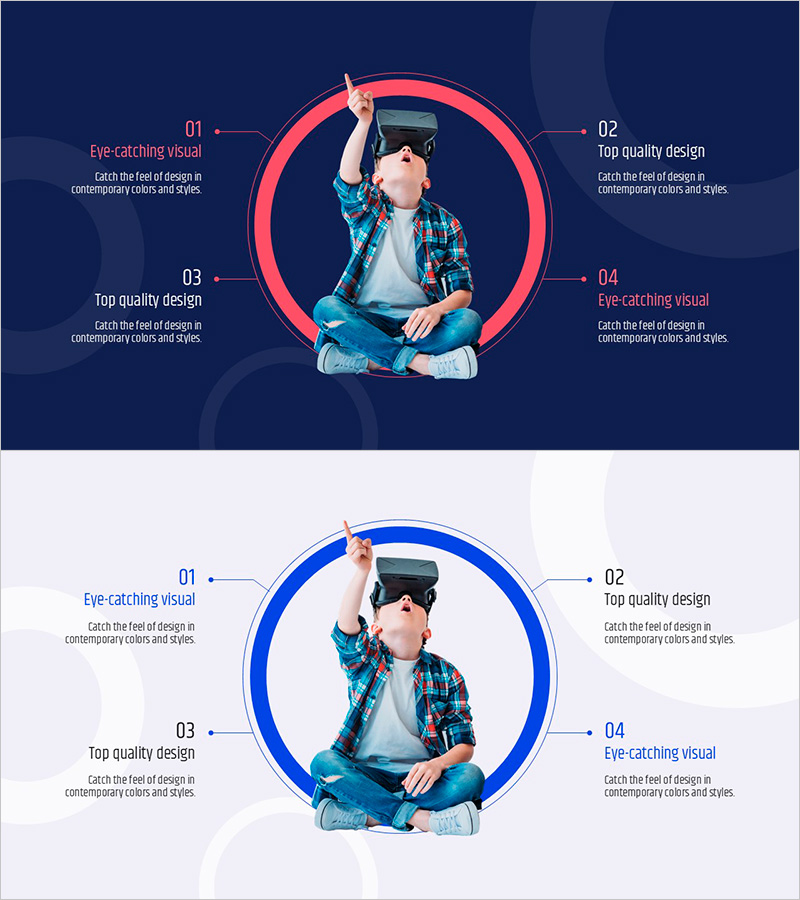
Advantages of VR Learning Education – Revolutionizing Learning Experiences
RJ0500044_18
- Last Update 06/19/2025
- File Size 1.8MB
- # of Slides 2
- File Format PPTX
- Slide Ratio 16:9
- Color
Keywords
- #Content-Based Slides
- #Design-Based Slides
- #Product/Service Introduction
- #Business Vision and Strategy
- #Diagram
- #Benefits and Advantages
- #Core Competencies
- #Spread
- #Centralized Diagram
- #16:9
- #central circular diagram PowerPoint
- #radial diagram slide template
- #4-point diagram presentation
- #VR education PowerPoint
- #center image diagram slide
About the Product
A central circular diagram PowerPoint slide that visualizes the core concepts of VR learning education through 4 key points. This radial structure places an image at the center and connects four directional text labels (top, bottom, left, right) with arrow connectors, simultaneously presenting key features, advantages, and impacts. The design features a red and blue dual-tone background with a distinct circular border and arrow connection lines that emphasize information flow. The 2-slide set offers multiple color variations (red version and blue version), with fully editable text and image areas. Ready to use immediately for educational institutions, technology companies, and innovation project presentations.
Usage Points
-
Main Usage
Visualizes 4 core points of VR learning, educational innovation, and technology solutions around a central image. The radial structure draws viewer attention to the center, then disperses information in four directions (top, bottom, left, right), simultaneously communicating key concepts, advantages, effects, and application areas.
-
How to Use
Use in educational institution orientation programs, technology company product launch presentations, innovation project value proposition slides, and corporate training materials. Replace the center image with learner, user, or core concept visuals, and modify the four labels to match your key points for immediate presentation use.
-
Recommended For
Education coordinators, technology marketers, project managers, corporate training instructors, and innovation strategy professionals. Ideal for student education materials, employee training programs, new technology introductions, and business strategy explanation presentations.
-
Slide Structure
2-slide set. Each slide features a central image area with four directional text labels and arrow connectors arranged in radial formation. Slide 1 uses a red circular border with red arrows; Slide 2 features a blue circular border with blue arrows, providing color variation options.
Related Products
-
Branding Product Core Competencies Slide – Differentiated Value Proposition
#Product/Service Introduction #Business Vision and Strategy #Diagram
-
Smart Health Diffusion Diagram – Emphasizing Business Vision
#Product/Service Introduction #Business Vision and Strategy #Diagram
-
3 Types of Wave Effects – Product and Service Introduction
#Product/Service Introduction #Business Vision and Strategy #Diagram
-
Rhombus Infographic Template – Realizing Business Vision
#Product/Service Introduction #Business Vision and Strategy #Diagram
