



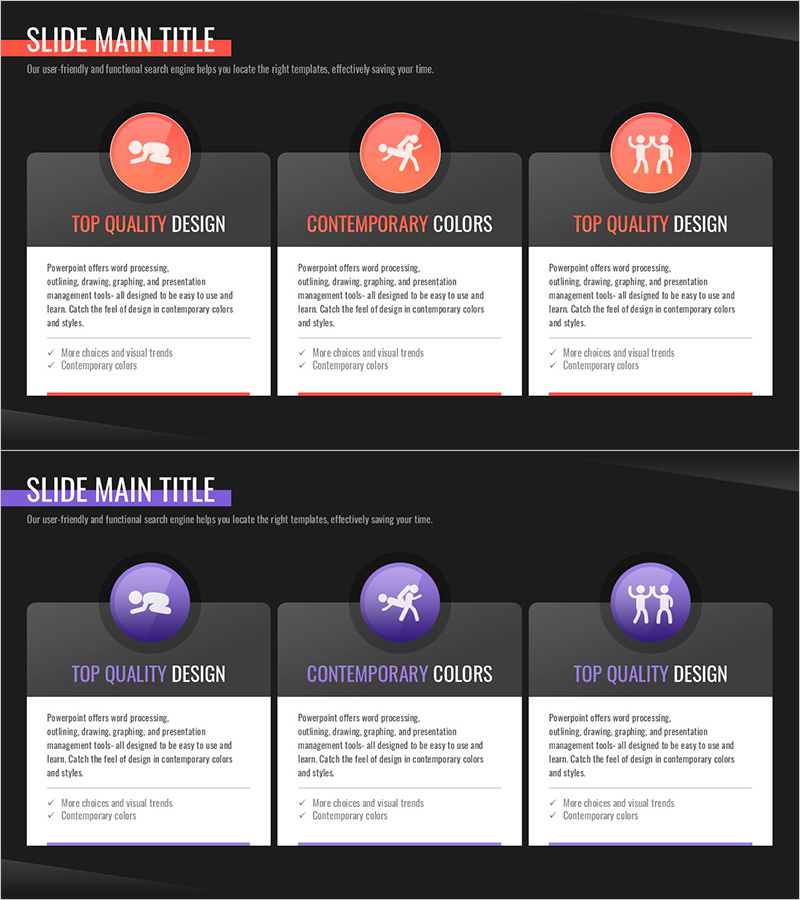
Solution to Violence Closed Diagram – A Plan for Problem Solving
RJ0500040_19
- Last Update 06/18/2025
- File Size 0.3MB
- # of Slides 2
- File Format PPTX
- Slide Ratio 16:9
- Color
Keywords
- #Content-Based Slides
- #Design-Based Slides
- #Product/Service Introduction
- #Operational Plan
- #Diagram
- #Features
- #Mitigation Measures
- #Cluster
- #Closed Cluster Diagram
- #16:9
- #closed diagram PowerPoint
- #problem-solving slide template
- #3-step process diagram
- #operational planning PPT
- #how to create closed diagram in PowerPoint
About the Product
A closed-form diagram PowerPoint slide optimized for problem-solving and operational planning presentations. The structure expands from a central circular node to three connected boxes, clearly representing a step-by-step process: problem identification → root cause analysis → solution implementation. The coral-red and dark-gray background contrast maximizes visual emphasis, with separate icon and text areas in each stage for easy content input. This 2-slide set is ready to use immediately for diverse presentation scenarios and professional business communications.
Usage Points
-
Main Usage
Visualizes a three-stage process from problem recognition to solution implementation. The closed-form structure originating from a central circular node emphasizes step-by-step connectivity, making it ideal for operational plans, strategic proposals, and policy presentations that require logical flow.
-
How to Use
Enter problem situation, root cause analysis, and solution approach into each box's text area. Customize icons and colors to match your presentation topic while maintaining the coral-red accent. Adjust background and text colors to align with organizational branding guidelines.
-
Recommended For
Recommended for policy officers, planning teams, operations managers, and educators presenting problem-solving strategies. Suitable for business planning documents, operational plans, policy proposals, and educational seminar materials.
-
Slide Structure
A 2-slide set where each slide features one central circular node connected to three rectangular boxes in a closed-form diagram layout. Coral-red circular icons contrast against the dark-gray background to establish visual hierarchy, with separate text input and icon areas in each box for flexible content customization.
Related Products
-

Diagram Slide Capturing the Journey of a Trip to Europe
#Product/Service Introduction #Operational Plan #Diagram
-

Four Action Plans for Achieving Goals Slide
#Product/Service Introduction #Operational Plan #Diagram
-
Visually Appealing Company Introduction PowerPoint Template
#Company Introduction #Product/Service Introduction #Business Vision and Strategy
-
Introduction to Mobile App Service Characteristics – Innovation and User Experience
#Product/Service Introduction #Technical Approach #Diagram
