



Rotating Arrow Diagram – Business Strategy and Operations Planning
RJ0500030_6
- Last Update 06/15/2025
- File Size 0.2MB
- # of Slides 2
- File Format PPTX
- Slide Ratio 16:9
- Color
Keywords
- #Content-Based Slides
- #Design-Based Slides
- #Business Strategy
- #Operational Plan
- #Diagram
- #Implementation Framework
- #Production and Technology Development Strategy
- #Cluster
- #Chain Diagram
- #16:9
- #rotating arrow diagram PowerPoint
- #5-step cycle diagram
- #circular process flow slide
- #business process diagram PPT
- #cycle diagram template download
About the Product
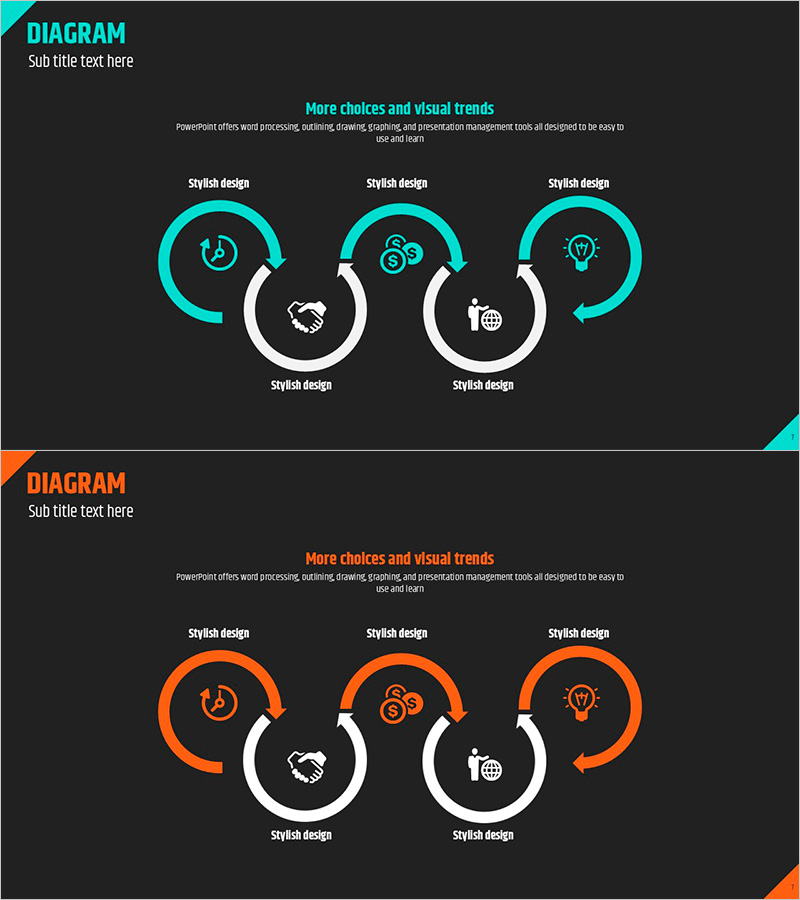
A rotating arrow diagram PowerPoint slide featuring five interconnected nodes arranged in a circular flow pattern. Available in two color versions—cyan and orange—with white connecting elements at the center and directional arrows on the outer ring to emphasize cyclical progression. Each node includes an icon (clock, coins, lightbulb, handshake, globe) representing key business concepts such as time, cost, innovation, collaboration, and global reach. Delivered as a 2-slide set in 16:9 widescreen format, ready for immediate use in business strategy presentations, operational planning, and project management discussions.
Usage Points
-
Main Usage
Visualizes cyclical business processes, sequential stages, and continuous improvement loops. Ideal for illustrating PDCA cycles (Plan-Do-Check-Act), iterative product development phases, or organizational improvement frameworks where repetition and feedback are central to the message.
-
How to Use
Replace node icons and labels with your process stage names. Use the cyan version to emphasize technology, reliability, and trust; select the orange version to convey energy, momentum, and action. Position your core value or objective at the center connector to reinforce process integration and unified purpose.
-
Recommended For
Executives, project managers, marketing professionals, and operations leaders presenting business plans, organizational improvements, product roadmaps, or continuous improvement initiatives. Particularly effective for explaining iterative workflows, feedback loops, and organizational culture focused on ongoing enhancement.
-
Slide Structure
2-slide set with 5-node circular rotating arrow diagram as the focal point. Each slide features a title area at the top, icon-embedded nodes arranged in a circle, and directional arrows on the outer perimeter. 16:9 widescreen format optimized for projector displays and online presentations.
Related Products
-
Management Core Systems and Strategies – Diagram for Business Execution
#Business Strategy #Operational Plan #Diagram
-
Product Usage Process Diagram – Operations and Technical Aspect
#Operational Plan #Technical Approach #Diagram
-

Fire Extinguisher Diagram – Visualizing Business Strategy
#Business Strategy #Operational Plan #Diagram
-
Introduction to Healthcare Services – Innovative Strategies
#Product/Service Introduction #Business Strategy #Diagram
