



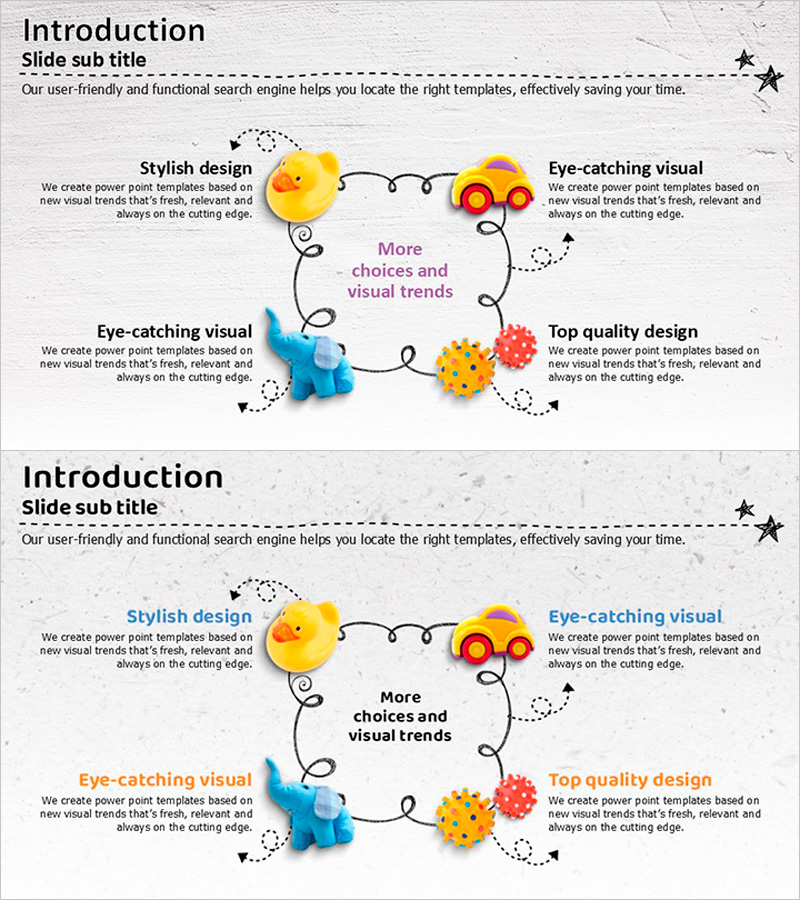
Toy Diffusion Diagram – Product and Service Introduction
RJ0500003_11
- Last Update 06/08/2025
- File Size 5.7MB
- # of Slides 2
- File Format PPTX
- Slide Ratio 16:9
- Color
Keywords
- #Content-Based Slides
- #Design-Based Slides
- #Product/Service Introduction
- #Business Introduction
- #Diagram
- #Product and Service Overview
- #Business Areas
- #Spread
- #16:9
- #toy diffusion diagram PowerPoint
- #4-quadrant diagram slide
- #product introduction presentation
- #diffusion diagram template
- #illustrated diagram PPT
About the Product
A toy diffusion diagram PowerPoint slide optimized for product and service introduction presentations. This slide features a central message radiating outward in four directions, with colorful illustrations positioned clockwise: a yellow duck, orange car, red gear, and blue dinosaur. Each quadrant contains text input areas for describing key values such as stylish design, eye-catching visuals, more choices and visual trends, and top quality design. The light gray background provides contrast for the vibrant illustrations, making the slide visually engaging. The 2-slide set includes multiple color variations (pink, orange, and blue tones) that can be customized to match your brand identity and presentation theme.
Usage Points
-
Main Usage
Present four key values, features, or differentiators of a product or service simultaneously. The radial structure with a central message naturally guides audience attention while systematically delivering information across four balanced quadrants.
-
How to Use
Replace the center text with your product name or core message. Add four key values or features in the quadrant text boxes moving clockwise from top-left. Customize the illustration colors to match your brand palette and modify text formatting as needed for your presentation context.
-
Recommended For
Ideal for new product launches, product repositioning, and service introduction presentations where core messaging needs emphasis. Recommended for marketing teams, product managers, and sales professionals presenting to customers, investors, or business partners.
-
Slide Structure
2-slide set with different color combinations: first slide features pink, orange, and blue tones; second slide offers alternative color scheme. Each slide contains 5 text input areas: 1 central circular message zone and 4 quadrant text boxes for detailed descriptions.
Related Products
-
Round Triangle Business Area Visualization Slide
#Product/Service Introduction #Business Introduction #Diagram
-
School Icons and Diffusion Diagrams – Highlighting Education and Creativity in Your Presentation
#Product/Service Introduction #Business Introduction #Diagram
-

Dark AI Investment Engine – 5-Node Ring Cluster PowerPoint
#Slide Type #Product/Service Introduction #Business Introduction
-
Curved Theme Purple Template Diagram3 – Business Area Introduction
#Product/Service Introduction #Business Introduction #Diagram
