



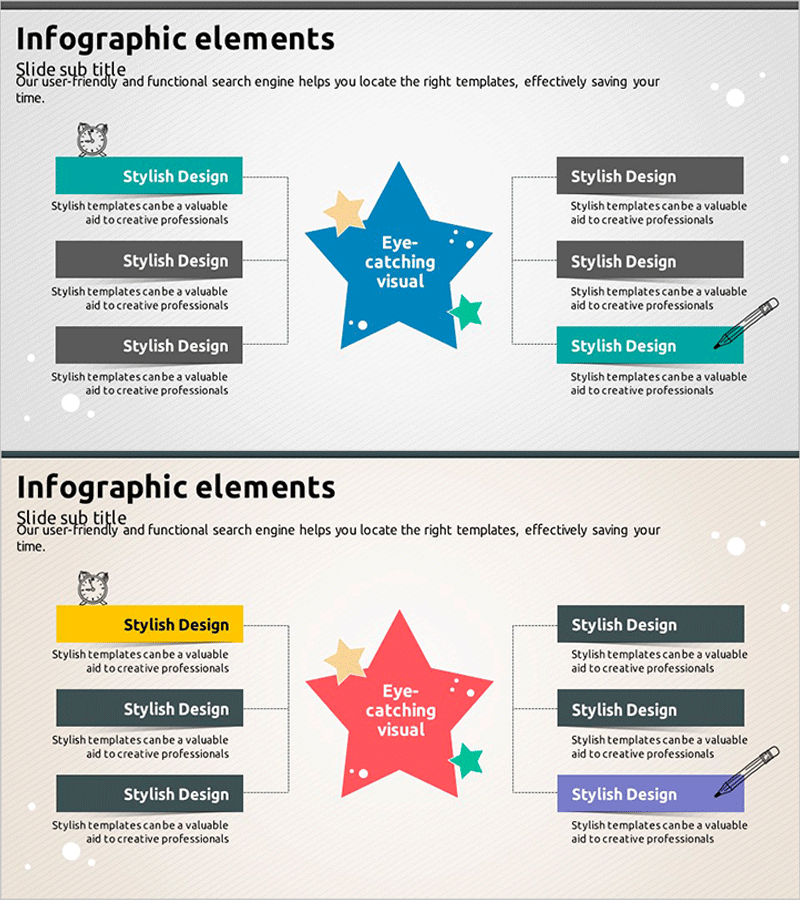
Star Diffusion Diagram – Product Strategy and Marketing Plan
RJ0500001_15
- Last Update 06/07/2025
- File Size 1.1MB
- # of Slides 2
- File Format PPTX
- Slide Ratio 16:9
- Color
Keywords
- #Content-Based Slides
- #Design-Based Slides
- #Product/Service Introduction
- #Marketing Plan and Strategy
- #Diagram
- #Composition
- #Spread
- #Centralized Diagram
- #16:9
- #radial diagram PowerPoint
- #star diagram slide template
- #6-direction strategy diagram
- #central diffusion PowerPoint
- #strategy analysis presentation slide
About the Product
A radial diagram PowerPoint slide featuring a central star shape with six directional branches for strategy visualization. This presentation template effectively illustrates how core concepts expand into detailed implementation items, making it ideal for product strategy, marketing planning, organizational role distribution, and business opportunity analysis. The design combines blue, teal, and orange color accents with connecting lines and customizable icon placeholders. Includes 2 slides optimized for 16:9 widescreen format. Ready to use in business presentations, strategic planning documents, and executive reports.
Usage Points
-
Main Usage
Visualizes how a core strategy or concept branches into six key implementation areas or stakeholder roles. Perfect for presenting product development strategies, marketing channel analysis, organizational structures, competitive positioning, and business opportunity frameworks in a balanced, easy-to-understand format.
-
How to Use
Enter your main topic in the central star shape and add specific items or departments in the six directional text boxes. Customize icons and colors for each branch to represent different categories or priorities. Use in executive briefings, team meetings, client presentations, and strategic planning sessions.
-
Recommended For
Marketing managers, strategy planners, product development teams, business consultants, executives, and educators presenting multi-faceted strategies or organizational structures. Ideal for situations requiring balanced representation of multiple elements or departments reporting to a central function.
-
Slide Structure
2-slide set. Slide 1 features a blue central star with six branches in teal, orange, and gray text boxes with icon placeholders. Slide 2 offers a color variation with a red central star and alternative layout options. All directional nodes are independently editable with full customization for text, icons, and colors.
Related Products
-

Product Sales Plan Circle Connection Diagram
#Marketing Plan and Strategy #Diagram #Pricing Strategy
-
Ingredients for a Meal Diagram – Health and Balance
#Product/Service Introduction #Diagram #Composition
-
Description of the Science Experiment Objectives PowerPoint Template – Effective Communication
#Product/Service Introduction #Marketing Plan and Strategy #Diagram
-
Subject Learning Elements Diagram – Visualizing Business Regions and Structure
#Product/Service Introduction #Business Introduction #Diagram
