



Modern Functional Slide Template – Emphasizing Visual Appeal and Practicality
RJ0400043_5
- Last Update 05/28/2025
- File Size 1.2MB
- # of Slides 2
- File Format PPTX
- Slide Ratio 16:9
- Color
Keywords
- #Content-Based Slides
- #Design-Based Slides
- #Product/Service Introduction
- #Diagram
- #Product/Service Introduction
- #Composition
- #Cluster
- #Chain Diagram
- #16:9
- #connected diagram PowerPoint
- #3-step process slide
- #circular node diagram
- #workflow template
- #feature explanation slide
- #how to create process diagram in PowerPoint
About the Product
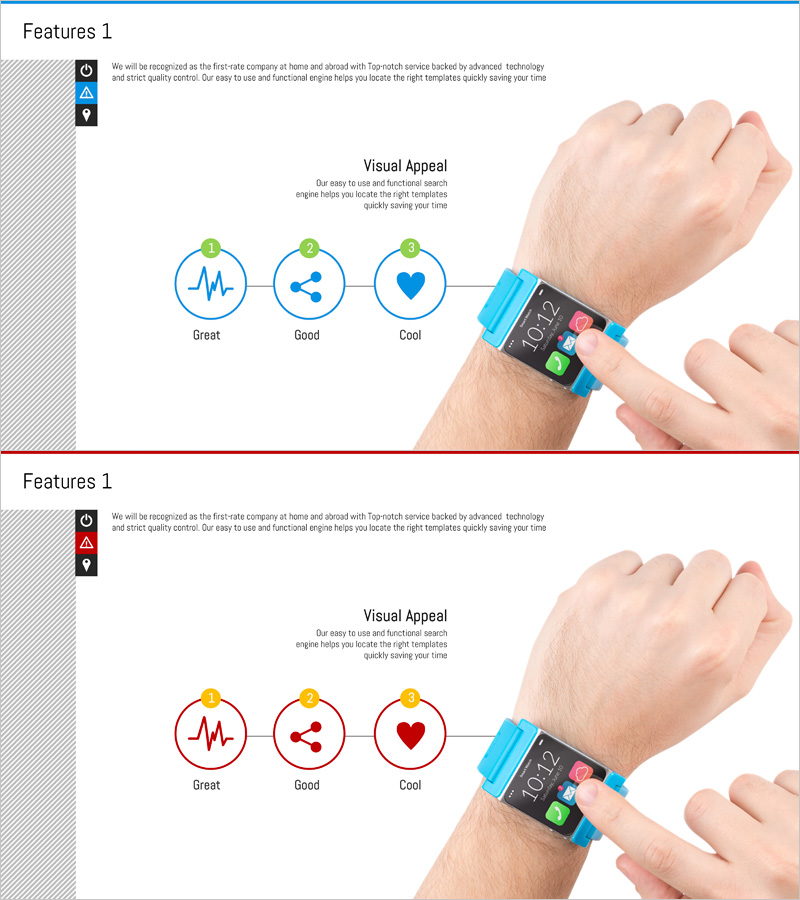
A process flow diagram PowerPoint slide featuring three circular nodes connected in linear sequence. Each node accommodates an icon and text input for visualizing step-by-step processes, evaluation criteria, or feature descriptions. The design uses blue outline circles with green numbered badges to clearly mark progression stages. A real-world product mockup (smartwatch) on the right side enhances presentation credibility and demonstrates practical application. The 2-slide set includes color variations (blue and red) for flexible brand alignment.
Usage Points
-
Main Usage
Visualize three-stage processes, evaluation frameworks (Great·Good·Cool), or product features using circular connected nodes. Insert icons into each node and customize text to communicate sequential workflows clearly and effectively.
-
How to Use
Apply to product feature introductions, evaluation criteria explanations, or service stage descriptions in presentations. Add relevant icons (information, warning, location) to the left icon area and modify node text to match your specific context and messaging.
-
Recommended For
Ideal for technology companies, startups, healthcare, and financial institutions presenting product features, service workflows, or evaluation systems. Effective in marketing plans, product introduction decks, and investor pitch presentations when highlighting core capabilities sequentially.
-
Slide Structure
Three circular nodes arranged horizontally from left to right with connecting lines. Each node displays a green numbered badge (1·2·3) at the top, with dedicated areas for icon insertion and text input. A product mockup (smartwatch) positioned on the right connects abstract concepts to real-world application.
Related Products
-
Introduction to Network Service Configuration – Cluster and Connection Diagrams
#Product/Service Introduction #Diagram #Product/Service Introduction
-
Diagram Showcasing Mobile App Service Configuration
#Product/Service Introduction #Diagram #Other
-
Introduction to Drone Components – Core of Product Design
#Product/Service Introduction #Diagram #Product/Service Introduction
-
Introduction to Food Trucks – Modern Diagram Utilization
#Product/Service Introduction #Diagram #Product/Service Introduction
