



Configuring and Introducing Network Firewall Services – The Beginning of Data Protection and Trust
RJ0400020_18
- Last Update 05/23/2025
- File Size 0.3MB
- # of Slides 2
- File Format PPTX
- Slide Ratio 16:9
- Color
Keywords
- #Content-Based Slides
- #Design-Based Slides
- #Product/Service Introduction
- #Diagram
- #Product/Service Introduction
- #Composition
- #Flow
- #16:9
- #firewall service architecture diagram PowerPoint
- #network security diagram slide
- #firewall architecture PPT template
- #system security configuration diagram
- #technical architecture visualization
About the Product
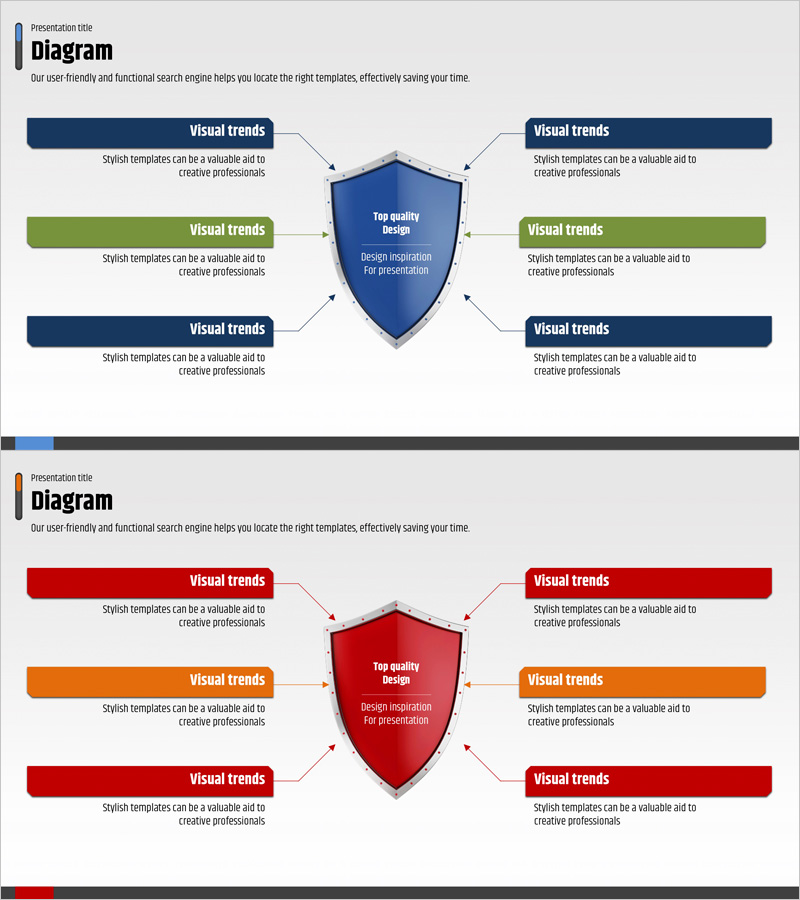
A network security and data protection architecture PowerPoint slide featuring a firewall service configuration diagram. The design uses a central shield-shaped element connected to six directional security components, visually representing system layers and protection mechanisms. Dark blue, green, and red color combinations convey both trustworthiness and security alert levels, while text boxes and arrows clarify each security domain's role. Ideal for IT companies, security solution providers, and financial institutions presenting technical architecture, product introductions, and investor presentations. The 2-slide set offers multiple color theme variations, allowing customization to match brand guidelines and presentation context.
Usage Points
-
Main Usage
Designed to communicate network security infrastructure and firewall service architecture at a glance. The central shield element with six connected security domains helps both technical teams and decision-makers understand system reliability and protection scope.
-
How to Use
Use in IT product demonstrations, financial institution security solution briefings, and technical architecture review meetings. Customize each text box with specific security functions (intrusion detection, encryption, access control, etc.) and adjust colors to represent risk levels or implementation priorities.
-
Recommended For
Security solution sales teams, technical architects, IT consultants, and information security officers in finance, telecommunications, and government sectors preparing technical presentations. Particularly effective for investor briefings emphasizing technical competitive advantages.
-
Slide Structure
2-slide set with each slide featuring one central shield-shaped core element surrounded by six customizable text boxes. First slide uses dark blue and green color scheme; second slide uses dark blue and red, allowing theme selection based on presentation context and brand requirements.
Related Products
-
Service Technical Characteristics and Configuration – Key Infographic
#Product/Service Introduction #Diagram #Product/Service Introduction
-
Introduction to Internet Shopping Purposes – Flow and Structure
#Product/Service Introduction #Diagram #Product/Service Introduction
-
Diagram Towards the Center – Product/Service Introduction
#Product/Service Introduction #Diagram #Product/Service Introduction
-
Highlighted Content Slides – A New Perspective on Product Introduction
#Product/Service Introduction #Diagram #Product/Service Introduction
