



Visualizing Business Strategy with Gear Shape Diagram
RJ0300044_8
- Last Update 04/30/2025
- File Size 0.2MB
- # of Slides 2
- File Format PPTX
- Slide Ratio 16:9
- Color
Keywords
- #Content-Based Slides
- #Design-Based Slides
- #Business Vision and Strategy
- #Marketing Plan and Strategy
- #Diagram
- #Business Strategy
- #Marketing Strategy
- #Cluster
- #Closed Cluster Diagram
- #16:9
- #gear diagram PowerPoint
- #interlocking gears slide template
- #business strategy visualization PPT
- #process flow diagram PowerPoint
- #how to create gear diagram in PowerPoint
About the Product
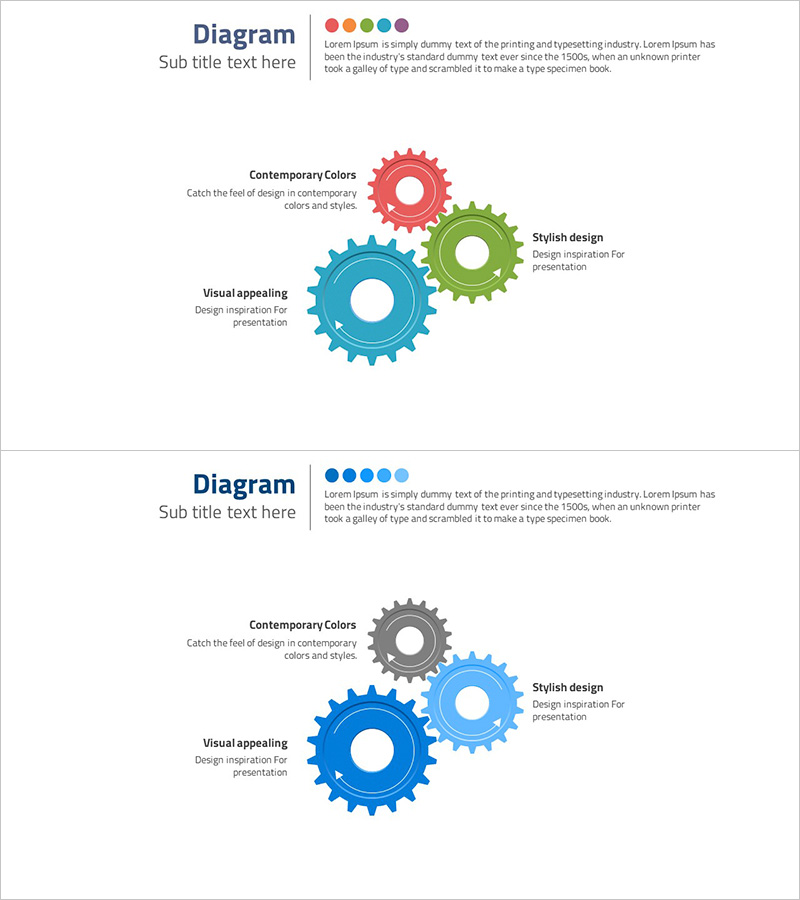
A gear diagram PowerPoint slide for visualizing business strategy and marketing plans. Three interlocking gears in red, blue, and green are positioned around a central axis, with editable text areas on each node. The 2-slide set includes a multi-color version for concept explanation and a single-color version for formal reports. This diagram effectively represents process interdependencies, cross-departmental collaboration, and synchronized workflows in presentations.
Usage Points
-
Main Usage
Visualizes business strategy, marketing plans, and cross-functional collaboration using interconnected gear shapes. Each gear node can be labeled with department names, strategic elements, or process stages to emphasize mutual interaction and simultaneous execution.
-
How to Use
Use in strategy presentations, marketing planning meetings, and business proposal slides. Apply the multi-color version (Slide 1) for concept introduction and the single-color version (Slide 2) for formal reports to maintain visual consistency. Double-click text areas to edit directly.
-
Recommended For
Recommended for marketing managers, planning teams, and executive presentations. Effective for illustrating business vision, strategic planning, project management, organizational structure, supply chain relationships, and any scenario requiring visualization of interconnected elements.
-
Slide Structure
2-slide set. Slide 1: Three gears (red, blue, green) arranged around a central axis with editable text input areas on each node. Slide 2: Identical structure in muted colors (gray, blue) for formal document tone. 16:9 widescreen format, PPTX file.
Related Products
-
Marketing Strategy Closure Diagram – The Definitive Guide to Business Strategy
#Business Vision and Strategy #Marketing Plan and Strategy #Diagram
-
Marketing Mix 4P Diagram – Business Strategy Development
#Business Vision and Strategy #Marketing Plan and Strategy #Diagram
-
Marketing Product Strategy Plus Diagram
#Business Vision and Strategy #Marketing Plan and Strategy #Diagram
-
Legal Consulting Strategy Diagram – Effective Business Strategy Visualization
#Business Vision and Strategy #Marketing Plan and Strategy #Diagram
