



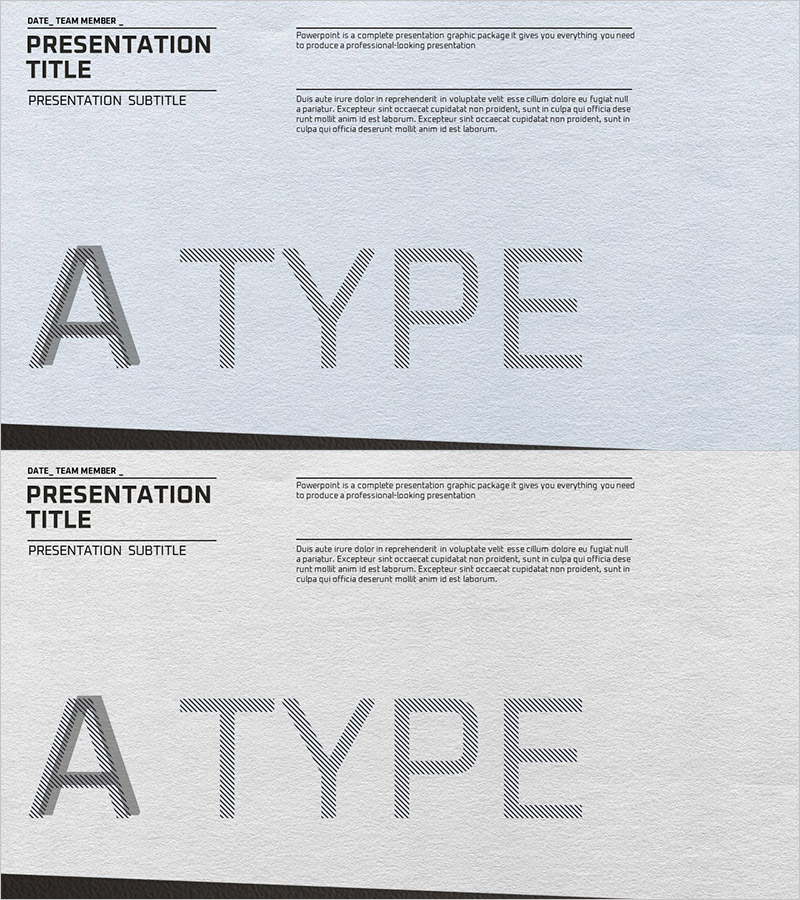
A Type Intro Slide - A Professional Start
RJ0300032_3
- Last Update 04/27/2025
- File Size 5.1MB
- # of Slides 2
- File Format PPTX
- Slide Ratio 16:9
- Color
Keywords
About the Product
A professional intro PowerPoint slide that sets the tone for your entire presentation. Featuring a light gray background with black horizontal lines and diagonal-patterned large-scale typography, this minimal layout conveys both professionalism and contemporary design. The 2-slide set clearly separates title, subtitle, and descriptive text areas, allowing you to effectively introduce your presentation topic and key message. Available as a 16:9 widescreen PPTX file ready for immediate editing, perfect for business presentations, corporate pitches, and proposal opening slides.
Usage Points
-
Main Usage
Serves as the opening slide of your presentation to capture audience attention and clearly introduce your topic. With separated title, subtitle, and descriptive text areas, it is optimized for conveying key messages and creating a trustworthy first impression in corporate presentations, business proposals, and project kickoffs.
-
How to Use
Select the text areas in the slide master to enter your presentation title and subtitle. Add presentation overview, date, and team name in the right description area to complete the slide. Background colors and line thickness can be adjusted from the Design tab, and logos or images can be inserted above the text boxes.
-
Recommended For
Ideal for executive presentations, investor pitches, project proposals, conference talks, internal meetings, and client presentations where professionalism is essential. Particularly recommended for situations where first impression is critical and a trustworthy opening is needed.
-
Slide Structure
The 2-slide set features a layout with date and team name input area in the upper left, large title text in the center, and descriptive text area on the right. The second slide repeats the same layout for continuity, and each slide can be edited independently for maximum flexibility.
Related Products
-
Global Business Intro – Sophisticated Presentation Design
#Slide Type #Intro
-
Space Circle Theme Introduction Slide - Innovative Design
#Slide Type #Intro
-

Introduction of the Bright Smile Medical Staff – Warm Welcome
#Slide Type #Intro
-
Space Circle Theme Intro – Captivating Opening
#Slide Type #Intro
